
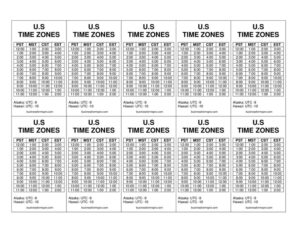
US Time Zone Mini Reference
Download a free US Time Zone Mini Reference template to quickly convert times across Eastern, Central, Mountain, and Pacific zones — free download in PDF and DOCX.
PDF
DOC
0
likes
Download Files
- DOC
The US Time Zone Mini Reference is a compact one-page chart that lays out the main United States time zones side by side so you can convert meeting times, call schedules, and deadlines at a glance. People most often use it to avoid scheduling mistakes when working with colleagues, clients, or family across different parts of the country. It’s free to download in both PDF and DOCX formats, with no signup required.
What Is a US Time Zone Mini Reference?
A US Time Zone Mini Reference is a quick-glance document that summarizes the four contiguous time zones — Eastern, Central, Mountain, and Pacific — along with their standard abbreviations and the hour offset between them. It is used by remote teams, customer-service staff, schedulers, travelers, and anyone who regularly coordinates across regions. Rather than a legal or financial record, it’s a practical desk aid: a printed sheet you tape to a monitor or a fillable file you keep open while booking calls. The reference typically shows what time it is in each zone relative to a chosen “anchor” time, so a 10:00 AM Eastern meeting instantly maps to 9:00 AM Central, 8:00 AM Mountain, and 7:00 AM Pacific.
When Do You Need a US Time Zone Mini Reference?
This reference earns its place on a desk anytime cross-country timing matters. Common scenarios include:
- Scheduling remote meetings with team members spread between New York, Chicago, Denver, and Los Angeles.
- Customer support and sales calls where you must reach someone during their local business hours, not yours.
- Coordinating webinars or training and announcing a single start time clearly across all four zones.
- Planning travel so you arrive, connect, and adjust your watch without missing a flight or a check-in.
- Working with vendors or contractors in different states who have firm cutoff times for orders or submissions.
- Family and personal calls to relatives in other regions, avoiding the awkward too-early or too-late phone call.
Understanding the Four Main US Time Zones
The continental United States is divided into four primary zones, each separated by one hour. From east to west they are Eastern Time (ET), Central Time (CT), Mountain Time (MT), and Pacific Time (PT). Eastern is the latest in the day, Pacific the earliest — so when it is noon in Boston it is 9:00 AM in Seattle. Each zone also shifts between standard time and daylight saving time during part of the year, which is why abbreviations swap between, for example, EST and EDT. Note that some areas, such as Arizona (outside the Navajo Nation), do not observe daylight saving time, and additional zones — Alaska and Hawaii-Aleutian — sit further west.
What a Time Zone Reference Should Have
A genuinely useful mini reference is clear, accurate, and easy to scan. The best ones include:
- The four zone names and their standard abbreviations (ET, CT, MT, PT).
- The hour offset between each adjacent zone (one hour each).
- A sample conversion row showing one anchor time mapped across all zones.
- A note on daylight saving time and which months it applies.
- Space to add your own common meeting times or key contacts and their zones.
- Optional rows for Alaska and Hawaii if your work reaches those states.
How to Fill Out a US Time Zone Mini Reference
Because this is a flexible template rather than a fixed form, you customize it to your own routine. Follow these steps:
- Choose your anchor zone. Decide which time zone you work from — usually your own. Enter it as the top reference column.
- List the zones you care about. Keep all four, or trim to just the ones you contact regularly, in east-to-west order.
- Confirm the abbreviations. Write ET, CT, MT, and PT, and note whether you’re in standard or daylight time for the current season.
- Fill in a sample conversion. Pick a common time — say your typical 10:00 AM meeting — and write the matching time in each zone.
- Add recurring events. Use the blank rows to list weekly calls, support hours, or deadlines, each shown in every relevant zone.
- Note exceptions. Flag Arizona’s no-DST rule or any contact who sits in Alaska or Hawaii.
- Print or save it. Keep the PDF pinned near your screen, or store the DOCX so you can update times as seasons change.
Tips for Using the Reference Day to Day
Keep one habit in mind: always state the zone when you propose a time. “Let’s meet at 2:00 PM ET” removes ambiguity in a way that “let’s meet at 2:00” never will. When daylight saving time begins or ends, take a moment to re-check your sample conversions, since the gap between zones stays the same but the offset to international partners may shift on different dates. If you frequently coordinate with people outside the lower 48, add Alaska Time and Hawaii-Aleutian Time rows so nothing is left to memory. Finally, when sending calendar invites, let the software convert automatically and use this sheet as a sanity check rather than the sole source of truth.
Common Mistakes to Avoid
- Forgetting daylight saving time — the offset between zones is constant, but the abbreviation and absolute time shift twice a year.
- Assuming Arizona follows Mountain Time year-round — most of the state does not observe DST, so it aligns with Pacific in summer.
- Omitting the zone label when sharing a time, which invites missed calls and double-booked rooms.
- Mixing 12-hour and 24-hour formats on the same sheet, which causes AM/PM confusion.
- Leaving out Alaska and Hawaii when you actually have contacts there.
- Never updating the sheet after a season change so the sample conversions go stale.
Frequently Asked Questions
What is a US Time Zone Mini Reference? It is a compact one-page chart that lists the main US time zones and shows how a given time in one zone translates to the others. People use it as a quick desk aid for scheduling calls, meetings, and deadlines across the country. It is meant to save you from doing mental math every time.
How many time zones does the continental US have? The lower 48 states span four primary zones: Eastern, Central, Mountain, and Pacific, each one hour apart. Including the full country adds Alaska Time and Hawaii-Aleutian Time further west. This mini reference focuses on the four main zones but can be expanded to include the others.
How do I fill out this template? Start by setting your own zone as the anchor, list the zones you contact most, confirm the abbreviations for the current season, and write a sample conversion using a time you use often. Then add rows for any recurring meetings or deadlines so they appear in every relevant zone. Print it or keep the editable file open while you schedule.
Does it account for daylight saving time? The one-hour spacing between zones does not change with daylight saving time, but the abbreviations and absolute times do. The template includes space to note which season you’re in, and you should re-check your sample conversions when the clocks change. Remember that a few areas, like most of Arizona, do not observe DST.
Is this reference legally binding or official? No — it is simply a convenience tool to help you convert and coordinate times. It does not replace official timekeeping sources or your calendar software’s automatic conversions. Use it as a quick double-check rather than an authoritative record.
How much does the template cost? It is completely free to download here in both PDF and DOCX formats, with no signup or payment required. You can print the PDF as-is or edit the DOCX to match your own zones, contacts, and recurring meetings. Reuse and update it as often as you like.
This template is a general example provided for informational purposes only and is not legal, scheduling, or professional advice. Time zone rules and daylight saving dates can change and vary by location — verify current times against an official source before relying on them for important commitments.
Related Forms
- Entry Form White
- Testimonial Form
- Backstage Pass
- Table Wait List
- Book Club Ballot
- Home Moving Checklist
Browse more in Miscellaneous.