
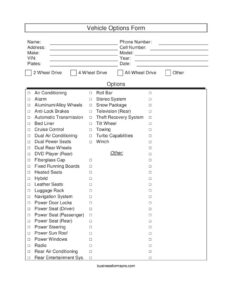
Vehicle Options Form
Document every feature on a car or truck with our free Vehicle Options Form template, available as a free download in PDF and DOCX formats.
PDF
DOCX
2 downloads
0
likes
Download Files
- DOCX
A Vehicle Options Form is a checklist used to record the make, model, and complete list of features and equipment on a specific car, truck, or SUV. People most often use it during a sale or trade-in to make sure every option is documented and nothing is overlooked when setting a price. You can download this Vehicle Options Form free in both PDF and DOCX formats, with no signup required.
What Is a Vehicle Options Form?
A Vehicle Options Form is a standardized worksheet that captures the equipment, packages, and convenience features installed on a vehicle. It is typically completed by a salesperson, dealership, private seller, or appraiser to create a clear inventory of what a vehicle actually has — from the drivetrain and transmission to comfort features like leather and heated seats. The form ties this list of options to identifying details such as the VIN, year, make, and model. Because the value of a used vehicle depends heavily on its options, this form helps buyers and sellers communicate accurately, supports fair pricing, and reduces disputes about what was or wasn’t included with the vehicle.
When Do You Need a Vehicle Options Form?
This form is useful any time the specific equipment on a vehicle matters. Common situations include:
- Selling a used vehicle privately — to list every feature for buyers and justify your asking price.
- Dealership intake and appraisal — when a salesperson logs a trade-in or new inventory unit and needs an accurate option sheet.
- Trade-in valuation — to show appraisers that the vehicle has premium options like navigation, a sun roof, or a towing package.
- Insurance documentation — to record valuable add-ons such as an alarm, theft recovery system, or aftermarket equipment.
- Online or printed listings — to organize feature details before posting an ad on a marketplace.
- Fleet or auction records — to keep consistent equipment data across many vehicles.
What a Vehicle Options Form Should Have
A complete Vehicle Options Form combines two things: clear vehicle identification and a thorough feature checklist. The identification section should pin down exactly which vehicle is being described — VIN, year, make, model, and plate number. The options section should cover drivetrain choices, transmission type, safety equipment, comfort and entertainment features, and any specialty or truck-specific gear. It should also include the contact information of the person submitting the form and the date completed, so the record can be traced back to a source and time. An Other or open Options line lets you note anything not already listed, such as aftermarket modifications.
How to Fill Out a Vehicle Options Form
- Enter the date at the top so the record reflects the vehicle’s condition and equipment as of that day.
- Add your contact details: Name, Address, Phone Number, and Cell Number, so the form can be linked to the seller, buyer, or appraiser.
- Identify the vehicle by recording the Year, Make, Model, VIN, and Plates. The VIN is the most important identifier — copy it carefully from the dash or door jamb.
- Mark the drivetrain: choose 2 Wheel Drive, 4 Wheel Drive, or All-Wheel Drive, and note Hybrid or Turbo Capabilities if applicable.
- Check the transmission and steering: Automatic Transmission, Power Steering, Tilt Wheel, and Cruise Control.
- Select comfort features: Air Conditioning, Dual/Rear Air Conditioning, Heated Seats, Leather Seats, Power Windows, Power Door Locks, and the various Power Seats (Driver, Passenger, Rear, or Dual).
- Note entertainment: Radio, Stereo System, Navigation System, DVD Player (rear), Rear Entertainment System, and Television (Rear).
- Add safety and security: Anti-Lock Brakes, Alarm, and Theft Recovery System.
- Record truck and specialty equipment: Bed Liner, Fiberglass Cap, Towing, Winch, Roll Bar, Snow Package, Dual Rear Wheels, Running Boards, Luggage Rack, Aluminum/Alloy Wheels, and Power Sun Roof.
- Use the Options and Other lines to describe anything else, then review for accuracy.
Tips for an Accurate Option List
Walk around the vehicle while completing the form rather than relying on memory. Sit inside and test features like power seats, cruise control, and the sun roof to confirm they work — listing an option that doesn’t function can create problems later. Cross-check the VIN against the window sticker or a vehicle history report if one is available, since manufacturers often build the same model with different option packages. For trucks and SUVs, pay extra attention to drivetrain and towing equipment, because 4 Wheel Drive, towing capacity, and snow packages significantly affect both value and buyer interest.
How It Differs From a Bill of Sale
A Vehicle Options Form is purely descriptive — it documents what the vehicle has. It is not a contract and does not transfer ownership. A bill of sale, by contrast, is the legal document that records the sale price, the parties, and the transfer of title. Many sellers use the Vehicle Options Form as a companion to a bill of sale: the options form supports the price, while the bill of sale finalizes the transaction. Keeping both in your records gives you a fuller paper trail for any future questions about the vehicle’s condition or value.
Common Mistakes to Avoid
- Copying the VIN incorrectly — even one wrong character can tie the form to the wrong vehicle.
- Checking options that aren’t actually present, which can mislead buyers and undermine trust.
- Forgetting aftermarket additions like a winch, roll bar, or upgraded stereo that belong on the Other line.
- Leaving the date blank, making it unclear when the vehicle was assessed.
- Skipping contact details, so there’s no way to follow up with the person who completed it.
- Confusing drivetrain types — mixing up 4 Wheel Drive and All-Wheel Drive, which buyers care about.
Frequently Asked Questions
What is a Vehicle Options Form used for? It is used to create a complete, organized list of the equipment and features installed on a specific vehicle. Sellers, dealerships, and appraisers use it to support pricing, build accurate listings, and keep clear records during a sale or trade-in.
Is a Vehicle Options Form legally binding? No, this form is a descriptive checklist, not a contract. It documents a vehicle’s features but does not transfer ownership or create a sale obligation. For the actual transaction, you would use a bill of sale and a properly transferred title.
How do I find all the options on my vehicle? Inspect the vehicle inside and out, test each feature, and check the window sticker if you have it. You can also enter the VIN into a manufacturer or third-party lookup tool, which often lists the original factory options for that exact vehicle.
Do I need to fill in the VIN? Yes, the VIN is strongly recommended because it uniquely identifies the vehicle and links the option list to one specific car or truck. Without it, the form could be confused with another similar make and model.
Can I edit this Vehicle Options Form template? Yes. The DOCX version is fully editable, so you can add your business name, remove options that don’t apply, or insert extra lines for aftermarket equipment. The PDF is ideal if you prefer to print and check boxes by hand.
How much does this form cost? It is completely free to download from Business Forms Pro in both PDF and DOCX formats, with no signup or payment required. You can use it for private sales, dealership intake, or fleet records.
This Vehicle Options Form template is provided as a general example for informational purposes only and does not constitute legal, financial, or tax advice. Requirements and disclosure rules for vehicle sales vary by jurisdiction — consult a qualified professional or your local motor vehicle authority for guidance specific to your situation.
Official resource: for the rules that apply to your situation, see your state DMV.
Related Forms
- Vehicle Inspection Report
- Truck Bill of Sale
- Used Car Mechanic Checklist
- Motorcycle Bill of Sale
- Odometer Statement
- New Car Comparison
Browse more in Auto Sales.