
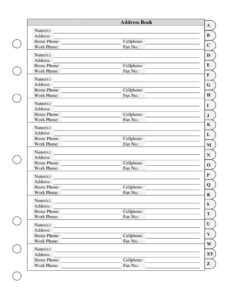
Address Book with Tabs
Organize all your contacts with this free Address Book with Tabs template — name, address, and phone fields, free download in PDF and DOCX.
PDF
DOCX
0
likes
Download Files
- DOCX
An Address Book with Tabs is a simple, organized template for recording the names, addresses, and phone numbers of everyone you contact regularly. People most often use it to keep personal and business contacts in one tidy, alphabetically tabbed place instead of scattered scraps of paper or unsynced phone apps. It’s free to download here in both PDF and DOCX formats — no signup required.
What Is an Address Book with Tabs?
An Address Book with Tabs is a structured contact directory that groups entries under labeled tab sections — usually by the first letter of a last name — so you can flip straight to the person you need. Each entry captures a contact’s name, mailing address, and several phone numbers. Households, small businesses, clubs, and offices all use it to maintain a reliable record of who they need to reach and how. Because it’s a fillable template, you can either type entries on a computer or print blank pages and write them in by hand. The tabbed layout makes a long list of contacts manageable, turning a crowded page into an easy-to-navigate reference you can keep at a desk or in a binder.
When Do You Need an Address Book with Tabs?
This template fits a wide range of everyday and professional situations where keeping organized contact details matters:
- Personal contact management — store family, friends, and neighbors’ addresses and phone numbers for cards, invitations, and quick calls.
- Small business or office use — keep a shared directory of clients, suppliers, and service providers at the front desk.
- Holiday and event mailing lists — pull addresses for greeting cards, wedding invitations, or party announcements.
- Clubs and organizations — maintain a member roster with home, cell, and work numbers for committee outreach.
- Emergency reference — keep a printed list of key contacts that works even when your phone battery is dead.
- Backing up digital contacts — create a paper copy in case you lose access to your phone or email account.
What an Address Book with Tabs Should Have
A complete address book entry gives you everything needed to reach a person through multiple channels. The essentials in this template are the contact name (or household names), a full mailing address, and a set of phone fields covering different contexts. Including more than one phone number is what makes the book genuinely useful — you can try a cell when someone is out, or a work line during business hours. Tabs along the edge keep entries grouped so the directory stays usable as it grows. Leaving room between entries also lets you update details over time without rewriting a whole page.
How to Fill Out an Address Book with Tabs
- Choose the tab — decide your sorting system (usually by last name) and turn to the matching letter tab before adding a new entry.
- Address Book Name(s) — write the contact’s full name. For a household or couple, list both names here, for example “Robert & Maria Chen.”
- Address — enter the complete mailing address: street number and name, apartment or unit, city, state or region, and postal code. Accuracy here matters most for mail and deliveries.
- Home Phone — record the landline or primary household number, including area or country code if relevant.
- Cellphone — add the mobile number, which is often the fastest way to reach someone directly.
- Work Phone — note the office or business line, plus any extension the person uses.
- Fax No. — include a fax number if the contact or business still uses one; leave it blank otherwise.
- Repeat and update — continue under each tab, and cross out or correct details whenever a contact moves or changes numbers.
Tips for Keeping Your Address Book Organized
A consistent format keeps the book readable over the years. Pick one sorting rule — last name is the most common — and apply it to every entry so you never wonder which tab a person lives under. Write clearly and use a pen for permanent entries, but leave a little space below each one for future updates like a new cell number. If you use the DOCX version on a computer, you can sort entries automatically and reprint a clean copy whenever pages get cluttered. For shared office use, designate one person to make edits so the directory doesn’t fill with conflicting versions.
Paper Address Book vs. Digital Contacts
Phone contact lists are convenient, but a printed Address Book with Tabs has real advantages. It never needs a charge, a password, or a working app, and it survives a lost or broken phone. It also gives you a single glanceable page rather than tapping through screens, which is handy for addressing a stack of envelopes. Many people keep both: digital contacts for daily calls and a printed book as a reliable backup and quick reference. This template works well in either role — print it for the backup copy, or fill the DOCX on screen and keep a tidy digital file.
Common Mistakes to Avoid
- Inconsistent sorting — filing some people by first name and others by last name makes contacts hard to find later.
- Incomplete addresses — skipping the apartment number or postal code leads to returned or delayed mail.
- Crowding entries — packing the page leaves no room to update a number when it changes.
- Illegible handwriting — a phone number you can’t read is the same as not having it.
- Forgetting to update — an address book is only as good as its most recent edit, so review it periodically.
- No backup — relying on a single paper copy with no photo or digital duplicate risks losing everything if it’s misplaced.
Frequently Asked Questions
What is an Address Book with Tabs? It is a contact directory template organized into labeled tab sections so you can quickly find a person by the first letter of their name. Each entry holds a contact’s name, mailing address, and home, cell, work, and fax numbers. It keeps all your important contacts in one easy-to-navigate place.
How do I fill out the address book? Start by choosing the correct letter tab, then write the contact’s name, full address, and phone numbers in the matching fields. Add only the phone numbers that apply and leave the rest blank. Repeat for each contact and update entries whenever someone’s details change.
Is this address book template free to download? Yes. You can download the Address Book with Tabs completely free in both PDF and DOCX formats, with no signup or account required. Use the PDF to print blank pages or the DOCX to type and edit entries on your computer.
Can I edit the fields or add my own categories? Yes. The DOCX version is fully editable, so you can rename fields, add an email line, or include extra sections such as a birthday or notes column. The PDF is ideal if you simply want to print and write entries by hand.
Do I need the fax number field? Not necessarily. The fax field is provided for contacts or businesses that still use one, but you can leave it blank for anyone who doesn’t. Only fill in the phone fields that are relevant to each contact.
Is an address book a legal document? No, an address book is simply a personal or organizational reference for contact information and carries no legal weight. There are no signature, witness, or notarization requirements. Still, treat it carefully since it may contain private details about the people in it.
This template is a general example provided for informational purposes only and is not legal, privacy, or data-protection advice. If you store contact details for an organization, handling and retention requirements may vary by jurisdiction — consult a qualified professional where appropriate.
Related Forms
- Team Roster
- Address List
- Team Contact List
- Class Reunion Student Update Form
- Memo Template
- Phone List
Browse more in Contact.