
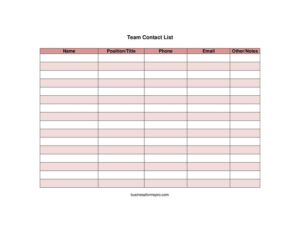
Team Contact List
Download a free Team Contact List template to organize names, titles, phone numbers, and emails for your group in seconds — free PDF and DOCX download.
PDF
DOCX
12 downloads
0
likes
Download Files
- DOCX
A Team Contact List is a simple directory that gathers every member’s name, role, phone number, and email in one easy-to-reference place. People most often use it to make sure everyone on a project, department, or volunteer group can reach each other quickly without digging through scattered messages. You can download this Team Contact List free in both PDF and DOCX formats, with no signup required.
What Is a Team Contact List?
A Team Contact List is a single document that records the key contact details of everyone working together toward a shared goal. It is typically created and maintained by a team leader, project manager, office administrator, coach, or group coordinator, and shared with all members so each person has the same up-to-date reference. The list documents who is on the team, what role each person plays, and how to reach them by phone or email. Rather than relying on memory or fragmented group chats, a well-kept contact list becomes the official roster everyone trusts. It is especially valuable when a team is large, distributed across locations, or made up of people who do not work side by side every day.
When Do You Need a Team Contact List?
This form is useful any time a group of people needs to coordinate and stay reachable. Common situations include:
- Launching a new project — give every contributor a roster of who’s involved and how to contact them from day one.
- Onboarding new hires — hand a new employee a department contact list so they know who to ask for help.
- Running a sports team or club — keep coaches, players, and parents connected for schedules, carpools, and last-minute changes.
- Organizing volunteers or event staff — coordinate shifts and tasks among people who may have never met.
- Managing a remote or hybrid team — replace casual hallway access with a shared directory everyone can see.
- Emergency planning — maintain a quick-reference list so you can reach team members fast when something urgent arises.
What a Team Contact List Should Have
A useful contact list balances completeness with clarity. At a minimum, each entry should identify the person by name, state their position or title so readers understand their role, and provide at least one reliable way to reach them. The strongest lists also include a notes column for context such as availability, preferred contact method, location, or backup contacts. A clear title and a last-updated date at the top help everyone confirm they are looking at the current version. Keep the layout consistent so the document stays scannable as it grows. The goal is a directory anyone can open and instantly find who they need and how to contact them.
How to Fill Out a Team Contact List
Work through one row per person, completing each field in the template:
- Name: Enter the team member’s full name. Use a consistent format — first and last name — so the list sorts cleanly and avoids confusion between people with similar names.
- Position/Title: Record the person’s role or job title, such as “Project Manager,” “Designer,” “Team Captain,” or “Volunteer Coordinator.” This tells readers what each person is responsible for.
- Phone: Add a direct or mobile number, including area or country codes if the team spans regions. Note whether it’s a work or personal line if that matters.
- Email: Enter the address the person checks most often. Double-check spelling, since a single wrong character makes the contact unreachable.
- Other/Notes: Use this flexible field for anything helpful — time zone, working hours, preferred contact method, role backup, or location.
Add a row for each member, then save the file and share it. Update entries whenever someone joins, leaves, or changes roles.
Keeping the List Accurate and Shareable
A contact list is only valuable if it stays current. Assign one person to own updates so changes don’t get lost, and add a visible “last updated” date near the title. When someone leaves the team, remove or archive their row rather than leaving stale details that confuse readers. If you maintain the list in DOCX, you can quickly add, reorder, or color-code rows; the PDF version is ideal for distributing a clean, read-only snapshot. Consider storing the master copy in a shared drive so everyone always opens the latest version instead of an outdated download saved months ago.
Privacy and Distribution Tips
Because the list holds personal contact details, share it thoughtfully. Distribute it only to people who genuinely need it, and let team members know their information is included. Some people may prefer to list a work email instead of a personal phone, so ask before adding sensitive details. For larger organizations, check whether your workplace has any policy on sharing employee contact information. Keeping the list in a secure, access-controlled location protects everyone’s privacy while still giving the team the convenience of a single directory.
Common Mistakes to Avoid
- Letting it go stale — an outdated list with disconnected numbers is worse than no list at all.
- Inconsistent formatting — mixing name orders or phone styles makes the document hard to scan.
- Skipping the role/title — without positions, readers can’t tell who handles what.
- Typos in emails or numbers — one wrong digit or letter breaks the entire point of the list.
- Leaving the notes blank — a quick note about availability or time zone often prevents missed connections.
- Over-sharing — sending personal details to people who don’t need them risks privacy complaints.
Frequently Asked Questions
What is a Team Contact List used for? It’s a shared directory that lets members of a project, department, club, or group quickly find each other’s names, roles, and contact details. Teams use it to coordinate work, share updates, and reach people fast without searching through old messages.
How do I fill out a Team Contact List? Add one row per person and complete the name, position/title, phone, and email fields, then use the other/notes column for extras like availability or preferred contact method. Keep the formatting consistent and update entries whenever someone joins or leaves the team.
Is this Team Contact List template free? Yes. You can download it completely free in PDF and DOCX formats, with no account or signup required. Use it as-is or customize the columns to fit your team.
Can I add more columns to the template? Absolutely. The DOCX version is fully editable, so you can add fields such as department, location, time zone, secondary phone, or emergency contact. Keep added columns consistent across every row so the list stays easy to read.
How do I keep the contact list secure and private? Share it only with people who need it, store the master copy in an access-controlled location, and ask members before including personal phone numbers or addresses. Check any workplace policy on sharing employee contact information before distributing widely.
What’s the difference between a contact list and an org chart? A contact list focuses on how to reach each person — names, titles, phone, and email — while an org chart shows reporting relationships and structure. Many teams use both: the chart for hierarchy and the contact list for day-to-day communication.
This Team Contact List template is provided as a general example for informational purposes only and does not constitute legal, privacy, or professional advice. Requirements for handling and sharing personal contact information vary by jurisdiction and organization — consult a qualified professional or your workplace policy if you have specific concerns.
Related Forms
- Class Reunion Student Update Form
- Address Book Large Print
- Memo Handwriting
- Phone List
- Address Book with Tabs
- Contacts Conversation Log
Browse more in Contact.