
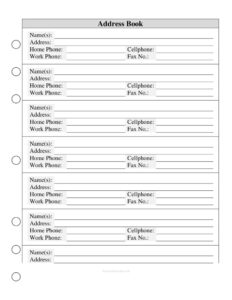
Address Book Large Print
Download a free large print address book template to record names, addresses, and phone numbers in easy-to-read type — free PDF and DOCX download.
PDF
DOC
0
likes
Download Files
- DOC
An Address Book Large Print template is a printable contact sheet that records names, addresses, and phone numbers in oversized, easy-to-read type. People most often use it to keep important contacts legible for those with low vision or anyone who prefers a clear, paper-based record. It’s free to download here in both PDF and DOCX formats — no signup required.
What Is an Address Book Large Print?
An Address Book Large Print is a simple organizational document designed to hold personal and professional contact details in a clean, high-visibility layout. Unlike a digital contacts app or a cramped pocket address book, this format uses generous spacing and larger fonts so the information stays readable for seniors, people with visual impairments, or anyone who finds tiny print difficult. Each entry captures a contact’s name or names, mailing address, and several phone numbers. Households, caregivers, and small offices use it as a central, printed reference they can keep by the phone, in a kitchen drawer, or in a binder for quick access whenever they need to reach someone.
When Do You Need an Address Book Large Print?
This template fits any situation where readable, reliable contact information matters more than digital convenience. Common scenarios include:
- Helping a senior relative keep family, friends, and doctors’ numbers in print they can read without glasses or a screen.
- Low-vision accessibility, giving someone with reduced eyesight a contact list they can use independently.
- Emergency reference by the home phone so caregivers, babysitters, or visitors can quickly find a number.
- Small office or front desk use, where staff need a shared, printed directory of vendors, clients, and service providers.
- Backup to digital contacts in case a phone is lost, a battery dies, or technology isn’t available.
- Organizing event or club contacts, such as a committee, neighborhood group, or volunteer team that prefers paper records.
What an Address Book Large Print Should Have
A complete large print address book entry should be easy to scan and leave no doubt about who a contact is or how to reach them. At minimum, each record should include the contact’s full name (or both partners’ names for a household), a complete mailing address, and the main ways to call or fax them. The defining feature is readability: large fonts, clear lines between entries, and enough room to write by hand. A good template also keeps fields consistent from entry to entry so the page reads predictably top to bottom, and it provides separate phone fields so you don’t have to guess which number is the cell, home, or work line.
How to Fill Out an Address Book Large Print
Work through one entry at a time, writing clearly in capital letters where possible for maximum legibility:
- Name(s): Enter the contact’s full name. For couples or households, list both names — for example, “James and Maria Lopez” — so the entry covers everyone at that address.
- Address: Write the complete mailing address, including street number and name, apartment or unit, city, state, and ZIP code. Keep it on multiple lines if needed for clarity.
- Home Phone: Record the landline or main household number, including area code.
- Cellphone: Add the mobile number — usually the fastest way to reach someone directly.
- Work Phone: Note the office or business number, plus any extension, if you ever need to reach the contact during working hours.
- Fax No.: Include a fax number if the contact uses one, common for medical offices, attorneys, and some businesses; leave it blank otherwise.
Repeat for each contact, and consider arranging entries alphabetically by last name so the book stays easy to search as it grows.
Tips for a More Usable Large Print Address Book
A few small choices make a big difference in how easy the book is to read and maintain. Use a dark pen — black or blue — rather than pencil, which can fade and reduce contrast against the page. Print on plain white or light cream paper to keep the type sharp. If you’re filling it out for someone with low vision, ask whether they’d prefer all-capital letters or a particular ink color, since contrast preferences vary from person to person. Keep one number per line so the eye doesn’t have to hunt, and avoid abbreviations that might confuse a reader later. If you store the book in a binder, slip completed pages into protective sleeves so frequently used entries don’t smudge or tear over time.
Keeping Your Address Book Current
Contact information changes often — people move, switch carriers, or retire from a job — so set a habit of reviewing the book a couple of times a year. When a number changes, neatly cross out the old entry and write the new one beside it, or reprint that page from the DOCX file so it stays clean. Because the template is free to download and edit, you can keep a master digital copy, update it as needs change, and print a fresh, legible version whenever the handwritten copy gets cluttered. This pairing of a digital master and a printed large-print copy gives you both a backup and an accessible everyday reference.
Common Mistakes to Avoid
- Writing too small: Defeating the purpose of a large print book by cramming text into the lines undermines its readability — write big and clear.
- Omitting area codes: A phone number without an area code may be useless when calling from a cell phone or another region.
- Mixing up phone fields: Putting a cell number in the home phone slot causes confusion later, so match each number to its correct field.
- Using faint ink or pencil: Low-contrast writing is hard to read and fades over time.
- Incomplete addresses: Leaving off the ZIP code or unit number can cause mail to go astray.
- No organization: Adding entries randomly makes the book hard to search; sort alphabetically or by group.
Frequently Asked Questions
What is an Address Book Large Print used for? It’s used to record contacts’ names, addresses, and phone numbers in oversized, easy-to-read type. It’s especially helpful for seniors, people with low vision, or anyone who prefers a clear printed contact list over a phone screen.
How do I fill out the address book? Complete one entry at a time, writing the name(s), full mailing address, and the home, cell, work, and fax numbers in clear print. Arranging entries alphabetically by last name makes the book easier to search as it fills up.
Is this address book template free to download? Yes. You can download it free here in both PDF and DOCX formats with no signup required. The DOCX version lets you type entries on a computer, while the PDF is ready to print and fill in by hand.
Can I edit the fields or font size? Yes. Open the DOCX file in a word processor to add or remove fields, increase the font size further, or change the spacing to suit your needs. You can then print and save your customized version.
What font size counts as large print? Large print is generally considered 16-point type or larger, with some accessibility guidelines recommending 18 point or more. The right size depends on the reader, so adjust the DOCX version up or down until it’s comfortable for the person who will use it.
Should I include fax numbers if I don’t use a fax? No, simply leave the fax field blank for contacts who don’t have one. The field is included because medical offices, attorneys, and some businesses still rely on fax, but it’s optional for personal contacts.
This template is provided as a general example for informational and organizational purposes only and does not constitute legal, medical, or professional advice. Accessibility needs and best practices vary by individual — consult a qualified professional where specialized guidance is required.
Related Forms
Browse more in Contact.