
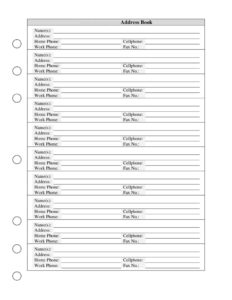
Address Book
Download a free Address Book template to organize names, addresses, and phone numbers in one place — free PDF and DOCX download, no signup required.
PDF
DOCX
5 downloads
0
likes
Download Files
- DOCX
An Address Book is a simple contact record that keeps each person’s name, address, and phone numbers together in one organized place. People most often use it to stop scrambling for a phone number or mailing address when they need it most — and you can download this template free in both PDF and DOCX formats, with no signup required.
What Is an Address Book?
An Address Book is a personal or organizational directory that stores contact details for the people and businesses you deal with regularly. Each entry typically captures a name, a mailing address, and several ways to reach the person by phone or fax. Individuals use it to keep friends, family, and service providers in order, while small offices use it to track clients, vendors, and partners. Unlike a digital contacts app tied to one device, a printed or document-based Address Book is portable, easy to back up, and works without batteries or a signal. It gives you a single, reliable reference you can flip to, print, hand off, or store as a household record.
When Do You Need an Address Book?
A dedicated Address Book is useful any time you need to find contact information quickly and accurately. Common situations include:
- Sending holiday cards or invitations — keep mailing addresses ready so you never miss anyone on the list.
- Running a home or small office — store details for plumbers, doctors, accountants, and other recurring contacts.
- Maintaining a client or vendor directory — log work phone, fax, and address for the businesses you deal with.
- Creating an emergency contact sheet — gather home, cell, and work numbers for family members in one place.
- Moving or relocating — bring everyone’s current address with you instead of losing scattered notes.
- Backing up your phone — keep a printed copy in case your device is lost, broken, or wiped.
What an Address Book Should Have
A complete Address Book entry makes a contact easy to identify and easy to reach. The essentials are a clear name (or names, for couples and households), a full mailing address, and the relevant phone numbers — home, cell, and work — plus a fax number where it applies. The strongest address books are consistent: every entry uses the same format, names are alphabetized or grouped, and details are dated or updated when something changes. Leaving space for notes, such as a birthday or relationship, can add value, but the core of the form is accurate, current contact data you can trust the moment you need it.
How to Fill Out an Address Book
Work through each entry one field at a time so nothing is missed:
- Address Book Name(s): Write the full name of the person, couple, or business. For households, list both names (for example, “John & Mary Smith”) so the entry covers everyone at that address.
- Address: Enter the complete mailing address — street number and name, apartment or unit, city, state or region, and postal code. Include the country if you mail internationally.
- Home Phone: Record the landline or primary home number, including the area code.
- Cellphone: Add the mobile number, which is usually the fastest way to reach someone directly.
- Work Phone: List the office or business line, plus any extension if needed.
- Fax No.: Enter a fax number if the contact still uses one — common for medical offices, legal firms, and some businesses.
Repeat for each contact, and keep entries grouped or alphabetized so the book stays easy to scan.
Tips for Keeping Your Address Book Current
An address book is only as useful as it is accurate. Set a reminder to review entries once or twice a year and update anyone who has moved or changed numbers. When a contact gives you a new detail, edit it right away rather than relying on memory. If you use the DOCX version, you can simply type over old information and reprint; if you prefer the PDF, print fresh copies after major changes. Consider keeping one master copy and a backup in a separate location so a spill or misplaced binder doesn’t wipe out your records. For shared household or office books, decide who is responsible for updates to avoid duplicate or conflicting entries.
Digital vs. Paper Address Books
Both formats have a place, and this template supports either. A printed Address Book is reliable during power or signal outages, easy to share with a family member or babysitter, and simple to keep in a drawer or emergency kit. A DOCX version, by contrast, is searchable, easy to edit, and can be duplicated instantly. Many people use both: they maintain the editable document as the master record and print a clean copy for the fridge, the office, or a go-bag. Whatever you choose, keeping the same fields — name, address, and phone numbers — ensures your information transfers cleanly between formats.
Common Mistakes to Avoid
- Skipping area codes — a phone number without an area code may be unusable when you actually need to dial.
- Incomplete addresses — leaving out the unit number or postal code can cause mail to be delayed or returned.
- Letting entries go stale — outdated numbers and old addresses defeat the purpose of the book.
- Inconsistent formatting — mixing name orders and address styles makes the book hard to scan.
- No backup — relying on a single copy risks losing everything if it’s lost or damaged.
- Crowding entries together — leaving no space for edits forces messy cross-outs over time.
Frequently Asked Questions
What is an Address Book used for? An Address Book is used to store and organize contact information — names, mailing addresses, and phone numbers — for the people and businesses you deal with. It gives you one reliable place to look up details for mailing, calling, or reaching someone in an emergency. Many people keep both a personal and a household or office version.
How do I fill out this Address Book template? Go entry by entry, filling in the name or names, the full mailing address, and the home, cell, work, and fax numbers as they apply. Keep formatting consistent across all entries and include area codes with every phone number. Group or alphabetize the contacts so you can find anyone quickly.
Is this Address Book template free to download? Yes. You can download it completely free from Business Forms Pro in both PDF and DOCX formats, with no signup or account required. Use the PDF for printing or the DOCX if you want to type and edit your entries.
Should I include a fax number if I don’t have one? Only fill in the fax field when the contact actually uses a fax line, which is common for medical offices, legal firms, and some businesses. For most personal contacts you can simply leave it blank. The template is flexible, so unused fields don’t have to be completed.
Can I use one entry for a couple or family? Yes. The “Name(s)” field is designed to hold more than one name, so you can list a couple or household together under a single address. This keeps shared mailing information tidy while still letting you note individual cell or work numbers.
How often should I update my Address Book? Review it at least once a year, and update individual entries immediately whenever someone moves or changes a phone number. Regular maintenance keeps the book accurate so you’re never stuck with a disconnected number or returned mail. Keeping a backup copy protects your records against loss.
This Address Book template is provided as a general example for informational purposes only and is not legal, financial, or professional advice. Contact-record needs and any data-handling requirements may vary by situation and jurisdiction; consult a qualified professional if you have specific concerns about storing personal information.
Related Forms
Browse more in Contact.