
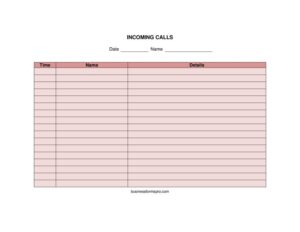
Incoming Calls
Track and manage phone messages with a free Incoming Calls log template; record callers, times, and follow-ups in PDF or DOCX free download.
PDF
DOCX
4 downloads
0
likes
Download Files
- DOCX
An Incoming Calls log is a simple tracking sheet used to record every phone call a person or business receives, capturing who called, when, why, and what action is needed. People most often use it to make sure no message gets lost between busy moments at a front desk or in a small office. You can download this Incoming Calls template free in PDF or DOCX, with no signup required.
What Is an Incoming Calls Log?
An Incoming Calls log is a structured record of inbound telephone activity. It is typically used by receptionists, office administrators, customer service staff, medical and dental front desks, and small business owners who answer their own lines. The log documents the date and time of each call, the caller’s name and contact details, the purpose of the call, who the call was for, and whether a follow-up is required. Rather than relying on scattered sticky notes or memory, the form creates one reliable place to capture every conversation. This makes it easy to return calls, hand off messages between shifts, and keep an accurate history of customer interactions for accountability and quality control.
When Do You Need an Incoming Calls Log?
Almost any setting that handles a steady volume of phone calls benefits from a written record. Common situations include:
- Front-desk reception — when one person answers calls for an entire office and must relay messages to the right colleague.
- Shift handovers — so the next employee on duty can see which calls came in and which still need a response.
- Customer service and support — to track recurring complaints, requests, or questions and ensure each one is resolved.
- Medical, dental, and legal offices — where appointment requests, prescription refills, or case updates arrive by phone and cannot be forgotten.
- Small businesses and home offices — when the owner steps away and needs a clear summary of who called during their absence.
- Sales teams — to log inbound leads and inquiries so they can be followed up promptly.
What an Incoming Calls Log Should Have
A useful Incoming Calls log balances enough detail to be helpful with enough simplicity to be filled out quickly while the phone is still ringing. The essential elements include a date and time column so calls can be ordered chronologically, the caller’s name and phone number or other contact method for returning the call, the name of the person the call was for, and a message or purpose field describing what the caller wanted. Strong logs also add a follow-up or action-required box, a completed/returned checkbox, and the initials of the staff member who took the call. Together these fields turn a quick scribble into a trackable task with clear ownership.
How to Fill Out an Incoming Calls Log
Complete each row as a call comes in so nothing is missed. Follow these steps:
- Record the date and time. Note when the call was received; this helps prioritize urgent messages and shows how long a follow-up has been pending.
- Write the caller’s name. Ask for and spell out the caller’s full name, and the company they represent if relevant.
- Capture the contact details. Note the phone number, extension, or email so the call can be returned without searching.
- List who the call is for. Identify the colleague, department, or yourself as the intended recipient.
- Summarize the message or purpose. Write a short, clear description of why they called — an inquiry, complaint, appointment, or request.
- Mark the action required. Indicate whether someone needs to call back, send information, or take another step.
- Add your initials. Sign or initial the entry so questions about the message can be directed to the right person.
- Update the status. Once the call is returned or resolved, check the completed box and add the date handled.
Tips for Managing Phone Messages Effectively
A log only works if it is used consistently. Keep the sheet in a fixed, visible spot near every phone so anyone answering can grab it instantly. Train all staff to fill in the same fields the same way, and agree on shorthand for common call types to save time. Review open items at the start and end of each shift, and physically check off messages once they are handled to prevent duplicate callbacks. For higher volumes, print several pages in advance and store completed sheets in a binder by date — this creates a searchable history you can refer back to when a customer says, “I called last Tuesday.”
Paper Log vs. Digital Tracking
This printable Incoming Calls form is ideal when you want a low-cost, no-software solution that works during internet outages and requires zero training. A paper or DOCX log is fast to set up and easy for anyone to use. As call volume grows, some teams graduate to spreadsheets or dedicated CRM software that can sort, search, and send reminders automatically. Many offices use both: the printed sheet for capturing calls in the moment, then a periodic transfer of important entries into a digital system. Whichever you choose, the same core fields apply, so this template doubles as a clear blueprint for designing a digital version.
Common Mistakes to Avoid
- Skipping the time stamp — without it, you cannot tell which messages are most urgent or how long a callback has waited.
- Vague messages — writing only “called back” or “wants info” forces the recipient to guess; be specific.
- Missing or wrong phone numbers — always read the number back to the caller to confirm it.
- Not noting who took the call — initials matter when someone needs clarification later.
- Forgetting to update status — an unmarked log makes it look like everything is still pending.
- Letting sheets pile up loose — store completed pages in order so you can find past calls quickly.
Frequently Asked Questions
What is an Incoming Calls log used for? It is used to record every inbound phone call so that messages, caller details, and required follow-ups are documented in one place. This prevents lost messages and helps staff return calls promptly and accurately. It is especially valuable at front desks and in offices where one person answers calls for many people.
How do I fill out an Incoming Calls log? Complete one row per call as it arrives, noting the date and time, the caller’s name and number, who the call is for, and a short summary of the message. Add your initials and mark whether a follow-up is needed. When the call is returned or resolved, check the completed box so others know it is handled.
Is this Incoming Calls template free? Yes. You can download it free in PDF or DOCX from Business Forms Pro with no signup or account required. Print as many copies as you need for your front desk or office.
Can I edit the columns to fit my office? Absolutely. The DOCX version is fully editable, so you can rename fields, add columns for things like extension numbers or call duration, or remove fields you do not use. This lets you tailor the log to your specific workflow.
Should I keep completed call logs? Keeping past logs is a good practice for accountability and for resolving disputes about whether and when someone called. Store finished sheets in chronological order in a binder or scan them into a digital folder. How long to retain them depends on your business’s record-keeping policies.
What is the difference between an Incoming Calls log and a phone message slip? A phone message slip records a single call on its own note, while an Incoming Calls log lists many calls together in rows on one sheet. The log gives you an at-a-glance overview and a running history, which makes it easier to track patterns and outstanding follow-ups.
This Incoming Calls log template is provided as a general example for informational purposes only and does not constitute legal, business, or professional advice. Record-keeping and privacy requirements vary by jurisdiction and industry — consult a qualified professional to ensure your practices meet applicable rules.
Related Forms
- Team Roster
- Address List
- Supplier Contact Info
- Standard Contact Form
- Memo Handwriting
- Address Book Large Print
Browse more in Contact.