
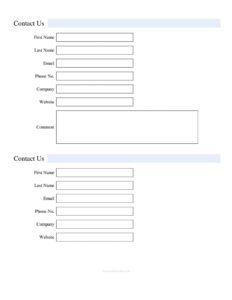
Standard Contact Form
Download a free Standard Contact Form template in PDF and DOCX to collect names, emails, and inquiries quickly — no signup, free download.
PDF
DOC
0
likes
Download Files
- DOC
A Standard Contact Form is a simple template businesses use to collect a visitor’s name, contact details, and message so they can respond to inquiries. The most common reason people use it is to give customers, leads, and partners an organized way to reach out without sending scattered emails. It’s free to download here in both PDF and DOCX formats, with no signup required.
What Is a Standard Contact Form?
A Standard Contact Form is a structured document or web-ready layout that gathers essential information from anyone wanting to get in touch with your organization. It is typically issued and used by businesses, freelancers, support teams, and sales departments to capture inquiries in a consistent format. Rather than relying on a vague “email us” link, the form prompts the sender for specific details — first name, last name, email, phone number, company, website, and a comment. This makes it easy to route messages to the right person, follow up promptly, and keep a clean record of who reached out and why. It works equally well printed at a reception desk or used as the basis for an online web form.
When Do You Need a Standard Contact Form?
This template fits almost any situation where you want a clean, repeatable way for people to reach you. Common scenarios include:
- Website inquiries: Embed it on a “Contact Us” page so visitors can ask questions or request a quote.
- Trade shows and events: Print copies for your booth to capture leads and follow up after the event.
- Customer support intake: Collect issue details and contact information before routing a ticket to the right team.
- Sales lead capture: Gather company and website details to qualify prospects before a call.
- Reception and front-desk use: Let walk-in visitors leave their information and the reason for their visit.
- Vendor and partner outreach: Provide a standard way for potential suppliers or collaborators to introduce themselves.
What a Standard Contact Form Should Have
A complete contact form balances enough fields to be useful with enough simplicity that people actually finish it. At minimum it should capture the sender’s full name, a reliable way to reach them (email and phone), and a free-text area for their message. For business-to-business use, fields for company name and website add valuable context that helps you understand who is contacting you and how serious the inquiry is. A good form also makes clear which fields are required versus optional, and gives the comment box enough room for a meaningful message. This template includes all of those core elements in a clean layout that you can brand, trim, or expand to suit your needs.
How to Fill Out a Standard Contact Form
Whether you’re completing the form yourself or designing it for others, walk through each field in order:
- First Name: Enter the sender’s given name so replies can be addressed personally.
- Last Name: Add the surname to complete the full name for your records and any follow-up correspondence.
- Email: Provide a valid email address — this is usually the primary way you’ll respond, so double-check spelling.
- Phone No.: Include a phone number for time-sensitive inquiries or when a call is faster than email; include the area or country code where relevant.
- Company: Enter the organization name if the inquiry is business-related; individuals can leave this blank.
- Website: Add the company or personal website URL, which helps you research the sender and gauge the inquiry.
- Comment: Write the message, question, or request in detail — the more specific the comment, the faster and more accurate your response can be.
Once complete, the form can be submitted online, handed in at a desk, or scanned and emailed depending on how you use it.
Tips for Getting Better Responses
A contact form is only as good as the replies it produces. Keep the form short so people don’t abandon it — every extra required field reduces completion rates. Clearly mark optional fields like Company and Website so individuals aren’t discouraged from reaching out. Set expectations near the form, such as a note on typical response time, so senders know when to expect a reply. If you use the form online, add basic validation so the email and phone fields are entered in a usable format. Finally, route submissions to a monitored inbox or shared queue so no inquiry slips through the cracks.
Customizing the Template for Your Brand
Because this is a flexible starting point, you can adapt it freely. Add your logo and company colors to the DOCX version, rename fields to match your industry, or insert extra fields such as a subject line, preferred contact method, or a dropdown for inquiry type. If you handle personal data, consider adding a short consent line explaining how you’ll use the information, and link to your privacy policy where applicable. For an online deployment, the same field structure maps directly to most web form builders, so the template doubles as a planning document for your developer or marketing team.
Common Mistakes to Avoid
- Asking for too much: Long forms with many required fields discourage people from finishing them.
- Missing a reply channel: Failing to make at least one of email or phone required can leave you unable to respond.
- No response process: Collecting messages without assigning someone to read and answer them defeats the purpose.
- Tiny comment box: A cramped message field signals you don’t want detail and limits the quality of inquiries.
- Ignoring privacy: Not explaining how contact data is used can erode trust and create compliance gaps.
- No confirmation: Leaving senders unsure whether their message went through leads to duplicate or abandoned inquiries.
Frequently Asked Questions
What is a Standard Contact Form used for? It is used to collect a person’s name, contact details, and message in one organized place so a business can respond efficiently. It works for website inquiries, support intake, sales leads, and front-desk visitor logs. The consistent format keeps every inquiry easy to track and follow up on.
Which fields are required on this form? At a minimum, you’ll want the first name, last name, an email or phone number, and the comment so you can identify the sender and understand their request. Company and Website are optional and most useful for business inquiries. You can mark required fields yourself when you adapt the template.
Is this contact form free to download? Yes. You can download the Standard Contact Form template here for free in both PDF and DOCX formats, with no signup or payment required. Use it as-is or customize it to match your brand.
Can I use this form online and on paper? Absolutely. The PDF works well for printing and in-person use at a reception desk or event booth, while the DOCX is easy to edit and its field structure maps directly to online web form builders.
Do I need to collect a phone number? Not necessarily — many businesses make phone optional and rely on email. Including a phone field is helpful for time-sensitive inquiries or when a quick call is more efficient, but you should require at least one reliable contact method.
Should I add a privacy notice to the form? If you collect personal contact details, it’s good practice to add a brief note explaining how the information will be used and to link to your privacy policy. Data-handling requirements vary by region, so review the rules that apply to you.
This template is a general example provided for informational purposes only and is not legal, financial, or compliance advice. Data-protection and privacy requirements vary by jurisdiction, so consult a qualified professional before collecting or storing personal information.
Related Forms
- Home Service Contact Sheet
- Address Book Large Print Tabs
- Supplier Contact Info
- Address List
- Address Book
- Team Roster
Browse more in Contact.