
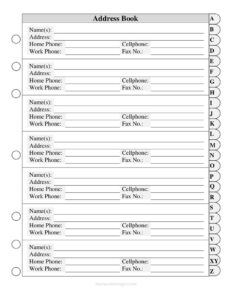
Address Book Large Print Tabs
Download a free Address Book Large Print Tabs template to organize names, phone numbers, and addresses in easy-to-read PDF and DOCX formats.
PDF
DOC
13 downloads
0
likes
Download Files
- DOC
An Address Book Large Print Tabs template is a simple, easy-to-read contact organizer that lets you record names, addresses, and multiple phone numbers in oversized type sorted under alphabetical tabs. People most often use it to keep family, friends, and important contacts in one clear, printable place that’s comfortable to read at a glance. It’s completely free to download in both PDF and DOCX formats, with no signup required.
What Is an Address Book Large Print Tabs Template?
An Address Book Large Print Tabs template is a paper-based contact directory designed with larger fonts and clearly labeled alphabetical sections (tabs) so entries are easy to find and read. It is used by individuals, families, caregivers, and small offices to store essential details for each person or business: name, mailing address, and home, cell, work, and fax numbers. Unlike a phone’s contact list, this version is tangible, doesn’t depend on batteries or software, and works well for anyone who prefers print or has difficulty reading small screens. The large-print design and tabbed layout make it especially useful for older adults, people with low vision, or anyone who wants a reliable backup of their key contacts.
When Do You Need an Address Book Large Print Tabs?
- You or a loved one finds small print in standard address books or phones hard to read and wants larger, clearer text.
- You want a paper backup of important contacts in case a phone is lost, broken, or out of battery.
- A caregiver needs a quick-reference list of family members, doctors, pharmacies, and emergency contacts kept by the phone.
- You’re setting up a household binder and want one place for everyone’s addresses and phone numbers.
- A small business or home office needs a printed directory of clients, vendors, and suppliers including work and fax numbers.
- You’re organizing contacts for an event, club, or community group and want an alphabetized, easy-to-update list.
What an Address Book Should Include
A complete, useful address book entry captures everything you might need to reach someone by mail, phone, or fax. For each contact, the template provides space for the following:
- Name(s) — the person, couple, family, or business the entry belongs to.
- Address — the full mailing address including street, city, state, and ZIP or postal code.
- Home Phone — the landline or primary household number.
- Cellphone — the mobile number for calls and texts.
- Work Phone — the office or business line.
- Fax No. — a fax number where applicable, useful for businesses and offices.
Grouping entries under alphabetical tabs keeps the book organized and makes any contact easy to locate without scanning every page.
How to Fill Out an Address Book Large Print Tabs
- Decide how you’ll sort entries — most people use the contact’s last name (or business name) to place each person under the correct alphabetical tab.
- Under the Name(s) field, write the full name. For couples or families, you can list both names together, such as “John & Mary Smith,” to save space.
- In the Address field, enter the complete mailing address on separate lines: street number and name, then city, state, and ZIP code so it’s mail-ready.
- Fill in the Home Phone with the household landline, including the area code.
- Add the Cellphone number for the person’s mobile — the best line for texts and quick calls.
- Enter the Work Phone if you contact this person at their job or business, and note an extension if needed.
- Record the Fax No. for business contacts who still send or receive faxes; leave it blank if it doesn’t apply.
- Write neatly in dark ink, place the completed entry under the matching letter tab, and leave a little room to update numbers later.
Tips for Keeping Your Address Book Useful
An address book is only helpful if it stays current and legible. Use a dark pen so entries remain readable in large print, and write one entry per slot to avoid crowding. Consider penciling in numbers that change often so you can erase and update them cleanly. If you maintain digital contacts too, set a reminder every few months to sync the two — add new people to the book and cross out any that are outdated. Keep the book in a consistent, easy-to-reach location, such as near the home phone or in a household binder, so anyone in the family can find it quickly in an emergency.
Print and Format Options
Because the template comes in both PDF and DOCX, you can choose the version that fits your needs. Print the PDF as-is for a clean, ready-to-use large-print layout, or open the DOCX in a word processor to adjust the font size even larger, change spacing, or add columns before printing. If you want extra durability, print on heavier paper and slip pages into a binder with tab dividers. You can also print multiple copies — one for the kitchen, one for a caregiver, and one to keep with travel documents — so important contacts are always within reach.
Common Mistakes to Avoid
- Writing in small or light handwriting that defeats the purpose of a large-print book.
- Forgetting to include area codes, which makes numbers useless when dialing from another region.
- Filing an entry under the wrong tab, making the contact hard to find later.
- Cramming several contacts into one slot so the page becomes cluttered and unreadable.
- Letting addresses and numbers go stale — never updating after someone moves or changes phones.
- Leaving out emergency or essential contacts like doctors and pharmacies that you’d want at a glance.
Frequently Asked Questions
What is an Address Book Large Print Tabs template? It is a printable contact organizer that records each person’s name, address, and home, cell, work, and fax numbers in large, easy-to-read type sorted under alphabetical tabs. It’s designed for anyone who prefers print or wants clearer text than a standard address book or phone screen offers.
How do I fill it out? Sort each contact by last name or business name, place it under the matching letter tab, then fill in the name, full mailing address, and the relevant phone and fax numbers. Write neatly in dark ink and leave space to update details later.
Is this address book template free? Yes. You can download the Address Book Large Print Tabs template for free in both PDF and DOCX formats from Business Forms Pro, with no signup or payment required.
Can I make the print even larger? Yes. Open the DOCX version in a word processor and increase the font size, line spacing, or margins to suit your eyesight, then print. The PDF version is also formatted in large print and ready to use as-is.
Do I have to fill in every field for each contact? No. Complete only the fields that apply — for example, you can leave the Fax No. or Work Phone blank for friends and family who don’t have them. The template is flexible for both personal and business contacts.
How should I organize entries? Most people alphabetize by last name or business name and place each entry under the corresponding tab. This keeps the book consistent and makes any contact quick to find without scanning every page.
This template is a general example provided for informational and organizational purposes only and does not constitute legal, financial, or professional advice. Always store personal contact information securely, and consult a qualified professional if you have specific privacy or record-keeping concerns.
Related Forms
- Class Reunion Student Update Form
- Team Contact List
- Contacts Conversation Log
- Address List
- Address Book Large Print
- Phone List
Browse more in Contact.