
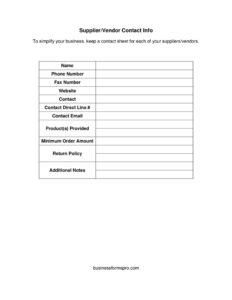
Supplier Contact Info
Organize vendor details with a free Supplier Contact Info template — track contacts, products, minimum orders, and return policies. Free download.
PDF
DOCX
8 downloads
0
likes
Download Files
- DOCX
A Supplier Contact Info form is a simple one-page sheet that captures everything your business needs to know about a single supplier or vendor in one place. People most often use it to stop digging through emails and invoices every time they need to reorder stock or reach a sales rep. You can download it free in both PDF and DOCX formats, with no signup required.
What Is a Supplier Contact Info Form?
A Supplier Contact Info form is a record-keeping document that organizes the key details of a vendor relationship — the company name, phone and fax numbers, website, the specific person you deal with, their direct line and email, the products they supply, minimum order requirements, and return terms. It’s typically maintained by purchasing staff, office managers, small business owners, or anyone responsible for ordering supplies. Rather than scattering vendor details across a phone, an inbox, and a stack of business cards, this single sheet consolidates them into a consistent format. Kept together as a binder or folder, these sheets become a quick-reference supplier directory that anyone on your team can use to place an order, ask a question, or resolve a return.
When Do You Need a Supplier Contact Info Form?
This form is useful any time you work with outside vendors and want their details documented and easy to find. Common situations include:
- Onboarding a new supplier — capture all their information the first time you place an order so nothing gets lost.
- Reordering inventory — quickly find the right contact, their minimum order amount, and the products they carry.
- Training or covering staff — a new or temporary employee can place orders without hunting for who to call.
- Handling a return or defective shipment — the return policy and direct contact are right there when you need them.
- Comparing vendors — keep one sheet per supplier so you can review minimum orders, products, and notes side by side.
- Audits and handoffs — when you sell the business or change roles, a complete supplier file makes the transition smooth.
What a Supplier Contact Info Form Should Have
A complete sheet records both company-level and person-level details, plus the practical terms that affect how you order. At minimum it should include the supplier’s full legal or trading name, general phone and fax numbers, and website. It should name your specific point of contact and their direct line and email so you reach a real person, not a general queue. Critically, it should also document the products the supplier provides, any minimum order amount, and the return policy — these are the terms that govern day-to-day purchasing. An additional notes area rounds it out, giving you space for delivery lead times, payment terms, account numbers, or personal reminders.
How to Fill Out a Supplier Contact Info Form
Work through the fields one at a time, using the most current information available:
- Name: Enter the supplier or vendor company’s full name as it appears on invoices.
- Phone number: Record the main business or sales line.
- Fax number: Add the fax line if the supplier still accepts faxed orders or documents.
- Website: Write the full URL, including any portal or online ordering address.
- Contact: Name the individual you deal with most — your sales rep or account manager.
- Contact direct line: Enter that person’s direct phone or extension so you skip the switchboard.
- Contact email: Add their direct email address for written orders and follow-ups.
- Products provided: List the items or categories you buy from this supplier.
- Minimum order amount: Note any minimum dollar value or quantity required per order.
- Return policy: Summarize the terms — return window, restocking fees, and process.
- Additional notes: Capture anything else: lead times, payment terms, or your account number.
Tips for Keeping Your Supplier Records Useful
A contact sheet is only as good as the information on it, so build a habit of reviewing each one periodically — sales reps change jobs, phone numbers get reassigned, and minimum order amounts get revised. When you update a sheet, note the date in the additional notes field so everyone knows the information is current. Store all your completed sheets in one place, whether that’s a physical binder organized alphabetically or a shared digital folder, and decide on a single owner who keeps them maintained. If you use the DOCX version, you can duplicate the file for each new vendor and type the details directly; the PDF works well if you prefer to print blank copies and fill them in by hand.
Why a Standardized Sheet Beats Scattered Notes
Many small teams track supplier information informally — a name in a phone, an email thread, a sticky note on a monitor. The problem is that this information lives in one person’s head or inbox, and when that person is unavailable, ordering stalls. A standardized Supplier Contact Info form puts the same fields in the same order for every vendor, so anyone can find what they need at a glance. It also surfaces the operational details people forget to write down, like minimum order amounts and return windows, which directly affect your costs and timelines.
Common Mistakes to Avoid
- Listing only the general phone number — without a named contact and direct line, you waste time getting routed each call.
- Leaving the minimum order amount blank — you may place an order that gets rejected or hit with a surcharge.
- Skipping the return policy — this is exactly the detail you’ll want during a stressful return or dispute.
- Letting sheets go stale — outdated contacts and prices cause failed orders and missed deadlines.
- Vague product descriptions — write specific items or categories so the right supplier is obvious.
- Storing sheets in scattered locations — keep them all in one binder or shared folder so the directory stays complete.
Frequently Asked Questions
What is a Supplier Contact Info form used for? It’s a one-page sheet that consolidates everything about a single vendor — contact details, products, minimum orders, and return terms — so you can reorder or reach them quickly. Businesses use it to build an organized supplier directory instead of relying on scattered emails and notes.
Is this Supplier Contact Info template free to download? Yes. You can download it free in both PDF and DOCX formats with no signup or account required. Use the editable DOCX to type details on your computer or print the PDF to fill in by hand.
How many of these forms should I create? Create one sheet per supplier or vendor. Keeping a separate sheet for each makes it easy to find a specific company and to compare minimum orders, products, and terms across your vendors.
What should I put in the additional notes field? Use it for anything that affects ordering but doesn’t fit the other fields — typical lead times, payment or credit terms, your account number, preferred ordering method, or a reminder of recent issues. Adding the date of your last update there also helps keep records current.
Does this form need to be signed or notarized? No. It’s an internal reference document, not a contract, so it doesn’t require signatures, witnesses, or notarization. Your actual purchasing agreements with the supplier are separate documents.
Can I customize the fields for my business? Absolutely. The DOCX version is fully editable, so you can add columns for pricing tiers, delivery schedules, or supplier ratings, or remove fields like fax number if they don’t apply to your vendors.
This template is provided as a general example for informational purposes only and does not constitute legal, financial, or business advice. Vendor terms, return policies, and contractual obligations vary by supplier and jurisdiction — review your actual agreements and consult a qualified professional where appropriate.
Related Forms
- Team Roster
- Address Book
- Address List
- Class Reunion Student Update Form
- Team Contact List
- Address Book Large Print Tabs
Browse more in Contact.