
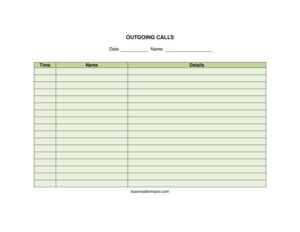
Outgoing Calls
Track every call your team makes with the free Outgoing Calls log template, available as a free download in PDF and DOCX with no signup required.
PDF
DOCX
7 downloads
0
likes
Download Files
- DOCX
An Outgoing Calls log is a simple tracking sheet used to record every phone call placed by an employee, department, or business. The most common reason people use one is to keep an organized record of who called whom, when, why, and what came of the conversation. It is free to download here in both PDF and DOCX formats, with no signup required.
What Is an Outgoing Calls Log?
An Outgoing Calls log is a structured document that captures the details of phone calls a person or team initiates. Unlike an incoming call sheet that records calls received, this form focuses specifically on calls placed outward — to customers, prospects, vendors, or contacts. It is typically maintained by receptionists, sales representatives, support agents, collections staff, or office administrators. The log documents the date and time of each call, the name and number of the person contacted, the purpose of the call, the outcome, and any follow-up needed. Whether kept on paper, in a binder, or filled in digitally, it creates a reliable, chronological record that supports accountability, billing accuracy, and customer service continuity across a busy workday.
When Do You Need an Outgoing Calls Log?
An outgoing call sheet is useful any time you need a written trail of phone activity. Common situations include:
- Sales prospecting — tracking cold and warm calls so reps know who has been contacted and when to follow up.
- Customer support callbacks — recording calls made to resolve tickets, confirm appointments, or update clients on order status.
- Accounts receivable and collections — documenting attempts to reach customers about overdue invoices, which can matter for compliance.
- Service scheduling — logging calls to confirm technician visits, deliveries, or installation windows.
- Billable time tracking — capturing client phone time for professionals such as consultants, attorneys, or agencies who bill by activity.
- Team performance reviews — giving managers a clear picture of call volume and outcomes per person or shift.
What an Outgoing Calls Log Should Have
A complete outgoing call sheet should capture enough detail to be useful weeks later without anyone having to remember the conversation. At minimum it should include a header identifying the company, department, or employee responsible for the log, along with the date range it covers. Each row should record the date and time the call was placed, the name of the person or organization called, their phone number, the reason or purpose of the call, the result or outcome, and a column for follow-up actions. Many teams also add the caller’s initials or name, a duration field, and a notes area for anything that does not fit neatly elsewhere. Clear column headers and adequate row space keep the log readable and easy to scan.
How to Fill Out an Outgoing Calls Log
Because this is a flexible tracking sheet, fill it in consistently so every entry is comparable. Follow these steps:
- Complete the header — write your name or department, the company name, and the date or week the sheet covers.
- Enter the date — record the calendar date the call was placed in a consistent format.
- Note the time — log when the call started; add duration if your sheet tracks it.
- Record the contact name — write the full name of the person or business you called.
- Add the phone number — include the number dialed so the call can be repeated or verified.
- State the purpose — briefly describe why you called (follow-up, sales, billing, confirmation).
- Document the outcome — note what happened: connected, left voicemail, no answer, sale closed, callback requested.
- Set a follow-up — record any next step and a target date so nothing slips through.
- Initial the entry — if multiple people share the log, add your initials for accountability.
Paper vs. Digital Call Logs
Both formats offered here serve different needs. The PDF version is ideal for printing and clipping to a desk or clipboard, where staff can jot entries by hand throughout the day — handy in environments where a screen is impractical. The DOCX version can be opened in word processors and edited on a computer, letting you customize column headers, add your logo, sort entries, or expand the table as your call volume grows. Some teams print the DOCX as a daily blank sheet and later transfer the data into a spreadsheet or CRM. Whichever you choose, keeping the layout consistent across days and team members makes it far easier to total call counts, spot patterns, and hand the record to a manager or auditor.
Tips for Getting the Most from Your Call Log
Log calls in real time rather than from memory at the end of the day — details fade fast. Use short, standardized outcome codes (VM for voicemail, NA for no answer, CB for callback) so the sheet stays scannable. Review follow-up columns each morning so promised callbacks actually happen. If you call the same contacts repeatedly, keep prior sheets nearby for context. Finally, store completed logs in a dated folder so you can retrieve a specific day’s activity quickly when a customer questions whether or when they were contacted.
Common Mistakes to Avoid
- Skipping the purpose field — without a reason, an entry tells you little when you review it later.
- Leaving outcomes blank — a missing result makes it impossible to know whether follow-up is needed.
- Inconsistent date and time formats — mixing formats makes sorting and totaling unreliable.
- Forgetting follow-up dates — promised callbacks get missed, hurting customer relationships.
- Recording incomplete phone numbers — partial numbers waste time when you need to call back.
- Not identifying who made the call — shared logs become useless without initials or names.
Frequently Asked Questions
What is an Outgoing Calls log used for? It is used to record the phone calls a person or business places, including who was called, when, why, and what resulted. Teams use it for sales follow-up, customer service, collections, and tracking billable phone time. The log creates an organized, chronological record that supports accountability and continuity.
How do I fill out an outgoing call sheet? Start by completing the header with your name and the date range, then add one row per call. For each call, record the date, time, contact name, phone number, purpose, outcome, and any follow-up needed. Filling it in as calls happen keeps the details accurate.
Is an Outgoing Calls log a legal document? On its own it is an internal record rather than a binding contract, but it can serve as supporting documentation. In areas such as debt collection or regulated industries, accurate call records may carry legal significance. Keep entries truthful and consistent in case the log is ever reviewed.
What is the difference between an incoming and outgoing call log? An incoming call log records calls your business receives, while an outgoing call log records calls your team places. The fields are similar, but the focus differs — outgoing logs emphasize purpose, outcome, and planned follow-up for calls you initiate.
How much does this Outgoing Calls template cost? It is completely free to download from Business Forms Pro in both PDF and DOCX formats. There is no signup, subscription, or payment required. You can print it, edit it, and reuse it as often as you like.
Can I customize the call log columns? Yes. Download the DOCX version to add or remove columns, insert your company logo, adjust the table size, or change headers to match your workflow. The PDF version is best when you simply want to print and fill it in by hand.
This Outgoing Calls template is provided as a general example for informational purposes only and does not constitute legal, financial, or compliance advice. Recordkeeping and call-tracking requirements vary by industry and jurisdiction. Consult a qualified professional to ensure your practices meet applicable rules.
Related Forms
- Memo Handwriting
- Address List
- Contacts Conversation Log
- Supplier Contact Info
- Address Change notification letter
- Petsitter Information
Browse more in Contact.