
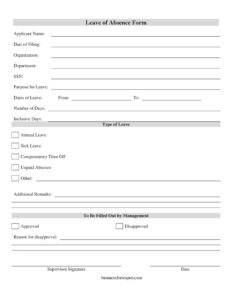
Leave Of Absence Form
Download a free Leave of Absence Form template in PDF and DOCX to request and document employee time off quickly — free download, no signup.
PDF
DOCX
2 downloads
0
likes
Download Files
- DOCX
A Leave of Absence Form is a workplace document an employee submits to formally request time away from work and to have that request reviewed and approved by management. People most commonly use it to put a vacation, sick day, or extended absence in writing so it’s properly recorded and authorized. You can download this Leave of Absence Form free in PDF and DOCX, with no signup required.
What Is a Leave of Absence Form?
A Leave of Absence Form is a short administrative request used by employers and employees to document time off from work. The employee fills in their details, the reason and dates for the leave, and the type of leave being requested; a supervisor or manager then approves or disapproves it and signs. It creates a clear paper trail showing who requested leave, when, for how long, and whether it was authorized. HR departments, small business owners, and managers use the form to track absences consistently, calculate accrued leave balances, and avoid misunderstandings about who is scheduled to be present on any given day.
When Do You Need a Leave of Absence Form?
This form is useful any time an employee will be away from work and that absence needs to be approved and recorded. Common situations include:
- Requesting annual leave or vacation days well ahead of a planned trip.
- Reporting sick leave for illness, recovery, or a medical appointment.
- Using compensatory time off earned from previously worked overtime.
- Taking an unpaid absence for personal matters when paid leave is unavailable or exhausted.
- Arranging an extended absence such as family, bereavement, or other special circumstances marked under “Other.”
- Documenting a multi-day or recurring absence so payroll and scheduling stay accurate.
Types of Leave This Form Covers
The template lets the requester select a leave category, which matters because each type is handled differently. Annual leave typically draws from a paid vacation balance. Sick leave may follow separate accrual or documentation rules. Compensatory time off offsets extra hours already worked. Unpaid absence covers time that is approved but not paid, while Other captures situations that don’t fit neatly into the standard categories. Choosing the correct type helps HR apply the right policy.
What a Leave of Absence Form Should Have
A complete request leaves no ambiguity for the approver or for payroll. The essentials are: the applicant’s identifying details, the date the request is filed, the organization and department, a clearly stated purpose, the exact dates and total days of leave, the selected type of leave, and a management section for the decision and supervisor signature. Including a field for the reason for disapproval is just as important as the approval line, because it documents why a request was denied. Together these elements turn an informal ask into a verifiable record both sides can rely on.
How to Fill Out a Leave of Absence Form
- Enter the Applicant Name exactly as it appears in company records.
- Write the Date of Filing — the day you are submitting the request.
- Fill in your Organization and Department so the form routes to the right approver.
- Provide your SSN or employee identifier if your employer uses it to match payroll records.
- State the Purpose for Leave in a brief, honest sentence.
- Complete the Dates of Leave by entering the From and To dates, then the Number of Days and Inclusive Days to confirm the total count.
- Check the correct Type of Leave: Annual Leave, Sick Leave, Compensatory Time Off, Unpaid Absence, or Other.
- Use Additional Remarks for context, contact details while away, or coverage arrangements.
- Leave the To Be Filled Out by Management section blank — your supervisor marks Approved or Disapproved, notes any Reason for disapproval, then adds their Supervisor Signature and Date.
Submitting and Tracking the Request
Submit the completed form to your manager or HR according to your workplace’s process, ideally before your leave begins so there is time to arrange coverage. Keep a copy for your own records once it’s signed, since the approved form is your proof that the absence was authorized. Employers should file each approved form with the employee’s records and update leave balances accordingly. When a request is disapproved, the documented reason gives the employee a clear basis for discussion or for resubmitting with adjusted dates.
A Note on Privacy and SSN Fields
Because this template includes a Social Security Number field, handle the completed form carefully. Many modern HR systems use an internal employee ID instead of a full SSN to reduce exposure of sensitive data. If your employer doesn’t require the SSN for leave processing, ask whether you can leave it blank or use an alternate identifier. Store and transmit completed forms securely, and shred or delete copies that are no longer needed. Treating leave records as confidential personnel documents protects both the employee and the organization.
Common Mistakes to Avoid
- Leaving the type of leave unchecked, which forces HR to guess how to classify and pay the time.
- Listing inconsistent dates — the From/To range not matching the Number of Days or Inclusive Days.
- Submitting the request too late for management to arrange coverage.
- Forgetting the supervisor signature, which leaves the leave technically unapproved.
- Writing a vague purpose that doesn’t give the approver enough to act on.
- Failing to keep a signed copy as proof the absence was authorized.
Frequently Asked Questions
What is a Leave of Absence Form used for? It is used to formally request time away from work and to record management’s decision on that request. The form documents who is taking leave, the dates and type of leave, and whether it was approved. It helps employers track absences and keeps payroll and scheduling accurate.
How do I fill out a Leave of Absence Form? Enter your name, filing date, organization, and department, then state the purpose and the exact dates and number of days. Check the appropriate type of leave and add any remarks. Leave the management section blank for your supervisor to mark approved or disapproved and sign.
Does a Leave of Absence Form need to be signed? Yes — the supervisor or manager signature in the management section is what makes the request officially approved. Without that signature and date, the leave is only a request and has not been authorized. Keep the signed copy as your record.
Is this Leave of Absence Form legally binding? The form is an internal administrative document rather than a contract, but a signed, approved copy serves as evidence that the absence was authorized. Your company’s leave policies and applicable employment laws still govern how leave is granted and paid. Requirements vary by jurisdiction and employer.
Do I have to provide my SSN on the form? The template includes an SSN field, but many employers use an internal employee ID instead. Ask your HR department whether the SSN is actually required for leave processing, and only provide it through secure channels. Always handle completed forms with sensitive data carefully.
How much does this Leave of Absence Form cost? Nothing — you can download it free from Business Forms Pro in both PDF and DOCX with no signup required. The DOCX version is editable, so you can add your company logo, adjust the leave types, or remove fields you don’t use before distributing it.
This Leave of Absence Form template is a general example provided for informational purposes only and is not legal, financial, or tax advice. Leave entitlements and recordkeeping requirements vary by jurisdiction and employer policy. Consult a qualified HR or legal professional to ensure your form and process comply with applicable laws.
Official resource: for the rules that apply to your situation, see the U.S. Department of Labor.
Related Forms
- Notice of Probation
- Adverse Action Notice
- Employee Record
- Employee Benefits Sheet
- Payroll Statement
- Bi-Weekly Time Card With Approval
Browse more in Employment.