
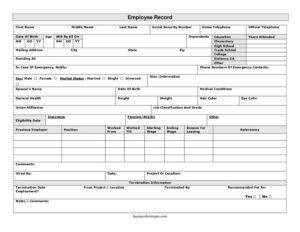
Employee Record
Use our free Employee Record template to organize staff details, emergency contacts, and employment history in one document — free download in PDF and DOCX.
PDF
DOC
1 downloads
0
likes
Download Files
- DOC
An Employee Record is a single document that consolidates an employee’s personal details, contact information, qualifications, and employment history into one organized file. Employers use it most often to maintain accurate, centralized personnel data from the day a worker is hired through the day they leave. You can download this Employee Record template for free in both PDF and DOCX formats, with no signup required.
What Is an Employee Record?
An Employee Record is a foundational HR document that captures who an employee is and the key facts surrounding their work relationship with a company. It is typically created and maintained by a human resources department, office manager, or business owner. The record documents identifying information (name, Social Security number, date of birth), contact and emergency details, education background, benefits enrollment, prior work history, and notes about how and when the person was hired or terminated. Kept up to date, it serves as the central reference point for payroll, benefits administration, emergency situations, and recordkeeping compliance. Because it gathers so much sensitive data in one place, an Employee Record should always be stored securely and accessed only by authorized personnel.
When Do You Need an Employee Record?
An Employee Record is useful at many points across the employment lifecycle. Common situations include:
- Onboarding a new hire — gathering personal, contact, and education details on the employee’s first day.
- Enrolling in benefits — recording insurance, pension or 401(k), and eligibility dates for payroll and HR systems.
- Emergency preparedness — keeping an up-to-date emergency contact and basic medical information on file in case of a workplace incident.
- Verifying experience — documenting a previous employer, position, wages, and reason for leaving during background or reference checks.
- Tracking assignments — noting the project or location an employee is assigned to and who hired them.
- Offboarding — recording termination date, who handled the termination, and any related comments when employment ends.
What an Employee Record Should Have
A complete Employee Record balances personal identification with employment-specific details. At minimum it should include the employee’s full legal name, identifying numbers, current contact and mailing address, and at least one emergency contact. Beyond that, a strong record captures education history, job classification and grade, benefits eligibility, and a summary of prior employment. Finally, it should leave space for hiring and termination details so the document reflects the full arc of the work relationship. Clear labels, dated entries, and a designated person responsible for updates make the record reliable and audit-friendly.
How to Fill Out an Employee Record
- Enter the employee’s first name, middle name, and last name, followed by their Social Security number and both home telephone and official telephone numbers.
- Record the date of birth and age, and note the date the employee will be 65 for benefits planning, along with the number of dependents.
- Document education by checking or describing elementary, high school, trade school, college, distance education, or other schooling completed.
- Fill in the mailing address and the address where the employee is residing at if different.
- Complete the in case of emergency notify field, the spouse’s name, and the spouse’s date of birth.
- Note relevant health details: medical conditions, general health, height, weight, hair color, and eye color.
- Record work classification: union affiliation, job classification and grade, eligibility date, and benefits such as insurance, pension/401(k), and other coverage.
- Add prior employment: previous employer, position, worked from / worked till, starting and ending wage, reason for leaving, and comments.
- Finally, log hired by, project or location, and any termination information — termination date, from project/location, terminated by, and notes.
Protecting Sensitive Information
Because this form collects a Social Security number, date of birth, and medical details, treat it as confidential. Store physical copies in a locked cabinet and keep digital versions in access-controlled, encrypted folders. Limit access to HR staff and managers who genuinely need it, and avoid emailing the completed record as an unprotected attachment. Many regions require employers to retain personnel records for a set number of years and to dispose of them securely afterward. The medical and health fields in particular may be subject to additional privacy rules, so consider keeping that portion in a separate confidential file if your jurisdiction or company policy calls for it.
Keeping the Record Current
An Employee Record is only as useful as it is accurate. Set a routine — for example, an annual review or a prompt during open enrollment — to confirm that addresses, phone numbers, emergency contacts, dependents, and benefits selections are still correct. Update the document immediately when an employee changes assignments, gets promoted to a new job classification and grade, or reaches a benefits eligibility date. When employment ends, complete the termination section the same day so the file closes cleanly. A well-maintained record reduces payroll errors, speeds up emergency response, and provides a clear paper trail if questions arise later.
Common Mistakes to Avoid
- Leaving emergency contact fields blank — this information is critical in a workplace incident and should never be skipped.
- Recording inconsistent dates — make sure date of birth, age, and the date the employee will turn 65 all line up.
- Failing to update after changes — outdated addresses or benefits data cause payroll and communication problems.
- Storing the record insecurely — exposing Social Security numbers and medical details can create privacy liabilities.
- Omitting prior employment details — incomplete previous-employer and wage history weakens reference checks and salary decisions.
- Forgetting to log who hired or terminated the employee — accountability fields help reconstruct decisions later.
Frequently Asked Questions
What is an Employee Record used for? It is used to keep an employee’s personal, contact, education, benefits, and employment-history details in one organized place. Employers rely on it for payroll, benefits administration, emergency response, and recordkeeping. It serves as the central reference for an individual throughout their time with the company.
How do I fill out an Employee Record? Start with personal identification and contact information, then add emergency contact, education, health, and benefits details. Next, record prior employment and finish with hiring and termination information. Work through each labeled field in order so nothing is missed.
Is an Employee Record a legal document? It is primarily an internal HR document rather than a contract, though it may be referenced in disputes or audits. Many jurisdictions require employers to retain personnel records for a minimum period. Keeping it accurate and secure helps you meet those recordkeeping obligations.
Do I need to collect a Social Security number on this form? Employers typically need the SSN for tax reporting and benefits enrollment, which is why the field is included. Because it is highly sensitive data, store the completed record securely and restrict access. Follow your local privacy rules on how this information is collected and retained.
How long should I keep an Employee Record? Retention periods vary by jurisdiction and by the type of information involved, often ranging from a few years to longer after employment ends. Check the rules that apply to your location and industry. When it is time to dispose of the record, do so securely to protect the employee’s privacy.
How much does this Employee Record template cost? Nothing — it is completely free to download from Business Forms Pro in both PDF and DOCX formats. There is no signup or payment required. You can customize the DOCX version to match your company’s fields and branding.
This Employee Record template is a general example provided for informational purposes only and is not legal, financial, or tax advice. Employment recordkeeping and privacy requirements vary by jurisdiction and industry. Consult a qualified HR, legal, or compliance professional to ensure your records meet applicable laws.
Official resource: for the rules that apply to your situation, see the U.S. Department of Labor.
Related Forms
- Check Driving Record
- Employee Orientation Checklist
- Payroll Statement
- Adverse Action Notice
- First Warning Notice Employee Behavior
- Hazard Assessment
Browse more in Employment.