
Vacation Request Form
Download a free Vacation Request Form template to submit and approve employee time off quickly and clearly. Free download in PDF and DOCX, no signup.
PDF
DOCX
2 downloads
0
likes
Download Files
- DOCX
A Vacation Request Form is a simple document an employee uses to ask for approved time off, listing the dates, the total days requested, and whether the time is covered by accrued vacation hours. It is the most common way to create a clear paper trail between staff and supervisors so leave is scheduled fairly and tracked accurately. You can download this template free in PDF and DOCX with no signup required.
What Is a Vacation Request Form?
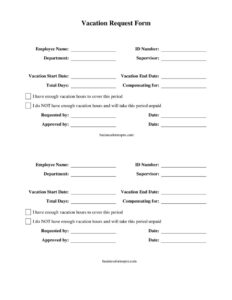
A Vacation Request Form is a standardized internal document that an employee submits to their supervisor or HR department to formally request days off work. It captures who is requesting leave, the department and supervisor involved, the start and end dates, the total number of days, and whether the employee has enough accrued vacation hours to be paid during that period. Once a manager signs off, the form becomes a record of the approval. Most businesses use it to coordinate coverage, prevent scheduling conflicts, and keep an auditable history of leave decisions. It is short, easy to complete, and works for organizations of any size that want a consistent, written way to manage time-off requests.
When Do You Need a Vacation Request Form?
This form is useful any time an employee plans to be away and the absence needs to be reviewed and recorded. Common situations include:
- An employee planning a holiday, a long weekend, or a multi-week trip and needing advance approval.
- A manager who wants to verify staffing coverage before granting leave during a busy season.
- HR maintaining accurate records of vacation balances and used days for payroll.
- A worker who has used up their paid balance and is requesting unpaid time off instead.
- Companies that require documented sign-off before time off appears on the team calendar.
- Resolving disputes later about whether and when a leave request was actually approved.
What a Vacation Request Form Should Have
A complete form removes ambiguity for both the employee and the approver. At a minimum it should identify the employee clearly, define the exact dates and total days requested, and indicate how the time will be paid. It should also include space for the supervisor to approve and date the request, creating a two-signature record. The most effective forms include:
- Employee identification: name, ID number, department, and supervisor.
- Precise vacation start and end dates plus a total day count.
- A note on what the time is compensating for, if relevant.
- A clear statement of whether accrued hours cover the period or whether it will be unpaid.
- Signature and date lines for both the requester and the approver.
How to Fill Out a Vacation Request Form
Follow these steps to complete the template field by field:
- Employee Name: Enter your full legal or payroll name so HR can match the request to your file.
- ID Number: Add your employee or payroll ID to avoid confusion with anyone sharing a similar name.
- Department: List the team or division you work in, which helps managers assess coverage.
- Supervisor: Name the manager who is responsible for approving your leave.
- Vacation Start Date and Vacation End Date: Enter the first and last day you will be away.
- Total Days: Calculate the number of working days requested, not counting weekends or holidays unless your employer requires it.
- Compensating for: Note any context, such as covering a shift swap or banked time, if applicable.
- Pay status: Check whether you have enough vacation hours to cover the period, or whether the time will be unpaid.
- Requested by / Date: Sign and date the form as the employee.
- Approved by / Date: Leave this for your supervisor to complete after review.
Paid Versus Unpaid Leave
One of the most important parts of this form is the pay-status section. Checking “I have enough vacation hours to cover this period” tells payroll to draw the time from your accrued balance, so your paycheck stays the same. Checking “I do NOT have enough vacation hours and will take this period unpaid” signals that the absence will reduce your pay for those days. Before submitting, it is worth confirming your current accrued balance with HR or through your employee portal so the box you check is accurate. An incorrect selection can cause payroll errors that take weeks to correct, so a quick balance check up front saves everyone time.
Tips for Faster Approval
Managers approve requests more quickly when the form is clear and submitted with reasonable notice. Submit your request well ahead of the dates, especially around holidays or peak periods when several coworkers may want the same time off. If your absence overlaps with a critical project, mention how your work will be covered or who can be a backup. Keep your day count and dates consistent so the approver does not have to send the form back for clarification. Finally, hold on to a copy of the approved form for your own records in case a question comes up later.
Common Mistakes to Avoid
- Miscounting total days by including or excluding weekends inconsistently with company policy.
- Forgetting to check the pay-status box, leaving payroll unsure how to treat the time.
- Submitting the request with too little notice for a busy period.
- Leaving out the supervisor’s name, which delays routing and approval.
- Assuming the request is granted before the “Approved by” line is signed.
- Overstating your available balance and ending up with an unexpected unpaid deduction.
Frequently Asked Questions
What is a Vacation Request Form used for? It is used by employees to formally request time off and by managers to review and approve it. The form documents the dates, total days, and pay status so the absence is properly recorded and coordinated with team coverage.
How do I fill out a Vacation Request Form? Enter your name, ID number, department, and supervisor, then add your start date, end date, and total days. Check whether the time is covered by accrued hours or will be unpaid, sign as the requester, and pass it to your supervisor for approval.
Does a Vacation Request Form need to be signed? Yes, the form includes lines for both the requester and the approver to sign and date. The employee signature confirms the request, and the supervisor signature serves as the official approval and record.
Is a Vacation Request Form legally binding? It is an internal company document rather than a contract, but a signed and approved form is strong evidence that leave was requested and granted. Your employer’s policies and any employment agreement govern how leave is ultimately handled.
What if I do not have enough vacation hours? You can still request the time by checking the box indicating the period will be taken as unpaid leave. Approval is at your employer’s discretion, and your pay will be reduced for the unpaid days.
How much does this Vacation Request Form cost? Nothing. You can download this template free in both PDF and DOCX formats, with no signup required, and customize it to match your company’s policies and branding.
This template is a general example provided for informational purposes only and is not legal, financial, or HR advice. Leave policies and entitlements vary by employer and by jurisdiction, so consult your company’s HR department or a qualified professional before relying on this form.
Official resource: for the rules that apply to your situation, see the U.S. Department of Labor.
Related Forms
- Employee Separation Report
- Employee Reference Request
- Hazard Assessment
- Job Acceptance Letter
- Praising Employee Input
- Project Time Card With Approval
Browse more in Employment.