
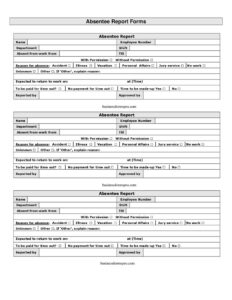
Absentee Report Form
Download a free Absentee Report Form template in PDF and DOCX to document employee absences, reasons, and approvals accurately—free download, no signup.
PDF
DOCX
1 downloads
0
likes
Download Files
- DOCX
An Absentee Report Form is a simple workplace document used to record when an employee is away from work, for how long, and why. The single most common reason people reach for one is to create a clear, written record of an absence for payroll, attendance tracking, and supervisor approval. You can download this Absentee Report Form free in both PDF and DOCX formats—no signup required.
What Is an Absentee Report Form?
An Absentee Report Form is a standardized record that documents an individual employee’s absence from scheduled work. It is typically completed by an employee, a supervisor, or an HR representative and captures the essentials: who was absent, which department and shift they belong to, the dates covered, and the stated reason. The form is then reviewed and signed off by an authorized approver. By putting this information in one place, the form helps employers maintain accurate attendance records, support fair leave decisions, and keep payroll calculations consistent. It serves as both a notification and a documented approval, reducing confusion about whether an absence was authorized.
When Do You Need an Absentee Report Form?
Almost any organization that tracks attendance will use a version of this form. Common situations include:
- An employee calls in sick and the supervisor needs to log the absence for payroll and records.
- A worker requests time off for a medical appointment, family matter, or personal day that must be approved in advance.
- An unplanned no-show or late arrival needs to be documented for attendance review.
- HR is compiling monthly or quarterly attendance statistics by department or shift.
- A manager needs to formally approve or deny a period of absence and keep evidence of that decision.
- An employee’s absence may affect bonus eligibility, leave balances, or disciplinary thresholds and must be recorded accurately.
Types of Absences This Form Can Cover
The same form template can document a wide range of absence types depending on what is written in the reason field. These often include sick leave, vacation or annual leave, personal leave, bereavement, jury duty, medical appointments, family emergencies, and unauthorized or unexplained absences. Some employers use one universal form for all categories and rely on the reason field to distinguish them, while others create separate logs. Because this template includes a free-text reason field along with clear start and end dates, it adapts to both planned and unplanned absences without modification.
What an Absentee Report Form Should Have
A complete and useful Absentee Report Form should clearly identify the employee and the absence, and it should leave no ambiguity about authorization. Essential elements include the employee’s full name and identifying details such as employee number, the department and shift so records can be sorted correctly, a specific reason for the absence, and the exact dates the absence covers. Just as important are the accountability fields: who reported the absence and who approved it. Together these turn an informal note into an auditable record that HR and payroll can rely on.
How to Fill Out an Absentee Report Form
- Name: Enter the full legal name of the absent employee as it appears in company records.
- Department: Write the department or team the employee belongs to, which helps managers track absences by group.
- Employee number: Add the unique ID or payroll number assigned to the employee to avoid confusion between people with similar names.
- Shift: Note the relevant shift—day, evening, night, or a specific schedule—so the absence aligns with the correct work hours.
- Reason for absence: State the reason clearly and concisely, such as illness, medical appointment, family emergency, or approved vacation.
- Absent for work from: Record the first date (and time, if relevant) the employee was or will be away.
- Till: Enter the last date the absence covers, defining the full duration.
- Reported by: Add the name of the person who reported the absence—often the employee, a colleague, or a supervisor.
- Approved by: Have the authorized manager or HR representative sign or print their name to confirm the absence has been reviewed and approved.
Using the Form for Records and Payroll
Once completed, the Absentee Report Form should be filed with the employee’s attendance records and shared with whoever processes payroll. Accurate dates in the “from” and “till” fields matter because they directly affect how many hours or days are deducted, charged to leave balances, or paid out. Keeping a consistent file of these forms also helps employers spot patterns, support fair treatment across teams, and respond confidently if an absence is ever questioned. Many organizations retain absence records for a set period in line with their internal policy and applicable labor regulations, so store completed forms securely and protect any personal information they contain.
Common Mistakes to Avoid
- Leaving the employee number blank, which makes it harder to match the form to the correct payroll record.
- Recording vague dates or forgetting to fill the “till” field, leaving the duration of the absence unclear.
- Skipping the “approved by” signature, so it is impossible to tell whether the absence was authorized.
- Writing an unclear or missing reason, which complicates leave categorization and reporting.
- Mixing up the shift, which can throw off attendance calculations for hourly staff.
- Failing to submit the form promptly, causing payroll errors or duplicate entries.
Frequently Asked Questions
What is an Absentee Report Form used for? It is used to document an employee’s absence from work, including the reason and the dates covered. Employers rely on it to keep attendance records accurate, support payroll processing, and confirm whether an absence was approved. It also creates a clear paper trail in case the absence is later reviewed.
Who fills out the Absentee Report Form? The form is usually completed by the absent employee, their supervisor, or an HR representative, depending on company practice. The “reported by” field names the person submitting the information, while the “approved by” field is signed by the manager or HR person authorizing the absence.
Does an Absentee Report Form need to be signed? While a handwritten signature is not always legally required, the “approved by” field should be completed by an authorized person to show the absence was reviewed and accepted. A signature or printed name in this field strengthens the record and reduces disputes about whether time off was approved.
Is this Absentee Report Form free to download? Yes. You can download this template completely free in both PDF and DOCX formats, with no signup or account required. The editable DOCX version lets you add your company name, logo, or extra fields to match your internal policy.
Can I customize the form for my company? Absolutely. Because the DOCX version is fully editable, you can adjust labels, add fields such as a payroll code or contact number, or insert your company branding. Keep the core fields—name, dates, reason, and approval—so the record stays clear and useful.
How long should we keep completed absence forms? Retention periods vary by employer policy and local regulations, but many organizations keep attendance records for several years. Store completed forms securely, limit access to authorized staff, and follow any applicable data protection rules since the forms contain personal information.
This Absentee Report Form template is a general example provided for informational purposes only and does not constitute legal, HR, or employment advice. Workplace requirements, leave entitlements, and recordkeeping rules vary by jurisdiction and employer—consult a qualified professional or your HR department to ensure compliance.
Official resource: for the rules that apply to your situation, see the U.S. Department of Labor.
Related Forms
- Employee Reference Request
- Shift Change Request
- Interview Invitation
- Jury Duty Employee Work Excusal
- Harassment Log
- Paycheck Authorization Form
Browse more in Employment.