
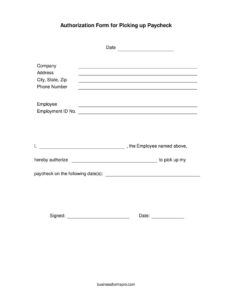
Paycheck Authorization Form
Download a free Paycheck Authorization Form template in PDF and DOCX to authorize direct deposit, deductions, or pay changes — free download, no signup.
PDF
DOCX
1 downloads
0
likes
Download Files
- DOCX
A Paycheck Authorization Form is a document an employee signs to give their employer written permission to handle a specific aspect of their pay — most commonly setting up or changing direct deposit. It creates a clear record of consent for payroll actions, and you can download it free in both PDF and DOCX formats with no signup required.
What Is a Paycheck Authorization Form?
A Paycheck Authorization Form is a written authorization completed by an employee and submitted to an employer’s payroll or HR department. It documents an employee’s consent for how their wages are paid or adjusted — for example, depositing pay into a designated bank account, applying a voluntary deduction, or approving a change in pay rate or schedule. The form protects both parties: it gives the employer documented permission to act, and it gives the employee a paper trail confirming exactly what they agreed to. Because it touches money and bank details, the form is typically kept securely in the employee’s personnel file and updated whenever pay arrangements change.
When Do You Need a Paycheck Authorization Form?
This form comes into play any time a payroll change needs documented employee consent. Common situations include:
- Setting up direct deposit — a new hire authorizes the company to deposit wages into their checking or savings account.
- Changing or splitting deposits — an employee wants pay routed to a different bank or split between two accounts.
- Voluntary deductions — authorizing amounts for retirement contributions, health premiums, union dues, or charitable giving.
- Wage advance or repayment — agreeing to repay a payroll advance or correct an overpayment through future paychecks.
- Pay rate or schedule changes — confirming a new hourly rate, salary, or pay frequency in writing.
- Garnishment or third-party payments — acknowledging a court-ordered or agreed deduction directed to another party.
Types of Paycheck Authorizations
Although they share a format, paycheck authorizations vary by purpose. A direct deposit authorization captures bank routing and account details. A deduction authorization specifies a dollar amount or percentage and how often it applies. A repayment authorization documents an amount owed and the schedule for recovering it. Choosing the right type — or combining sections on one form — ensures the document matches the action being taken and avoids confusion later.
What a Paycheck Authorization Form Should Have
A complete form leaves no ambiguity about who is authorizing what. The essential elements are:
- Employee full legal name, employee ID number, and contact details.
- Employer or company name and the department receiving the request.
- A clear statement of what is being authorized (direct deposit, deduction, rate change, repayment).
- Specific details: bank name, routing and account numbers, account type, or the deduction amount and frequency.
- The effective date the change should begin.
- The employee’s signature and date, plus a space for employer or payroll approval.
How to Fill Out a Paycheck Authorization Form
Follow these steps to complete the form accurately:
- Enter your identifying information. Write your full legal name as it appears on payroll records, your employee ID, job title, and the date.
- Name the employer. Add the company name and, if applicable, the payroll or HR department handling the request.
- Select the type of authorization. Indicate whether you are setting up direct deposit, requesting a deduction, approving a repayment, or confirming a pay change.
- Provide the specifics. For direct deposit, enter the bank name, routing number, account number, and account type (checking or savings). For a deduction, state the amount or percentage and how often it applies.
- Set the effective date. Note when the change should take effect so payroll applies it to the correct pay period.
- Review for accuracy. Double-check every digit of any bank or account number — a single error can misroute your pay.
- Sign and date. Add your signature to confirm consent, then submit the form for employer or payroll approval.
Handling Bank and Sensitive Information Safely
Because this form often contains bank account and routing numbers, treat it as confidential. Submit it directly to your payroll or HR contact rather than emailing it unencrypted or leaving it in a shared space. Employers should store completed forms in a secure file with restricted access and retain them as long as required by company policy and recordkeeping rules. If you are voiding a check to verify your account, attach it securely and never share full account details over unverified channels.
Paycheck Authorization vs. a Pay Stub
It is easy to confuse these documents, but they serve opposite directions. A Paycheck Authorization Form is forward-looking — it grants permission for how future pay will be handled. A pay stub is a record of pay already issued, showing gross wages, deductions, and net pay for a specific period. You complete an authorization once to set up or change an arrangement; you receive a pay stub every pay cycle as documentation of what was paid.
Common Mistakes to Avoid
- Transposing account or routing numbers — even one wrong digit can send your wages to the wrong place or delay them.
- Leaving the effective date blank — without it, payroll may apply the change late or to the wrong period.
- Forgetting to sign — an unsigned form is not valid authorization and will be rejected.
- Not specifying the deduction amount or frequency — vague instructions lead to errors or disputes.
- Failing to keep a copy — always retain your own record of what you authorized.
- Submitting through insecure channels — protect bank details by handing the form to payroll directly.
Frequently Asked Questions
What is a Paycheck Authorization Form used for? It is used to give an employer written permission to handle your pay in a specific way, such as setting up direct deposit, applying a voluntary deduction, or approving a repayment. The signed form serves as documented consent for the payroll action.
Do I need to notarize a Paycheck Authorization Form? No, notarization is generally not required. The employee’s signature and date, along with employer or payroll approval, are usually sufficient. Always follow your employer’s specific submission process.
Is a Paycheck Authorization Form legally binding? Once you sign it, it serves as your documented consent and can generally be relied upon by your employer to make the authorized change. Many authorizations — especially direct deposit — can be modified or canceled in writing, so check your employer’s policy and applicable rules.
How do I change or cancel an authorization? Submit a new form indicating the updated arrangement or a written request to cancel, and note an effective date. Keep a copy of the change so there is a clear record of when the prior authorization ended.
What information do I need to fill it out? Have your full legal name, employee ID, and the specific details of the action ready — for direct deposit, that means your bank name, routing number, account number, and account type. For deductions, you’ll need the amount or percentage and frequency.
How much does this template cost? Nothing — this Paycheck Authorization Form template is completely free to download in both PDF and DOCX formats, with no signup required. You can edit the DOCX version to match your company’s payroll process.
This template is a general example provided for informational purposes only and is not legal, financial, or tax advice. Payroll and authorization requirements vary by jurisdiction and employer policy — consult a qualified professional or your HR department for guidance specific to your situation.
Official resource: for the rules that apply to your situation, see the U.S. Department of Labor.
Related Forms
- Praising Employee Input
- Bi-Weekly Time Card With Approval
- Candidate Evaluation
- Employee Turnover Rate
- Letter Of Demotion
- Payroll Statement
Browse more in Employment.