
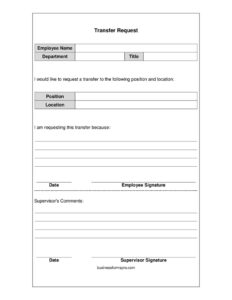
Request for Transfer
Download a free Request for Transfer form template in PDF and DOCX to formally ask for a new role or location at work with a clear, professional layout.
PDF
DOCX
0
likes
Download Files
- DOCX
A Request for Transfer is a short workplace document an employee uses to formally ask to move to a different position or location within the same organization. People most often reach for it when they want to change departments, relocate to another office, or step into a new role internally. You can download this Request for Transfer template free in PDF and DOCX, with no signup required.
What Is a Request for Transfer?
A Request for Transfer is a written form submitted by an employee to a supervisor or human resources department asking to be reassigned to a new job title, department, or work site within the same company. It documents who is making the request, their current role, the position and location they want, and the reason behind the request. Because it includes spaces for both an employee signature and supervisor comments, it creates a clear paper trail of the conversation. This matters for fairness and record-keeping: it shows when the request was made, what was asked, and how management responded. The form does not guarantee approval — it simply opens the process in a professional, documented way.
When Do You Need a Request for Transfer?
Internal transfers happen for many reasons. This form is useful whenever you want your request taken seriously and recorded properly rather than handled through an informal chat. Common situations include:
- Relocating to a branch or office closer to home after a move or change in commute.
- Moving into an open position in another department that better fits your skills or career goals.
- Requesting a shift to a different team because of workload, scheduling, or a desire for new responsibilities.
- Seeking a lateral move to gain experience in a different function before pursuing a promotion.
- Asking to change locations for family, health, or personal reasons that make your current site difficult.
- Responding to an internal job posting where the employer asks for a formal transfer request on file.
In each case, the form gives your manager a concrete document to review, forward to HR, and respond to in writing.
What a Request for Transfer Should Have
A complete transfer request is brief but covers the essentials. It should clearly identify the employee with their full name, current department, and current job title so there is no confusion about who is asking. It should name the specific position and location being requested, rather than a vague desire to “move somewhere else.” A short, honest explanation of the reason gives decision-makers context. Finally, it needs a date and the employee’s signature to confirm authenticity, plus a dedicated space for supervisor comments and a supervisor signature so the response becomes part of the record. Keeping the form focused on these elements makes it easy to process and reduces back-and-forth questions.
How to Fill Out a Request for Transfer
- Employee name: Write your full legal name as it appears in company records so HR can match the request to your file.
- Department: Enter the department you currently work in, such as Customer Service, Accounting, or Warehouse Operations.
- Title: List your current job title exactly as it appears on your most recent paperwork or paystub.
- Position: Under the section requesting a transfer, name the specific role you want — for example, “Senior Account Coordinator” or the posting’s exact title.
- Location: State the office, branch, store, or city you wish to move to. Be precise if the company has multiple sites.
- Reason for the transfer: In the “I am requesting this transfer because” area, give a clear, professional explanation in a sentence or two.
- Date and Employee Signature: Date the form and sign it to confirm the request is genuine and current.
- Supervisor’s Comments: Leave the comments, date, and supervisor signature lines blank — these are completed by your manager when they review and respond.
What Happens After You Submit It
Once you hand the form to your supervisor, it typically follows your company’s internal process. Your manager reviews the request, adds comments in the designated space, signs and dates it, and usually forwards it to human resources. From there, the request may be approved, denied, or held pending the availability of the position you named. Keep a copy of the signed form for your own records. If your employer has a formal transfer policy in an employee handbook, read it first — some companies require you to be in your current role for a minimum period or to meet specific eligibility rules before a transfer can be considered.
Tips for a Stronger Transfer Request
A well-written reason can make a real difference. Frame your explanation around what you bring to the new role and how the move supports both your goals and the team, rather than focusing only on dissatisfaction with your current position. Mention relevant skills or experience that prepare you for the requested position. Keep your tone professional and respectful, even if the underlying reason is personal. If timing matters — for example, you need to relocate by a certain date — note that clearly so your supervisor can plan. A short, specific, courteous request is far easier to approve than a vague or emotional one.
Common Mistakes to Avoid
- Leaving the position or location blank, which forces HR to guess what you actually want.
- Writing a vague reason like “personal reasons” when a brief, honest explanation would help your case.
- Forgetting to sign or date the form, which can stall or invalidate the request.
- Filling in the supervisor’s comments or signature lines yourself — those are reserved for management.
- Submitting the request informally and keeping no copy, leaving you without proof it was filed.
- Skipping your company’s transfer policy and requesting a move you are not yet eligible to make.
Frequently Asked Questions
What is a Request for Transfer form used for? It is used by an employee to formally ask to move to a different position or location within the same company. The form records your current role, the role you want, your reason, and your supervisor’s response. It creates a clear, documented start to the transfer process.
How do I fill out a Request for Transfer? Enter your name, current department, and title, then specify the position and location you want and your reason for the request. Sign and date the form, then leave the supervisor’s comments and signature section for your manager to complete. Keep your wording clear and professional throughout.
Does a Request for Transfer need to be notarized? No. A transfer request is an internal workplace document and does not require notarization or witnesses. It only needs your signature and date, plus your supervisor’s signature when they respond.
Is submitting this form a guarantee my transfer will be approved? No. The form formally opens the request, but approval depends on factors like position availability, your eligibility, and company policy. Your supervisor and HR review the request before making a decision.
How much does this Request for Transfer template cost? Nothing — it is completely free to download here in both PDF and DOCX formats, with no signup required. You can fill it out by hand or edit the DOCX version on your computer before printing.
Can my employer deny my transfer request? Yes. Employers generally have discretion over internal transfers based on business needs, openings, and policy. If your request is denied, ask your supervisor or HR for the reasoning and whether you can reapply later.
This Request for Transfer template is a general example provided for informational purposes only and is not legal, financial, or employment advice. Company policies and applicable rules vary by employer and jurisdiction — consult your employee handbook, human resources department, or a qualified professional for guidance specific to your situation.
Official resource: for the rules that apply to your situation, see the U.S. Department of Labor.
Related Forms
- Absentee Report Form
- Sexual Harassment Complaint
- First Warning Notice Employee Behavior
- Employee Termination Notice
- Shift Change Request
- Job Application Comparison Chart
Browse more in Employment.