
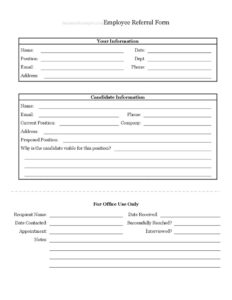
Employee Referral Form
Download a free Employee Referral Form template in PDF and DOCX to let staff recommend candidates and track referrals through hiring — free download.
PDF
DOCX
0
likes
Download Files
- DOCX
An Employee Referral Form is a simple document staff members use to recommend a qualified candidate for an open role at their company. Most people reach for one when they know someone who would be a great fit for a job and want to formally pass that name along to HR or a hiring manager. You can download this Employee Referral Form for free in both PDF and DOCX — no signup required.
What Is an Employee Referral Form?
An Employee Referral Form is an internal recruiting document that captures who is making a referral, who they are recommending, and why that person is a good match for a specific position. It is typically issued by the human resources or talent team and completed by an existing employee. The form documents the candidate’s contact details, current employment, and the role being suggested, then provides an office-use section for recruiters to log follow-up activity. Because employee referrals often produce higher-quality hires who stay longer, this form helps companies tap into their team’s networks in a structured, trackable way rather than relying on casual hallway mentions or scattered emails.
When Do You Need an Employee Referral Form?
This form is useful any time a company wants to source candidates through its own workforce. Common situations include:
- An employee knows a former colleague or friend who fits an open requisition and wants to put their name forward officially.
- HR is running a formal employee referral program — often with bonuses — and needs a consistent way to log every submission.
- A hiring manager is struggling to fill a hard-to-recruit technical or specialized role and asks the team for recommendations.
- The company is scaling quickly and wants to reduce time-to-hire and agency fees by leaning on internal networks.
- An employee meets a strong candidate at a conference, meetup, or alumni event and wants to refer them before the contact goes cold.
- HR needs an audit trail showing which referrals were contacted, interviewed, and ultimately hired for bonus payout purposes.
What an Employee Referral Form Should Have
A complete referral form has three clear parts. First, the referring employee’s information so HR knows who to credit and contact. Second, the candidate’s information including how to reach them, where they currently work, and the proposed position — plus a short justification of why they are a strong fit. Third, an office-use section that lets recruiters record the referral’s progress: when it was received, whether the candidate was reached, whether an appointment or interview occurred, and any notes. Together these sections turn a casual recommendation into a documented, trackable lead that supports both fair bonus payouts and better hiring decisions.
How to Fill Out an Employee Referral Form
- Under Your Information, enter your full Name and the Date you are submitting the form.
- Add your Position and Dept. so HR can identify your role and team within the company.
- Provide your Email, Phone, and Address so the recruiting team can confirm details or notify you of a referral bonus.
- Move to the Candidate Information section and enter the candidate’s Name, Email, and Phone.
- Record the candidate’s Current Position, Company, and Address to give recruiters useful background.
- Specify the Proposed Position you are referring them for — be precise and use the exact job title or requisition.
- Answer Why is the candidate viable for this position? with concrete strengths, relevant experience, and skills.
- Leave the For Office Use Only block blank — HR completes the Recipient Name, Date Received, Date Contacted, Successfully Reached?, Appointment, Interviewed?, and Notes fields as the referral progresses.
Writing a Strong Referral Justification
The most valuable field on this form is the question asking why the candidate is viable. A vague answer like “great person” gives recruiters little to work with, while a specific one moves the candidate forward. Tie your reasoning directly to the proposed position: mention the years of relevant experience, a notable project or accomplishment, specific tools or certifications, and how their background maps to the team’s needs. If you have worked alongside the candidate, describe what they were like as a teammate. A focused two or three sentences here often makes the difference between a referral that gets screened out and one that lands an interview.
How HR Uses the Office Section
The For Office Use Only portion exists so recruiters can manage the referral without going back to the employee for status updates. The Recipient Name identifies who in HR owns the lead, and Date Received timestamps the submission. As the process unfolds, the team logs the Date Contacted, marks whether the candidate was Successfully Reached?, notes any scheduled Appointment, and indicates whether the candidate was Interviewed?. The Notes field captures everything else — scheduling details, screening outcomes, or reasons a candidate declined. This section creates the paper trail many referral-bonus programs require before any payment is approved.
Common Mistakes to Avoid
- Referring a candidate without their knowledge or consent — always ask first so they expect a call from your employer.
- Leaving the candidate’s email or phone blank, which stalls the referral before anyone can reach out.
- Writing a generic justification instead of specific, role-relevant reasons the person is qualified.
- Forgetting to record the exact proposed position, leaving HR to guess which opening you mean.
- Filling in the office-use section yourself — those fields are for the recruiting team only.
- Submitting after the role is already filled; check that the position is still open before referring.
Frequently Asked Questions
What is an Employee Referral Form used for? It is an internal recruiting tool that lets an existing employee formally recommend a candidate for an open job. The form captures the referrer’s details, the candidate’s information, the proposed position, and a justification, then gives HR space to track follow-up. It standardizes referrals and supports fair bonus tracking.
How do I fill out an Employee Referral Form? Complete your own contact details, then enter the candidate’s name, email, phone, current employer, and the position you are referring them for. Add a clear explanation of why they are qualified, and leave the office-use section blank for HR. Be accurate and specific so recruiters can act quickly.
Do I need the candidate’s permission to refer them? Yes, you should always ask the candidate before submitting their information. This ensures they are genuinely interested, expect to be contacted, and consent to having their details shared. It also keeps you in line with your company’s privacy and referral policies.
Is an Employee Referral Form legally binding? No, it is an internal administrative document, not a contract. It does not guarantee the candidate will be hired or that you will receive a bonus — those depend on your employer’s program rules and hiring outcomes. It simply records and tracks the recommendation.
Do referral forms come with a bonus? Many companies pay referral bonuses, but the form itself does not create one. Whether a payout applies, how much it is, and when it is paid are governed by your organization’s specific referral program. Check your HR policy for eligibility and timing details.
Is this Employee Referral Form free to download? Yes. You can download this Employee Referral Form template for free in both PDF and DOCX formats with no signup required. Use the DOCX version to add your company logo, adjust fields, or tailor it to your referral program.
This Employee Referral Form template is provided as a general example for informational purposes only and does not constitute legal, HR, or employment advice. Referral program rules and privacy requirements vary by company and jurisdiction — consult a qualified HR or legal professional before relying on this document.
Official resource: for the rules that apply to your situation, see the U.S. Department of Labor.
Related Forms
- Employee Tracker
- Request To Attend Training
- Absentee Report Form
- Attendance Record
- Employee Record
- Shift Trade Tracker
Browse more in Employment.