
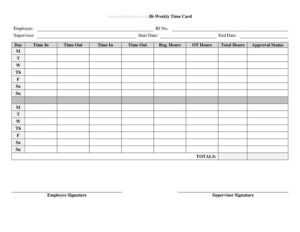
Bi-Weekly Time Card With Approval
Track two weeks of work hours with our free Bi-Weekly Time Card With Approval template, featuring built-in supervisor sign-off — free download in PDF and DOCX.
PDF
DOCX
4 downloads
0
likes
Download Files
- DOCX
A Bi-Weekly Time Card With Approval is a payroll document that records an employee’s hours worked across a two-week pay period and includes a dedicated space for a supervisor to review and sign off before payment is processed. Most people use it to capture daily clock-in and clock-out times, calculate total hours, and create an approved record for accurate paychecks. It’s free to download here in both PDF and DOCX formats, with no signup required.
What Is a Bi-Weekly Time Card With Approval?
A Bi-Weekly Time Card With Approval is a structured timekeeping form covering a 14-day pay cycle, typically two consecutive work weeks. It is filled out by an hourly or non-exempt employee to log when they started and stopped work each day, along with breaks and total hours. The form’s defining feature is the approval line — a section where a manager or supervisor verifies the recorded hours are accurate and signs to authorize payment. Employers use it to support payroll processing, comply with wage-and-hour recordkeeping expectations, and resolve disputes about hours worked. Because it covers two weeks at once, it aligns neatly with the common bi-weekly pay schedule used by many businesses.
When Do You Need a Bi-Weekly Time Card With Approval?
This form fits any workplace that pays staff every two weeks and needs a verified record of hours. Common situations include:
- Bi-weekly payroll runs: When your company issues paychecks every other Friday and needs hours documented per employee for the full period.
- Hourly and non-exempt staff: For workers paid by the hour whose pay depends on exact time worked, including any overtime.
- Manual or hybrid timekeeping: Small businesses without a digital punch system that still need a reliable paper or fillable record.
- Contract and temporary workers: To track hours for short-term staff whose timesheets must be approved before invoicing or payment.
- Audit and compliance backup: When you need signed documentation to support wage records in case of a labor review or dispute.
- Remote or field employees: For staff working off-site who self-report hours that a supervisor then verifies and approves.
What a Bi-Weekly Time Card Should Have
A complete bi-weekly time card includes employee identification, the pay period covered, daily time entries, and an approval section. To be useful for payroll and recordkeeping, it should capture the employee’s name and any ID or department, the start and end dates of the two-week period, and a row for each day showing time in, time out, lunch or break time, and daily total hours. It should total regular and overtime hours separately, include signature lines for both the employee and the approving supervisor, and provide dated signatures so the record reflects when it was certified. Clear column labels and a running total reduce calculation errors and make verification fast.
How to Fill Out a Bi-Weekly Time Card With Approval
- Enter employee details: Write the employee’s full name, employee ID or number if used, and the department or job title at the top.
- Set the pay period: Fill in the start and end dates of the two-week period so the card clearly covers the correct 14 days.
- Log each workday: For every day worked, record the time in and time out. Use a consistent format (such as 8:00 AM / 4:30 PM) throughout.
- Record breaks: Note unpaid lunch or break time so it can be subtracted from the daily total.
- Calculate daily totals: Subtract break time from the elapsed work time to get hours worked that day, and enter the figure in the daily total column.
- Separate overtime: Where applicable, split hours into regular and overtime columns according to your employer’s rules.
- Total the period: Add the daily totals for both weeks to get the grand total of hours for the pay period.
- Sign as the employee: The employee signs and dates to certify the hours are accurate.
- Obtain approval: The supervisor reviews the entries, signs the approval line, and dates it to authorize payment.
Tips for Accurate Timekeeping
Accuracy starts with recording entries in real time rather than reconstructing them from memory at the end of the period. Encourage employees to clock in and out at the actual moment they begin and finish, and to note breaks immediately. Use the same time format consistently to avoid confusion between morning and afternoon hours. Round only if your company has a stated rounding policy, and apply it the same way every time. Keep a copy of each approved time card with your payroll records — many jurisdictions expect employers to retain hours-worked documentation for a set number of years. Storing both the original and a scanned copy protects you if a question about pay ever arises.
Why the Approval Step Matters
The supervisor approval line is what turns a self-reported timesheet into a verified payroll record. By signing, the manager confirms the employee actually worked the listed hours and that any overtime was authorized. This step protects both sides: the employee gets a documented agreement that their hours were accepted, and the employer gains a safeguard against inflated or disputed claims. Approval also creates a clear chain of accountability, which is valuable during audits or wage disputes. Build it into your routine so no time card moves to payroll without a dated signature from the person responsible for verifying hours.
Common Mistakes to Avoid
- Leaving the pay period blank: Without start and end dates, it’s unclear which two weeks the card covers.
- Forgetting to subtract breaks: Failing to deduct unpaid lunch time inflates daily totals and overpays hours.
- Mixing AM and PM: Inconsistent time formats lead to miscalculated hours.
- Skipping the overtime split: Lumping all hours together can cause overtime to be paid incorrectly.
- Missing signatures: An unsigned or unapproved card may delay payroll or be rejected.
- Submitting late: Turning in the card after the payroll cutoff can push pay to the next cycle.
Frequently Asked Questions
What is a bi-weekly time card? It is a timekeeping form that records an employee’s hours worked over a two-week pay period and includes a supervisor approval line. It captures daily start and end times, breaks, and totals so payroll can be processed accurately.
How do I fill out the time card? Enter the employee’s name and pay period dates, then log time in, time out, and breaks for each day. Calculate daily and period totals, then have the employee and supervisor sign and date the form.
Does a time card need to be signed? While requirements vary by employer, a signature from the employee certifying accuracy and a supervisor signature approving the hours is standard practice. The approval line is what authorizes the recorded hours for payment.
Is a time card legally binding? A signed and approved time card serves as a business record of hours worked and can support payroll and wage compliance. It is not a contract, but it provides documentation that may be relied upon in disputes or audits.
How much does this template cost? Nothing — this Bi-Weekly Time Card With Approval template is completely free to download in PDF and DOCX formats, with no signup or payment required.
Can I edit the template for my company? Yes. The DOCX version is fully editable, so you can add your company name, adjust columns, change the time format, or include additional fields like project codes to match your payroll process.
This template is a general example provided for informational purposes only and is not legal, financial, or tax advice. Wage, overtime, and recordkeeping requirements vary by jurisdiction and employer policy — consult a qualified professional or your local labor authority to ensure compliance.
Official resource: for the rules that apply to your situation, see the U.S. Department of Labor.
Related Forms
- Employee Official Warning Letter
- Report of Absence for Military Duty
- Performance Improvement Plan
- Personnel Emergency Contact Record
- Grievance Report
- Request for Transfer
Browse more in Employment.