
Daily Production Report
Download a free Daily Production Report template in PDF or DOCX to track scenes shot, crew times, and footage on every shoot day, no signup required.
PDF
DOCX
3 downloads
0
likes
Download Files
- DOCX
A Daily Production Report (often called a DPR) is the official end-of-day summary that records exactly what a film or video crew accomplished on a given shoot day. Producers, line producers, and assistant directors use it to track scenes shot, hours worked, pages and minutes completed, and film stock consumed. You can download this template free in PDF and DOCX, with no signup required.
What Is a Daily Production Report?
A Daily Production Report is a one-page document generated at the end of each shooting day that captures the production’s progress against its schedule and budget. It is typically prepared by the second assistant director or production coordinator and reviewed by the line producer and the studio or financiers. The DPR documents call times, meal breaks, wrap times, the scenes that were filmed, pages and screen minutes completed, the number of camera setups, and how much film stock or media was used. Together these figures show whether a shoot is on pace, over, or behind, and they create a permanent paper trail that the production office, payroll, and post-production teams rely on long after the day wraps.
When Do You Need a Daily Production Report?
The DPR is filed on every working day of principal photography. Common situations where it becomes essential include:
- Submitting a daily progress summary to producers, studio executives, or completion guarantors who are monitoring the schedule.
- Reconciling crew hours and meal penalties for payroll and union timekeeping at the end of a shoot day.
- Tracking pages and minutes shot against the shooting schedule to know if the production is ahead or behind.
- Documenting which scheduled scenes were not completed so they can be rescheduled or moved to a pickup day.
- Logging film stock or digital media consumption for inventory, lab orders, and budget control.
- Building a historical record for insurance claims, weather days, or any disputes about what happened on set.
What a Daily Production Report Should Have
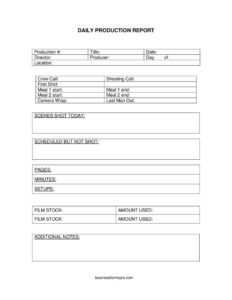
A complete DPR identifies the production, the specific day, and the key creative personnel, then summarizes the day’s timeline and output. At minimum it should include the production number and title, the shoot date, the director and producer, and the day-of count within the schedule. It must capture the full daily timeline — crew call, shooting call, first shot, both meal windows, camera wrap, and last man out — alongside production metrics such as scenes shot, scenes scheduled but not shot, pages, screen minutes, camera setups, and film stock used. A notes field lets you flag anything unusual, like weather delays, accidents, or equipment failures.
How to Fill Out a Daily Production Report
- Enter the production # and title so the report ties to the correct project.
- Record the date of the shoot and the day of number (for example, Day 12 of 30).
- List the director and producer overseeing the day.
- Note the location where filming took place — stage, address, or set name.
- Log the timeline: crew call, shooting call, and the time of the first shot.
- Enter both meal breaks — meal 1 start, meal 1 end, meal 2 start, and meal 2 end.
- Record camera wrap and last man out to close the day’s hours.
- List the scenes shot today and any scheduled but not shot.
- Fill in production output: pages, minutes, and setups.
- Document the film stock and amount used, then add additional notes for anything noteworthy.
Reading the Numbers: Pace and Progress
The real value of a DPR lies in comparing today against the plan. The scenes shot today versus scheduled but not shot tells everyone instantly whether the day landed on target. Pages and minutes measure creative progress — many productions aim for a set page count per day, and falling short repeatedly signals a schedule problem. The number of setups indicates how efficiently the camera department moved, while the gap between crew call and last man out reveals the true length of the working day. Meal start and end times matter for union compliance, since late or missed meals can trigger penalties. Read together, these fields give producers an early-warning system for budget overruns.
How the DPR Connects to Other Production Paperwork
The Daily Production Report does not stand alone. It is usually compiled from the call sheet, the second assistant director’s time sheet, the camera reports, the script supervisor’s daily log, and the editor’s notes. Times on the DPR should match the production time sheets used for payroll, and the scenes listed should reconcile with the script supervisor’s lined script. Film stock figures should agree with the camera department’s stock reports and the lab order. Keeping these documents consistent prevents confusion in post-production and protects the production if hours, footage, or progress are ever questioned.
Common Mistakes to Avoid
- Logging the wrong day-of number, which throws off the cumulative schedule tracking across the whole shoot.
- Leaving meal start and end times blank, making it impossible to verify compliance or calculate penalties later.
- Confusing crew call with shooting call — they are distinct times and both belong on the report.
- Forgetting to list scenes scheduled but not shot, so rescheduling needs get overlooked.
- Recording approximate film stock figures instead of the actual amount used, which distorts inventory and lab orders.
- Filing the report from memory hours later rather than recording times as the day unfolds, leading to inaccurate data.
Frequently Asked Questions
What is a Daily Production Report used for? It is a one-page end-of-day summary that records a film or video shoot’s timeline, the scenes filmed, pages and minutes completed, setups, and stock used. Producers and studios use it to track progress against the schedule and budget. It also creates a permanent record for payroll, post-production, and insurance.
Who fills out the Daily Production Report? On most productions the second assistant director or production coordinator drafts the DPR, drawing on the call sheet, time sheets, and camera reports. The line producer or production manager typically reviews and approves it before it is distributed. On smaller shoots, a single producer or production assistant may complete it.
What is the difference between crew call and shooting call? Crew call is the time the crew is required to arrive and begin setting up, while shooting call is when the cast and camera are expected to be ready to roll. The gap between them covers setup, lighting, rehearsal, and getting actors into hair, makeup, and wardrobe. Both are recorded so the day’s hours and pace are clear.
How are pages and minutes calculated on the report? Pages refer to the script pages covered that day, often measured in eighths of a page, and minutes estimate the resulting screen time. The script supervisor usually provides these figures from the lined script. They are compared with the shooting schedule to gauge whether the production is on pace.
Is a Daily Production Report legally binding? The DPR is an internal record rather than a contract, but it can carry significant weight because it documents hours worked, meal breaks, and on-set events. It may be referenced in payroll, union, or insurance matters, so accuracy is important. Treat it as an official record even though it is not a signed agreement.
How much does this Daily Production Report template cost? Nothing — it is completely free to download from Business Forms Pro in both PDF and DOCX formats, with no signup or account required. You can fill out the PDF directly or edit the DOCX version to match your production’s layout. Use it on as many shoots as you like.
This Daily Production Report template is a general example provided for informational purposes only and is not legal, financial, or labor advice. Reporting requirements and union rules vary by jurisdiction, guild, and production. Consult a qualified professional or your production’s legal and accounting team for guidance specific to your project.
Related Forms
- Location Use Release Form
- Actor Pay Form
- Video Production Rates
- Shooting Notice
- Extras Release Form
- Extras Breakdown
Browse more in Film Production Forms.