
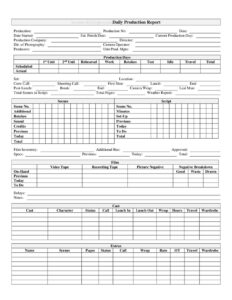
Daily Film Production Report
Track scenes, cast, crew calls, and film inventory with the free Daily Film Production Report template, available as a free download in PDF and DOCX.
PDF
DOCX
8 downloads
0
likes
Download Files
- DOCX
A Daily Film Production Report is the official daily record of what happened on set during a single shooting day, capturing call times, scenes completed, film inventory, cast and crew hours, and any delays. Productions use it to keep producers, accountants, and studios informed of progress against schedule and budget. You can download this template free in both PDF and DOCX, with no signup required.
What Is a Daily Film Production Report?
A Daily Film Production Report (often called a DPR or daily) is the standardized document prepared at the end of each shooting day, usually by the Second Assistant Director or the production office. It records the day’s measurable output — pages and scenes shot, set-ups, sound and camera usage — alongside who worked, when they were called, and when they wrapped. The report is reviewed and approved by the Unit Production Manager and circulated to producers and the studio. It serves as the authoritative paper trail that ties creative progress to time, labor, and consumables, making it essential for both scheduling decisions and post-production accounting.
When Do You Need a Daily Film Production Report?
This report is generated for every working day of principal photography, but the information it captures supports many specific needs:
- Tracking schedule progress — comparing scheduled versus actual scenes and pages so you know if you are ahead or behind.
- Payroll and crew hours — logging call, lunch, and wrap times for cast and extras to calculate overtime and travel pay.
- Budget reconciliation — recording film, video, and recording tape inventory drawn, used, and remaining.
- Reporting to studios or financiers — providing producers and executives a daily snapshot of production health.
- Documenting delays — capturing weather holds, equipment failures, or talent issues that affect the schedule.
- Second unit coordination — separating 1st Unit and 2nd Unit days when multiple crews shoot simultaneously.
What a Daily Film Production Report Should Have
A complete report covers four core areas: production identification (title, number, dates, production day), the day’s timeline (crew call through camera wrap), creative output (scenes, pages, set-ups, sound), and resource tracking (film inventory and labor hours). It should clearly distinguish previous, today, and total/to-do figures so cumulative progress is visible at a glance. Finally, it must include space for delays and notes, and a signature or approval line for the Unit Production Manager.
How to Fill Out a Daily Film Production Report
- Header: Enter the Production title, Production No., Date, Date Started, Est. Finish Date, and the Current Production Day.
- Key personnel: List the Production Company, Director, Director of Photography, Camera Operator, Producers, and Unit Production Managers.
- Production days: Tally 1st Unit, 2nd Unit, Rehearsal, Work, Retakes, Test, Idle, Travel, and Total days, comparing Scheduled to Actual.
- Timeline: Record the Set, Location, Crew Call, Shooting Call, First Shot, Lunch start and end, Post-Lunch break, Camera Wrap, and Last Man times.
- Script progress: Note Total Scenes in Script, Total Pages, the Weather Report, and list Scenes shot with Scene Nos., Minutes, Retakes, Set-Ups, and Sound — split into Previous, Today, and To-Do columns.
- Film inventory: Enter Picture Negative figures (On-Hand, Good, Waste), plus Film, Video Tape, and Recording Tape Drawn, Previous, Today, and To-Do.
- Cast and extras: For each Cast member and Extra, log Character, Status, Call, Lunch In/Out, Wrap, Hours, Travel, Wardrobe, Rate, and OT.
- Delays and notes: Document any delays, then route the report for approval.
Understanding the Previous / Today / Total Columns
One of the most important features of this report is its three-column logic. Previous shows the cumulative total through the prior shooting day, Today shows what was accomplished on the current day, and Total (or To-Do) shows the running cumulative figure or what remains. Applied consistently across scenes, pages, set-ups, and film footage, this structure lets a producer instantly answer the key question: are we on pace? If the script has 110 scenes and the cumulative total reaches 60 by day 15 of a 30-day schedule, you can see at a glance whether the back half of the shoot is achievable. Always carry yesterday’s totals forward accurately, because an error in the previous column ripples through every report that follows.
Reading the Time Log for Payroll and Overtime
The timeline fields are not just for the record — they drive cost. The gap between Crew Call and Camera Wrap, adjusted for the Lunch and Post-Lunch break, determines worked hours, while the Last Man time captures the latest a crew member left set. For cast and extras, the Call, Lunch In/Out, Wrap, Hours, and OT fields feed directly into timesheets and union calculations. Travel and Wardrobe columns account for additional compensable time. Accurate, minute-level entries here protect the production from disputes and ensure everyone is paid correctly, so treat these fields as financial records, not estimates.
Common Mistakes to Avoid
- Rounding call and wrap times — guessing instead of recording actual clock times can cause payroll errors and grievances.
- Forgetting to carry forward previous totals — breaking the cumulative chain makes progress tracking meaningless.
- Omitting the weather report — weather often explains delays and justifies schedule changes later.
- Skipping the delays section — undocumented downtime is hard to defend to financiers or insurers.
- Mismatching scenes and pages — failing to reconcile scene numbers against pages shot hides true coverage.
- Leaving film inventory blank — incomplete stock and waste figures throw off both budget and the camera department.
Frequently Asked Questions
Who fills out the Daily Film Production Report? Typically the Second Assistant Director or a production office coordinator compiles it at the end of each shooting day, drawing on time records, the script supervisor’s notes, and the camera department’s footage logs. The Unit Production Manager usually reviews and approves it before distribution.
What is the difference between scheduled and actual figures? Scheduled figures reflect what the shooting schedule planned for the day, while actual figures record what truly happened on set. Comparing them reveals whether the production is ahead, on pace, or behind, which is the core purpose of the report.
Do I need to track 1st Unit and 2nd Unit separately? If your production runs more than one camera crew at the same time, yes — tracking them separately keeps progress, hours, and footage attributable to each unit. On single-unit shoots you can simply use the 1st Unit fields.
Is a Daily Film Production Report legally required? It is not a government-mandated form, but studios, completion bond companies, insurers, and union agreements frequently require it. It also serves as key evidence in any payroll or scheduling dispute, so most professional productions treat it as mandatory.
How do I handle delays on the report? Use the delays and notes section to describe what caused lost time — weather, equipment failure, talent availability — and estimate the time lost. Detailed delay notes help explain budget overruns and support insurance or force majeure discussions later.
Is this template really free to download? Yes. You can download the Daily Film Production Report template free in both PDF and DOCX formats with no signup required, and adapt the fields to match your production’s specific workflow.
This template is provided as a general example for informational purposes only and does not constitute legal, financial, tax, or accounting advice. Production reporting practices, union requirements, and recordkeeping obligations vary by jurisdiction and by the agreements governing your project — consult a qualified production accountant, line producer, or legal professional for guidance specific to your situation.
Related Forms
- Walkie Signout Sheet
- Student Film Actor Release Form
- Production Assistant Breakdown
- Extras Breakdown
- Daily Production Report
- Script Supervisor Notes
Browse more in Film Production Forms.