
Script Supervisor Notes
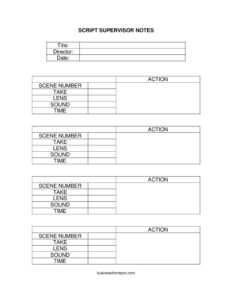
Track scenes, takes, lenses, and continuity on set with this free Script Supervisor Notes template, available as a free download in PDF and DOCX.
PDF
DOCX
18 downloads
0
likes
Download Files
- DOCX
The Script Supervisor Notes form is the on-set document a script supervisor uses to record every take, lens, sound status, and continuity detail as a scene is filmed. Productions rely on it most often to give editors and the director a clear, take-by-take record of what was shot and which versions were preferred. You can download it free in both PDF and DOCX formats, with no signup required.
What Is a Script Supervisor Notes Form?
A Script Supervisor Notes form is a structured log maintained by the script supervisor — the crew member responsible for continuity and for tracking the relationship between the script and what actually gets captured on camera. It documents each scene and take alongside technical and performance details such as the lens used, whether sound was recorded, the time, and a brief description of the action. These notes travel from the set to the editing room, where they help the editor quickly find usable footage. They also protect continuity across days, locations, and pickup shoots, ensuring a coffee cup, a line reading, or a camera angle matches from one shot to the next.
When Do You Need a Script Supervisor Notes Form?
- Shooting a narrative feature, short film, or scene that will be assembled in post and needs a reliable take log.
- Filming coverage of a scene from multiple angles, where matching action and eyelines across setups is essential.
- Recording which takes the director marked as good (circled takes) so the editor starts with the best material.
- Capturing technical metadata — lens choice, sound roll status, timing — that the camera and sound departments need referenced later.
- Planning continuity for scenes shot out of sequence, so wardrobe, props, and performance line up when cut together.
- Documenting reshoots or pickup days that must seamlessly match footage captured weeks earlier.
What a Script Supervisor Notes Form Should Have
A complete set of notes captures both identifying information and shot-level detail. At the top, the form should clearly state the project title, the director, and the shoot date so pages stay organized across a multi-day schedule. The body should hold one line per take, recording the scene number, take number, the lens used, sound status, the time of the take, and a short description of the action. Together these fields create a searchable record that lets anyone in the production — from the editor to the director — locate a specific moment without scrubbing through raw footage. Consistent, legible entries are what make the document genuinely useful downstream.
How to Fill Out a Script Supervisor Notes Form
- Title: Enter the project or production name at the top so the notes are tied to the right film, especially if you work on more than one.
- Director: Record the director’s name, which identifies whose creative calls on takes the notes reflect.
- Date: Write the shoot date for this page so the log stays in chronological order across the schedule.
- Scene number: Log the scene being filmed, matching the numbering in the shooting script.
- Take: Number each take sequentially within the scene, and mark or circle the preferred takes as the director calls them.
- Lens: Note the lens used for the setup (for example, 35mm or 50mm) so the look can be matched on coverage and reshoots.
- Sound: Indicate whether sound was recorded — a sync take versus MOS (no sound) — so the editor knows what audio exists.
- Time: Enter the time the take was shot or its running length, which helps with pacing notes and scheduling.
- Action: Briefly describe what happened in the take, including any continuity details, flubbed lines, or notes worth flagging.
Why Script Supervisor Notes Matter in Post-Production
The value of these notes becomes obvious in the editing room. When an editor opens a project with dozens of scenes and hundreds of takes, the script supervisor’s log is the map. A well-kept set of notes tells the editor which take the director circled, which had a sound issue, and what specifically changed from one take to the next. This saves hours of footage review and reduces the chance a continuity error slips into the final cut. The same notes also support the camera and sound departments if questions arise about lens choices or which takes carried usable audio. In effect, the form is a bridge between what happened on set and the decisions made afterward.
Tips for Keeping Clean Continuity Notes
- Write legibly and consistently — others will read these notes long after the shoot wraps.
- Mark circled (preferred) takes clearly the moment the director names them, before you forget.
- Note any continuity flags in the action column, such as a prop moving or a costume change between setups.
- Keep the lens and sound columns accurate even when the day moves fast; that metadata is hard to reconstruct later.
- Number takes against the scene so the editor can cross-reference camera and sound reports without confusion.
Common Mistakes to Avoid
- Leaving the title, director, or date blank, which makes loose pages impossible to sort across a long shoot.
- Skipping take numbers or reusing them, so the editor can’t match a note to specific footage.
- Forgetting to flag MOS (sound-free) takes, leading to wasted searches for audio that was never recorded.
- Recording vague action descriptions that don’t capture the continuity detail or the reason a take was good or bad.
- Not marking circled takes promptly, leaving the editor to guess which versions the director preferred.
- Letting the lens column lapse, which complicates matching coverage and any later reshoots.
Frequently Asked Questions
What is a Script Supervisor Notes form used for? It is used on a film set to log every take with details like scene number, take, lens, sound status, time, and a description of the action. These notes give the editor and director a clear record of what was shot and which takes were preferred. They are essential for maintaining continuity and speeding up post-production.
How do I fill out the form during a shoot? Start by entering the title, director, and date once per page, then add a new line for each take as the camera rolls. For each take, record the scene number, take number, lens, sound status, time, and a short note on the action. Mark the director’s preferred takes clearly so they stand out later.
What does “MOS” mean in the sound column? MOS indicates a take shot without synchronized sound, while a sync take records audio alongside the picture. Noting this in the sound field tells the editor exactly which takes have usable audio. It prevents wasted time searching for sound files that don’t exist.
Do I need to circle every good take? You should mark the takes the director identifies as preferred, often called circled takes, so editors know where to start. You don’t have to circle everything — just the versions worth prioritizing. Clear marking turns a long log into an actionable shortlist for the cutting room.
Is this form legally binding or just a working document? Script Supervisor Notes are a practical production document, not a contract, so they carry no legal obligations. Their purpose is communication and continuity between the set and post-production. Treat them as a reliable internal record rather than a formal agreement.
Is this Script Supervisor Notes template free to download? Yes, the template is completely free to download here in both PDF and DOCX formats, with no signup required. You can print the PDF for on-set use or edit the DOCX version to match your production’s workflow. Customize the columns to fit your camera and sound reporting needs.
This Script Supervisor Notes template is a general example provided for informational purposes only and does not constitute legal, financial, or professional production advice. Workflows, terminology, and reporting standards vary by production, studio, and region — adapt the form to your project and consult an experienced script supervisor or qualified professional as needed.
Related Forms
- Walkie Signout Sheet
- Video Production Contract
- Location Release Form
- Script Supervisor Daily Report
- Extras Breakdown
- Production Assistant Breakdown
Browse more in Film Production Forms.