
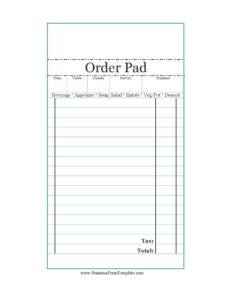
Restaurant Order Pad
Download a free Restaurant Order Pad template to take accurate table orders, track courses, and total checks fast — free PDF and DOCX download.
PDF
37 downloads
0
likes
Download Files
A Restaurant Order Pad is a simple form servers use to record what each table orders, organized by course so the kitchen and bar can prepare items correctly. The most common reason people use one is to capture customer selections quickly and accurately during service, then carry those details straight through to the check. You can download this Restaurant Order Pad free in PDF and DOCX, with no signup required.
What Is a Restaurant Order Pad?
A Restaurant Order Pad is a structured note sheet that servers, waitstaff, and counter staff use to write down a guest’s food and drink selections during a dining visit. It documents the table, the number of guests, the assigned server, and an itemized breakdown of the order by category — beverages, appetizers, soups and salads, entrées, sides, and desserts. The pad serves as the bridge between the dining room and the kitchen line, ensuring tickets are clear and nothing is forgotten. It also doubles as a working record for calculating subtotals, tax, and the final total. Small cafés, food trucks, family restaurants, and full-service establishments all rely on order pads to keep service organized.
When Do You Need a Restaurant Order Pad?
An order pad earns its place any time staff take orders by hand rather than relying solely on a point-of-sale terminal. Common situations include:
- Taking tableside orders in a sit-down restaurant where a server visits each table and writes selections by course.
- Running a busy section during peak hours when a written ticket is faster and more reliable than memory.
- Operating without a POS system, such as a new pop-up, food truck, or seasonal stand that needs a low-cost ordering method.
- Training new servers who benefit from a clear, category-by-category template to learn the menu flow.
- Backing up the electronic system during outages so service can continue smoothly.
- Managing large parties or banquets where multiple guests order at once and notes must stay organized by table and seat.
What a Restaurant Order Pad Should Have
A complete order pad keeps every order traceable and easy to ring up. The essentials are a date and table number so each ticket is identifiable, the number of guests for tracking covers, and the server name for accountability and tips. It should provide clearly labeled lines for each menu category — beverage, appetizer, soup or salad, entrée, vegetable or potato side, and dessert — so the kitchen reads the ticket in the order food is fired. Finally, it needs space to write quantities, a running subtotal, a tax line, and a total so the pad can convert directly into the guest check.
How to Fill Out a Restaurant Order Pad
- Write the date at the top so the ticket can be matched to the shift and sales records later.
- Enter the table number and, if your pad uses one, the ticket number to keep this order distinct from others in your section.
- Record the number of guests seated, which helps with seat-by-seat ordering and split checks.
- Add your name in the server field for accountability and to route the table to you.
- Note beverage selections first, since drinks are usually delivered before food.
- List any appetizer items, then each guest’s soup/salad choice.
- Write the main entrée for each guest, followed by the chosen veg/pot side so the kitchen plates it correctly.
- Capture any dessert orders, which are often taken later in the meal.
- Total the items into a subtotal, apply the tax, and write the final total to produce the guest check.
Organizing the Order by Course
The strength of this pad is that it follows the natural flow of a meal. Beverages and appetizers come first, soups and salads bridge to the main course, the entrée and its side anchor the plate, and dessert closes the experience. Writing orders in this sequence helps the kitchen fire dishes in the right timing and reduces the chance an item is delivered out of order. For tables with several guests, many servers add a small seat number or position note next to each item so plates are delivered without asking “who had the salmon?” Keeping the ticket legible matters: print clearly, abbreviate consistently, and circle special requests like allergies or temperatures so they stand out to the line cooks.
Turning the Pad Into a Guest Check
Because the pad already itemizes everything the table ordered, converting it to a check is straightforward. Confirm quantities against what was actually served, add the prices for each category, and sum them into a subtotal. Apply your local sales tax to reach the total, and note that tax rates vary by location, so always use the rate in effect for your establishment. If the table splits the bill, the seat-level notes you made while ordering make it easy to divide items accurately. Keeping the completed pad after service also gives you a paper trail for reconciling cash, voids, and comps at the end of the shift.
Common Mistakes to Avoid
- Forgetting to write the table or ticket number, which causes orders to be delivered to the wrong table.
- Skipping the guest count, making split checks and cover tracking harder at the end of the night.
- Using illegible handwriting or inconsistent abbreviations that the kitchen line can misread.
- Failing to note special requests — allergies, no onions, well-done — where the cook can see them.
- Calculating the total without applying the correct local tax rate, leading to under- or overcharging.
- Not recording the server name, which complicates tip distribution and accountability for the order.
Frequently Asked Questions
What is a Restaurant Order Pad used for? It is used by servers to record a table’s food and drink selections by course, communicate them clearly to the kitchen and bar, and then total the order into a guest check. It keeps service organized and reduces ordering errors, especially during busy shifts.
How do I fill out a Restaurant Order Pad? Start with the date, table, guest count, and server name, then list items under each category — beverage, appetizer, soup/salad, entrée, side, and dessert. Finish by totaling the items, adding tax, and writing the final total to create the check.
Is this order pad template free to download? Yes. You can download the Restaurant Order Pad free in both PDF and DOCX formats, with no signup or account required. Print it as-is or customize the DOCX with your restaurant name and menu categories.
Can I customize the categories on the pad? Absolutely. The DOCX version lets you rename or add lines — for example, adding a wine list, kids’ menu, or modifier section — so the pad matches your actual menu and service style.
Do I still need an order pad if I use a POS system? Many restaurants keep printed pads as a backup for system outages, for training new staff, and for operations like food trucks or pop-ups that run without a terminal. A paper pad is fast, reliable, and works anywhere.
How should I handle tax on the order pad? Calculate the subtotal of all items first, then apply the sales tax rate that applies to your location, since rates vary by state and municipality. Write the resulting figure on the total line so the guest check is accurate.
This Restaurant Order Pad template is provided as a general example for informational purposes only and does not constitute legal, financial, or tax advice. Tax rates, labor practices, and recordkeeping requirements vary by jurisdiction — consult a qualified professional to ensure your forms and procedures comply with applicable rules.
Need to work out sales tax? Use our free Sales Tax Calculator to add or remove sales tax from any amount in seconds.
Official resource: for the rules that apply to your situation, see the U.S. Small Business Administration.
Related Forms
- Work Invoice Labor
- Back Order Slip
- Lost Orders Tracker
- Rain Check Long
- Bill of Materials
- Job Invoice
Browse more in Invoices and Order Forms.