
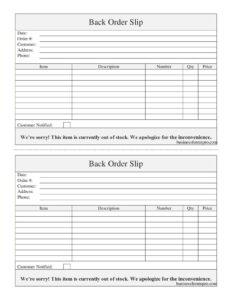
Back Order Slip
Track out-of-stock items with this free Back Order Slip template, available as a free download in PDF and DOCX to keep orders organized.
PDF
DOCX
1 downloads
0
likes
Download Files
- DOCX
A Back Order Slip is a simple document used to record items a customer has ordered but that are temporarily out of stock and will ship when inventory is replenished. Businesses use it most often to keep track of unfulfilled order lines so nothing falls through the cracks and customers stay informed. You can download this Back Order Slip free in PDF and DOCX formats — no signup required.
What Is a Back Order Slip?
A Back Order Slip is an internal order-tracking form that documents merchandise a customer has requested when that merchandise is not currently available to ship. It is typically issued by a sales, warehouse, or fulfillment team and records who ordered the item, what was ordered, how many units are pending, the agreed price, and whether the customer has been told about the delay. Unlike a standard invoice, a back order slip focuses on the gap between an order and its fulfillment. It serves as a reminder to follow up, a reference for restocking, and a paper trail that protects both the business and the customer when delivery timelines slip.
When Do You Need a Back Order Slip?
Any business that sells physical goods will eventually run short on stock. A Back Order Slip is the tool that keeps those pending orders organized. Common situations include:
- A customer orders a popular product that has sold out, and you want to reserve and ship it once new stock arrives.
- A supplier shipment is delayed, leaving part of a larger order unfulfilled while the rest goes out.
- A retail counter or showroom needs to record special-order or made-to-order items for a specific customer.
- Your warehouse splits a single order into shipped and pending lines and needs a record of what still owes the customer.
- A wholesale or B2B account places a recurring bulk order that periodically exceeds on-hand quantities.
- Seasonal demand outpaces supply and you must track which buyers are waiting for which items.
What a Back Order Slip Should Have
A complete back order slip captures everything needed to identify the customer, the order, and the specific items left to fulfill. At minimum it should include the date the slip was created, a reference order number, full customer contact details, a clear description of each backordered item, the quantity owed, the price, and a note confirming whether the customer has been notified of the delay. These elements turn a loose promise into a trackable commitment that anyone on your team can act on, even if the original salesperson is unavailable.
How to Fill Out a Back Order Slip
- Date: Enter the date you are creating the slip so you can measure how long the item has been on back order.
- Order #: Record the original order or invoice number this back order relates to, linking it to the full transaction.
- Customer: Write the customer’s full name or business name exactly as it appears on the order.
- Address: Enter the shipping address where the backordered goods should be sent once available.
- Phone: Add a current phone number so you can reach the customer with restock updates.
- Item: List the item name or product title being backordered.
- Description: Add details such as model, color, size, or specification to avoid confusion.
- Number: Enter the SKU, part number, or catalog number that identifies the product in your system.
- Qty: Record the quantity still owed to the customer on this order.
- Price: Note the unit or line price so totals match the original order when it ships.
- Customer Notified: Mark whether the customer has been informed of the delay, and when.
Managing Back Orders After the Slip Is Created
Filling out the slip is only the first step. Treat each open back order slip as a live task: file it where your fulfillment team checks daily, and reconcile it against incoming supplier shipments. When stock arrives, match the new inventory against your pending slips, prioritize the oldest orders first, and update the Customer Notified field once you have confirmed a ship date. Keeping the slip accurate prevents double-selling the same units to two customers and helps you spot products that are chronically short, which is valuable data for purchasing decisions.
Back Order Slip vs. Invoice and Packing Slip
It is easy to confuse these documents. An invoice requests payment for goods or services and reflects the full transaction. A packing slip accompanies a shipment and lists what is physically inside the box. A Back Order Slip, by contrast, documents what was not shipped and remains owed. Many businesses use all three together: the invoice bills the order, the packing slip covers the items that went out, and the back order slip tracks the remainder until it can be fulfilled and a final shipment completes the order.
Common Mistakes to Avoid
- Leaving the order number blank, which makes it impossible to tie the back order to the original transaction.
- Recording a vague item name without a SKU or description, leading to the wrong product being shipped later.
- Forgetting to update the Customer Notified field, so the customer is left guessing about the delay.
- Listing the wrong quantity owed, especially when an order is partially shipped.
- Failing to confirm the shipping address, which causes delays once stock finally arrives.
- Filing the slip and never revisiting it, allowing pending orders to be forgotten entirely.
Frequently Asked Questions
What is a back order slip used for? It is used to track items a customer ordered that are temporarily out of stock. The slip records the customer, the specific items, the quantity owed, and whether the customer has been notified, so the order can be fulfilled once inventory returns.
How do I fill out a back order slip? Start with the date and the original order number, then add the customer’s name, address, and phone. List each backordered item with its description, part number, quantity, and price, and finally mark whether the customer has been notified of the delay.
Is a back order slip the same as an invoice? No. An invoice bills the customer for the full order, while a back order slip only documents the items that could not be shipped immediately. The two work together, with the slip tracking the unfulfilled balance.
Do I need to notify the customer about a back order? Notifying customers is a best practice and is required by some consumer-protection rules. The Customer Notified field exists to record that you communicated the delay, which builds trust and helps avoid disputes.
Is this back order slip legally binding? The slip itself is an internal tracking record rather than a contract. The underlying sales agreement governs the transaction, but keeping an accurate slip helps document your commitment to fulfill the order.
How much does this template cost? Nothing — this Back Order Slip template is completely free to download in both PDF and DOCX formats, with no signup or account required. You can print it as-is or edit the DOCX version to match your business.
This Back Order Slip template is provided as a general example for informational purposes only and does not constitute legal, financial, or tax advice. Business and consumer requirements vary by jurisdiction and industry, so consult a qualified professional to ensure your forms and order practices meet applicable rules.
Need to work out sales tax? Use our free Sales Tax Calculator to add or remove sales tax from any amount in seconds.
Official resource: for the rules that apply to your situation, see the U.S. Small Business Administration.
Related Forms
- Contractor Change Form
- Bill of Materials
- Work Invoice Labor
- Lost Orders Tracker
- Replacement Parts Order Form
- Rain Check Long
Browse more in Invoices and Order Forms.