
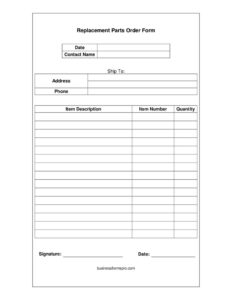
Replacement Parts Order Form
Use our free Replacement Parts Order Form template to request spare parts accurately, with a free download in PDF and DOCX, no signup required.
PDF
DOCX
36 downloads
0
likes
Download Files
- DOCX
A Replacement Parts Order Form is a simple document used to request spare or replacement components from a supplier, manufacturer, or internal warehouse. People most often reach for it when a piece of equipment breaks down and a specific part needs to be ordered quickly and accurately. You can download this template free in both PDF and DOCX formats, with no signup required.
What Is a Replacement Parts Order Form?
A Replacement Parts Order Form is a standardized request used to order parts that repair, restore, or maintain machinery, vehicles, appliances, or other equipment. It is typically completed by a maintenance technician, facilities manager, service department, or customer, and submitted to a parts supplier or vendor. The form documents exactly what is being ordered—item descriptions, part numbers, and quantities—along with where to ship the parts and who to contact. By capturing this information in one place, the form reduces miscommunication, prevents wrong parts from being shipped, and creates a paper trail for both the requester and the supplier. It serves as the starting point for fulfillment, invoicing, and inventory tracking.
When Do You Need a Replacement Parts Order Form?
This form is useful any time a specific component must be requested from a supplier rather than purchased off a shelf. Common situations include:
- Equipment breakdown: A machine on a production line fails and a technician needs a replacement motor, belt, or sensor ordered right away.
- Routine maintenance: Scheduled servicing requires filters, gaskets, or wear parts that must be ordered in advance.
- Warranty or service claims: A customer reports a defective component and the service team orders a replacement under warranty.
- Fleet and vehicle repairs: A fleet manager orders brake pads, belts, or electrical parts identified by part number.
- Appliance or HVAC repair: A field technician documents the exact parts needed for a repair visit and orders them for delivery to a job site.
- Inventory restocking: A stockroom replenishes commonly used spare parts before they run out.
What a Replacement Parts Order Form Should Have
A complete form gives the supplier everything needed to fulfill the request without follow-up questions. At minimum it should include the order date, the name of the person placing the order, a clear shipping destination and address, a contact phone number, and a detailed line-item list of parts. Each line should identify the part by description, part number, and quantity so there is no ambiguity. Finally, a signature and date authorize the request and confirm who approved it. Together these elements turn a vague request into an actionable, traceable order that protects both parties.
How to Fill Out a Replacement Parts Order Form
- Date: Enter the date you are submitting the order so the supplier can track turnaround time and prioritize fulfillment.
- Contact name: Write the full name of the person responsible for the order—whoever the supplier should call with questions.
- Ship to: Specify the recipient or department where the parts should be delivered, such as a maintenance shop, warehouse, or job site.
- Address: Provide the complete shipping address, including suite, dock, or building number to avoid delivery errors.
- Phone: List a direct phone number where the contact can be reached during business hours.
- Item description: Describe each part clearly—for example, “drive belt, 1/2 inch” or “hydraulic seal kit.”
- Item number: Enter the manufacturer or catalog part number for each item to ensure the exact part is shipped.
- Quantity: Indicate how many of each part you need.
- Signature and date: Sign and date the form to authorize the order and confirm approval.
Why Accurate Part Numbers Matter
The single biggest source of errors on a replacement parts order is a vague or missing part number. Many components look identical but differ in voltage, thread size, material, or revision, and a description alone often is not enough to guarantee the right part. Whenever possible, copy the item number directly from the part itself, the original packaging, the equipment’s service manual, or the manufacturer’s parts diagram. Including both a description and a part number gives the supplier a way to cross-check the request and flag obvious mismatches. For older or discontinued equipment, note the model and serial number in the description field so the supplier can identify a compatible substitute if the original part is no longer made.
Tips for Faster Fulfillment
To speed up processing, group all parts for a single piece of equipment on one form rather than spreading them across several requests. Double-check the shipping address against the actual delivery point, especially when parts go to a remote job site rather than a main office. If an order is urgent, note that clearly and provide a phone number that is monitored throughout the day. Keeping a copy of every submitted form lets you confirm what was ordered if a shipment arrives incomplete or incorrect. Many organizations also assign their own internal reference or purchase order number to each form for easier reconciliation with invoices later.
Common Mistakes to Avoid
- Leaving the part number blank: Relying on a description alone often results in the wrong part being shipped.
- Incomplete shipping address: Missing a dock, suite, or building number causes delivery delays and returns.
- Vague quantities: Writing “a few” instead of an exact number leads to over- or under-ordering.
- No contact phone: Without a reachable number, the supplier cannot resolve questions quickly.
- Forgetting the signature: An unsigned form may be treated as unauthorized and held until approval is confirmed.
- Mixing unrelated orders: Combining parts for different machines without labeling them can confuse fulfillment.
Frequently Asked Questions
What is a Replacement Parts Order Form used for? It is used to request specific spare or replacement parts from a supplier, manufacturer, or internal warehouse. The form documents what parts are needed, in what quantity, and where they should be shipped, creating a clear record for both the requester and the supplier.
How do I fill out a Replacement Parts Order Form? Enter the date, your contact name, the ship-to recipient, full address, and a phone number, then list each part by description, item number, and quantity. Finish by signing and dating the form to authorize the order. Including accurate part numbers is the most important step.
Why do I need the part number if I already have a description? Many parts look similar but differ in specifications, so the part number ensures the exact component is shipped. The description and number together let the supplier cross-check the request and catch mistakes before fulfillment.
Does this form need to be signed? The form includes a signature and date so the requester can authorize the order. Many suppliers and internal purchasing departments require a signature to confirm the request is approved before processing it.
Can I order multiple parts on one form? Yes. The item description, item number, and quantity fields are designed to list several parts at once. For clarity, keep parts for the same piece of equipment together and add extra lines if you need more space.
Is this Replacement Parts Order Form really free? Yes, it is completely free to download in both PDF and DOCX formats with no signup required. You can use the PDF as-is or edit the DOCX version to add your company logo, fields, or supplier details.
This template is provided as a general example for informational purposes only and does not constitute legal, financial, or procurement advice. Ordering procedures, warranty terms, and supplier requirements vary by company and jurisdiction—consult a qualified professional or your supplier for guidance specific to your situation.
Need to work out sales tax? Use our free Sales Tax Calculator to add or remove sales tax from any amount in seconds.
Official resource: for the rules that apply to your situation, see the U.S. Small Business Administration.
Related Forms
- Back Order Slip
- Receiving Record
- Proforma Invoice
- Construction Invoice
- Letter to Confirm Verbal Order
- Tailor Alterations Form
Browse more in Invoices and Order Forms.