
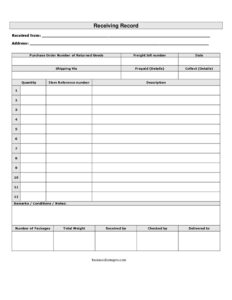
Receiving Record
Download a free Receiving Record template to log incoming shipments, verify deliveries, and track packages — free PDF and DOCX download, no signup.
PDF
DOCX
17 downloads
1
likes
Download Files
- DOCX
A Receiving Record is the document your warehouse or receiving department fills out whenever a shipment arrives, capturing exactly what was delivered, how much, and in what condition. The most common reason people use one is to verify that incoming goods match the purchase order before signing off on a delivery. You can download this Receiving Record template free in both PDF and DOCX, with no signup required.
What Is a Receiving Record?
A Receiving Record is an internal control document used to log and confirm the receipt of goods, returns, or shipments. It is typically completed by a receiving clerk, warehouse staff, or stockroom employee at the moment a delivery arrives at the dock or door. The form documents who the goods came from, the related purchase order or return, the carrier and freight details, the quantity and description of items, and the physical condition of the packages on arrival. Once signed by the person who received and the person who checked the shipment, it becomes a permanent record used for inventory updates, accounts payable matching, and dispute resolution. In short, it is the paper trail proving what actually showed up.
When Do You Need a Receiving Record?
Any operation that takes in physical goods benefits from a consistent receiving process. A Receiving Record is especially useful in these situations:
- Accepting a supplier delivery against an open purchase order, so quantities and descriptions can be matched line by line.
- Processing returned goods coming back from a customer, where the returned PO number and condition notes are essential.
- Inspecting freight shipments where you must record the freight bill number, carrier, and whether charges were prepaid or collect.
- Documenting damaged or short shipments so you have written proof for a claim with the carrier or vendor.
- Updating inventory counts in a stockroom, warehouse, or retail back room when new stock is added.
- Routing goods internally to the correct department or location after they clear receiving inspection.
What a Receiving Record Should Have
A complete Receiving Record ties three things together: the source of the goods, the shipment details, and the verification. To do that reliably, the form should capture the sender’s name and address, a reference to the originating purchase order or return authorization, the carrier and freight bill number, the date received, and the shipping method. It also needs an itemized section listing quantity, description, and any reference number for each line, plus a notes area for condition and remarks. Finally, it should record physical totals — number of packages and total weight — and signature lines for the person who received the goods, the person who checked them, and where they were ultimately delivered. Together these create a verifiable, auditable receiving entry.
How to Fill Out a Receiving Record
Work through the form in the order goods physically arrive and are inspected:
- Enter Receiving from — the supplier, vendor, or customer name — and their full address.
- Record the purchase order number (or the PO number of returned goods if this is a return) so the shipment can be matched to its order.
- Note the freight bill number from the carrier’s paperwork and the date the shipment was received.
- Fill in shipping via with the carrier or method, then indicate whether freight was prepaid or collect, adding any charge details.
- In the itemized rows, log each line’s quantity, reference number, and description of the goods.
- Use the remarks/conditions/notes field to flag damage, shortages, or discrepancies.
- Count and enter the number of packages and the total weight received.
- Have the receiver sign received by, the inspector sign checked by, and note where the goods were delivered to.
Prepaid vs. Collect and Freight Details
The prepaid and collect fields matter more than they first appear. Prepaid means the shipper has already paid the freight charges and they are billed back through the invoice or absorbed by the vendor. Collect means your company is responsible for paying the carrier on delivery. Recording this correctly prevents double-paying freight or missing a charge that belongs on the invoice. Pair this with the freight bill number so your accounts payable team can reconcile carrier invoices against what was actually received. If freight is collect, confirm the amount before signing, and capture any accessorial charges in the remarks section.
Why Condition Notes Protect You
The remarks, conditions, and notes field is your first line of defense in a damage or shortage claim. Carriers and vendors generally limit liability once a delivery is signed for clean — meaning without noted exceptions. If a carton is crushed, a pallet is leaning, or seals are broken, write it down before signing and, where possible, photograph it. Note the number of packages received versus the number expected so a shortage is documented at the point of receipt. A receiving record with clear, contemporaneous condition notes is far more persuasive than a complaint raised days later.
Common Mistakes to Avoid
- Signing without counting — never confirm receipt before verifying the actual number of packages and quantities.
- Leaving the PO number blank, which makes it nearly impossible to match the delivery to its order or return.
- Skipping condition notes on visibly damaged freight, which can forfeit your right to a carrier claim.
- Confusing prepaid and collect, leading to paying freight twice or missing a chargeback.
- Missing the checked-by signature, leaving no independent verification of the count.
- Failing to record total weight, which is needed to validate the freight bill and detect missing items.
Frequently Asked Questions
What is the difference between a receiving record and a packing slip? A packing slip is created by the shipper to list what they say is in the box, while a receiving record is created by you to document what you actually received and its condition. The receiving record is your independent verification and often references the packing slip and purchase order.
Does a receiving record need to be signed? Yes, it should be signed by the person who received the goods and ideally by a second person who checked them. Dual signatures provide internal control and reduce errors or fraud in the receiving process.
Is this Receiving Record template free to download? Yes, it is completely free to download in both PDF and DOCX formats with no signup or payment required. You can print the PDF for dock use or edit the DOCX to match your company’s fields and branding.
How do I handle a damaged or short shipment? Note the damage or shortage clearly in the remarks/conditions/notes field before signing, record the actual quantity and package count, and keep the freight bill number. This documentation supports any claim you file with the carrier or vendor.
Who fills out a receiving record? Typically a receiving clerk, warehouse associate, or stockroom employee completes it as goods arrive. In smaller businesses, the owner or office manager may handle receiving and verification themselves.
How long should I keep completed receiving records? Many businesses retain them alongside purchase orders and invoices for several years to support audits, tax records, and warranty or dispute claims. Check your own retention policy and any applicable regulations, since requirements vary.
This Receiving Record template is provided as a general example for informational purposes only and does not constitute legal, financial, or tax advice. Recordkeeping and freight claim requirements vary by jurisdiction and by carrier or vendor agreement — consult a qualified professional for guidance specific to your situation.
Need to work out sales tax? Use our free Sales Tax Calculator to add or remove sales tax from any amount in seconds.
Official resource: for the rules that apply to your situation, see the U.S. Small Business Administration.
Related Forms
- Rain Check Wide
- Rain Check Long
- Back Order Slip
- Lost Orders Tracker
- Tax Invoice Statement Book
- Packing Slips Multiple
Browse more in Invoices and Order Forms.