
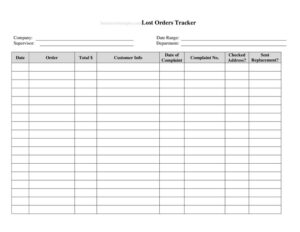
Lost Orders Tracker
Track and analyze missed sales with our free Lost Orders Tracker template, helping you spot patterns and recover revenue—free download in PDF and DOCX.
PDF
DOCX
5 downloads
0
likes
Download Files
- DOCX
A Lost Orders Tracker is a simple record-keeping tool that helps your business log every order or sale that fell through, along with the reason it was lost. Most teams use it to spot recurring problems—pricing, stock, slow follow-up—so they can win more deals over time. It’s free to download here in both PDF and DOCX, with no signup required.
What Is a Lost Orders Tracker?
A Lost Orders Tracker is a structured log used by sales teams, business owners, and customer service staff to document orders, quotes, or potential sales that did not convert into a completed transaction. Rather than letting near-misses disappear, the tracker captures who the customer was, what they wanted, when the opportunity was lost, the value involved, and—most importantly—why it slipped away. Over weeks and months, this turns scattered disappointments into a dataset you can actually learn from. Managers use it during reviews to identify patterns, allocate follow-up effort, and decide whether issues stem from price, product availability, competitor activity, or internal delays. In short, it converts lost revenue into actionable intelligence.
When Do You Need a Lost Orders Tracker?
Almost any business that quotes, sells, or fulfills orders benefits from tracking the ones that get away. Consider these common situations:
- A customer requests a quote but never confirms, and you want to know why they walked.
- An order is cancelled before fulfillment because the item was out of stock or back-ordered too long.
- A prospect chooses a competitor, and you need to log whether it was price, lead time, or features.
- A sales rep follows up too late and the deal goes cold—worth recording for coaching.
- A purchase order is rejected or returned due to errors, pricing disputes, or terms.
- You’re preparing a quarterly review and want hard numbers on missed revenue and root causes.
Types of Lost Orders to Track
Not every lost order is the same, and grouping them sharpens your analysis. Common categories include price-related losses (you were undercut or quoted too high), availability losses (out of stock, long lead times), service losses (slow response, poor follow-up, communication breakdowns), competitor losses (the buyer preferred another supplier), and customer-side losses (budget cut, project cancelled, change of plans). Adding a category column to your tracker lets you filter and total each type, revealing whether your biggest leak is pricing, operations, or sales process. That distinction matters because each cause has a different fix.
What a Lost Orders Tracker Should Have
A complete and useful tracker captures enough detail to act on without becoming a chore to fill in. At minimum it should include a date the order was lost, a unique order or quote reference, the customer or company name, contact details, a description of the product or service requested, the estimated order value, the reason or category for the loss, the salesperson or owner responsible, any competitor named, and a follow-up or next-action field. A status column—open, lost, or won-back—keeps the log current and lets you measure recovery efforts.
How to Fill Out a Lost Orders Tracker
- Enter the date lost: record when the order was confirmed lost or cancelled, not when it was first quoted.
- Add an order or quote reference: use your existing invoice, quote, or PO number so you can cross-reference your system.
- Record the customer name and contact: include company, contact person, phone, or email for any future re-engagement.
- Describe the product or service: note exactly what was requested, including quantity and any key specifications.
- Enter the estimated value: log the order amount or potential revenue so you can total lost income later.
- Select the reason or category: choose price, stock, lead time, competitor, service, or customer decision.
- Name the responsible person: assign the salesperson or team member handling the account.
- Note the competitor (if known): record who won the business to track competitive trends.
- Add follow-up actions and status: write the next step and mark the row open, lost, or recovered.
Turning the Data Into Action
A tracker only pays off when you review it regularly. Set a recurring cadence—weekly for fast-moving sales, monthly for longer cycles—to total lost value by category and by salesperson. If price losses dominate, revisit your quoting strategy or discount approvals. If availability is the culprit, talk to purchasing about safety stock or alternate suppliers. If service and follow-up delays appear often, the fix may be a faster response process or clearer ownership. Flag any high-value losses for a personal callback; some lost orders are genuinely recoverable if you reach out promptly with a better offer or a sincere apology for a service slip.
Lost Orders Tracker vs. a Sales Pipeline
A sales pipeline tracks live opportunities moving toward a close, while a Lost Orders Tracker focuses specifically on deals that have already ended unsuccessfully. The two complement each other: when an opportunity drops out of the pipeline, it should land in the tracker with a documented reason. Keeping lost deals separate prevents them from cluttering your active forecast while still preserving the lessons they offer. Many teams export closed-lost records from a CRM into a tracker like this for deeper, distraction-free analysis.
Common Mistakes to Avoid
- Vague reasons: writing “didn’t work out” tells you nothing—use specific, consistent categories.
- Inconsistent entry: if only some reps log losses, your data is skewed and unreliable.
- Skipping the order value: without amounts you can’t prioritize which losses hurt most.
- Never reviewing it: a tracker no one reads is wasted effort; schedule regular reviews.
- Ignoring follow-up: failing to flag recoverable deals means leaving winnable revenue on the table.
- Mixing live and lost deals: blending active opportunities with lost ones muddies your forecast.
Frequently Asked Questions
What is a Lost Orders Tracker used for? It is used to document orders, quotes, or sales that did not convert, along with the reason each was lost. Over time it reveals patterns—such as recurring pricing or stock issues—so you can fix the underlying problems and recover more revenue.
How do I fill out a Lost Orders Tracker? Start with the date the order was lost, then add the order reference, customer details, a description of what was requested, and the estimated value. Finish by selecting a reason category, assigning a responsible person, and noting any follow-up action and current status.
Is this Lost Orders Tracker free to download? Yes. You can download it free in both PDF and DOCX formats with no signup or account required. The DOCX version is fully editable so you can add your own columns or branding.
Can I customize the columns and categories? Absolutely. The DOCX template can be edited to match your products, sales stages, or loss reasons. Many users add columns for region, deal size tier, or expected re-quote date to suit their workflow.
How often should I review the tracker? Review it on a regular schedule—weekly for high-volume sales and monthly for longer cycles. Consistent reviews let you total lost value by cause, coach your team, and act quickly on high-value deals that may still be recoverable.
Is a Lost Orders Tracker the same as a CRM report? Not exactly. A CRM often generates closed-lost reports automatically, but this standalone template is useful for smaller teams without a CRM or for focused, manual analysis. You can also export CRM data into it for a cleaner, distraction-free review.
This template is a general example provided for informational purposes only and does not constitute legal, financial, or business advice. Practices and requirements vary by industry and organization—consult a qualified professional before relying on it for important business decisions.
Need to work out sales tax? Use our free Sales Tax Calculator to add or remove sales tax from any amount in seconds.
Official resource: for the rules that apply to your situation, see the U.S. Small Business Administration.
Related Forms
- Numbered Purchase Order
- Bill of Materials
- Restaurant Order Pad
- Packing List
- Statement of Work
- Features Comparison Chart
Browse more in Invoices and Order Forms.