
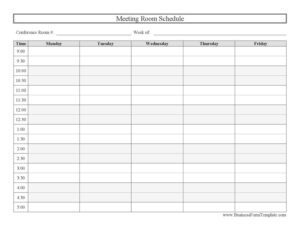
Conference Room Schedule
Organize bookings with this free Conference Room Schedule template — track weekly meeting room reservations by day and time, free download in PDF and DOCX.
PDF
9 downloads
0
likes
Download Files
A Conference Room Schedule is a simple weekly grid used to track who has reserved a meeting room and when, preventing double-bookings and last-minute scramble for space. It is the go-to tool whenever multiple teams share a limited number of rooms, and you can download it free in PDF and DOCX with no signup required.
What Is a Conference Room Schedule?
A Conference Room Schedule is a planning document that maps out reservations for a specific meeting space across a single workweek. Typically posted outside the room, pinned to a shared wall, or maintained by a receptionist or office manager, it shows every available time slot from morning to late afternoon and which slots are taken. The template organizes the week into days (Monday through Friday) and breaks each day into half-hour increments from 9:00 to 5:00, so anyone can see at a glance whether a room is free. It documents the room number, the week covered, and the people or meetings claiming each block of time, creating a clear, shared record of usage.
When Do You Need a Conference Room Schedule?
This schedule earns its place anywhere demand for meeting space outstrips supply. Common situations include:
- Shared offices with limited rooms — a few teams competing for one or two conference rooms throughout the day.
- Recurring meetings — weekly standups, client calls, or department reviews that need a guaranteed, repeating time slot.
- Coworking and serviced offices — where members book rooms hourly and a posted grid keeps everyone honest.
- Schools, libraries, and community centers — reserving a study room, board room, or activity space for groups.
- Reception-managed bookings — a front-desk staffer who fields requests and writes them into the master sheet.
- Event or interview days — when back-to-back sessions need to be slotted carefully so no two overlap.
What a Conference Room Schedule Should Have
A useful schedule keeps the layout clean and the information complete. The essentials are a labeled room identifier so it is obvious which space the sheet covers, the week it applies to, and a full time axis broken into consistent intervals. Each booked cell should name the person or team responsible and ideally a short meeting purpose so others know whether the slot is flexible. Including all five business days side by side lets users compare options quickly. The half-hour granularity matters: it accommodates both quick 30-minute check-ins and longer multi-slot sessions without forcing everyone into rigid hour blocks.
How to Fill Out a Conference Room Schedule
- Conference room #: Enter the room number or name at the top so the sheet is tied to one specific space (for example, “Room 3” or “North Boardroom”).
- Week of: Write the Monday date that begins the week the schedule covers, so it is clear when the grid expires and a fresh one is needed.
- Time column: Confirm the time labels run correctly from 9:00 through 5:00 in half-hour steps (9:00, 9:30, 10:00, and so on down to 5:00).
- Day columns: Find the correct day — Monday, Tuesday, Wednesday, Thursday, or Friday — for the booking.
- Locate the slot: Move to the intersection of the chosen day and start time.
- Enter the booking: Write the organizer’s name or team and a brief meeting title in that cell.
- Block longer meetings: For sessions over 30 minutes, fill every consecutive slot the meeting occupies so the space reads as reserved throughout.
- Leave open slots blank: Empty cells signal availability for the next person to claim.
Tips for Keeping the Schedule Accurate
The schedule only works if it stays current, so build a few simple habits around it. Designate one owner — often an office manager or receptionist — who has final say on conflicting requests and keeps the master copy authoritative. Encourage staff to cancel slots they no longer need so others can grab the freed time. Use pencil or an editable DOCX version for in-person sign-ups that change frequently, and print a fresh PDF each Monday so old bookings do not linger. If your office runs busier than 9:00 to 5:00, you can extend the time column in the DOCX file to start earlier or end later. Color-coding by team or adding initials in each cell makes a packed week far easier to read.
Paper Schedule vs. Digital Calendar
A printed Conference Room Schedule and a shared digital calendar each have strengths. The paper grid is instant, requires no logins, and works perfectly posted right on the door where people decide on the spot whether to step in. A digital calendar handles automatic reminders, invitations, and remote booking but depends on everyone checking it before they walk over. Many offices use both: the digital system for advance planning and the printed sheet as the physical, at-a-glance source of truth. This template fits naturally as that posted reference, or as a standalone solution for teams that prefer to keep things simple.
Common Mistakes to Avoid
- Forgetting the week-of date — without it, an old sheet gets mistaken for the current week’s bookings.
- Vague entries — writing only “meeting” instead of a name leaves no one accountable when conflicts arise.
- Not blocking the full duration — marking only the start time makes a 90-minute meeting look like a 30-minute one.
- Multiple unofficial copies — several versions floating around guarantees double-booking; keep one master.
- Never clearing cancellations — stale reservations waste a room that could be in use.
- Skipping the room number — in offices with several spaces, an unlabeled sheet is useless.
Frequently Asked Questions
What is a Conference Room Schedule used for? It is used to reserve and track meeting room time across a week so teams do not double-book the same space. By laying out each day in half-hour slots, it gives everyone a clear picture of when the room is free or taken. It is most often posted near the room or kept by a front-desk coordinator.
How do I fill out the time slots? Find the correct day column, then write the organizer’s name and meeting purpose in the cell matching the start time. For meetings longer than 30 minutes, fill every consecutive slot the session covers. Leave cells blank to indicate the room is available.
Can I change the hours on the template? Yes. The DOCX version is fully editable, so you can extend the time column to begin before 9:00 or run past 5:00, or adjust the intervals. The PDF is best for printing a fixed 9:00 to 5:00 layout straight away.
Is this schedule legally binding? No. A Conference Room Schedule is an internal organizational tool, not a contract. It records bookings to coordinate shared space, but it carries no legal force on its own.
How much does this template cost? Nothing. It is completely free to download in both PDF and DOCX formats, with no signup or account required. You can print as many weekly copies as your office needs.
Who should manage the schedule? Most offices assign one person — typically an office manager, administrative assistant, or receptionist — to own the master copy and resolve conflicting requests. This keeps bookings consistent and prevents competing versions from circulating.
This template is a general example provided for informational purposes only and does not constitute legal, financial, or professional advice. Office and facility policies vary by organization, so adapt the schedule to your own workplace rules and procedures.
Related Forms
- Restroom Cleaning Checklist
- Laundry Dry Cleaning Form
- Phone Tree
- Work Seeking Log
- Advertisement Tracker
- Hotel Reservation Request
Browse more in Log and Inventory.