
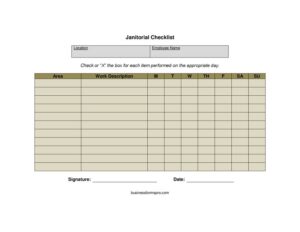
Janitorial Checklist
Track daily cleaning tasks by area and weekday with our free Janitorial Checklist template, available as a free download in PDF and DOCX.
PDF
DOCX
3 downloads
0
likes
Download Files
- DOCX
A Janitorial Checklist is a simple tracking document used to record cleaning tasks performed in a building or facility, organized by area and by day of the week. The most common reason people use one is to make sure every cleaning duty gets done consistently and to have a signed record proving the work was completed. It’s free to download here in both PDF and DOCX formats, with no signup required.
What Is a Janitorial Checklist?
A Janitorial Checklist is a structured log that breaks cleaning responsibilities into individual tasks and tracks whether each one was completed on a given day. It is typically used by janitorial staff, building maintenance teams, cleaning contractors, and facility managers. The form documents the location being serviced, the specific area within that location, a description of the work to be done, and a set of weekday columns for marking off completed tasks. By capturing an employee name, signature, and date, the checklist also creates accountability — it shows who did the work and when. Whether you manage one small office or a portfolio of buildings, this form turns vague “keep it clean” expectations into a measurable, repeatable routine.
When Do You Need a Janitorial Checklist?
This form is useful any time cleaning needs to be tracked, verified, or proven. Common scenarios include:
- Daily office cleaning — tracking trash removal, vacuuming, restroom sanitizing, and surface wiping across a workweek.
- Cleaning contractor accountability — a contractor leaves a signed checklist so the client can verify the agreed-upon scope was completed.
- Multi-area facilities — schools, gyms, medical offices, and restaurants that need different tasks logged for lobbies, kitchens, bathrooms, and common areas.
- Shift handoffs — a closing janitor records what was finished so the next shift knows what remains.
- Health and safety compliance — documenting that high-touch surfaces and restrooms were cleaned on a set schedule.
- Property management inspections — managers reviewing completed checklists during walkthroughs or audits.
Types of Janitorial Checklists
Although this template uses a weekly layout, the same structure adapts to several rhythms. A daily checklist focuses on routine tasks like emptying bins and mopping. A weekly checklist — like this one — spreads recurring duties across Monday through Sunday columns. A deep-clean or periodic checklist covers less frequent jobs such as window washing, baseboard scrubbing, or carpet shampooing. You can use this form for any of these simply by adjusting the work descriptions you list in each row.
What a Janitorial Checklist Should Have
A complete and useful janitorial checklist includes a few core elements. It should clearly identify the location and the specific area being cleaned, so there is no confusion in larger buildings. Each work description should be specific enough that anyone reading it understands the task. The form needs a set of day columns (Monday through Sunday) so completion can be marked per day. Finally, it should capture the responsible employee name, a signature to confirm the work, and the date the log applies to. Together these turn a to-do list into a verifiable record.
How to Fill Out a Janitorial Checklist
- Location: Enter the building, address, or site name being serviced — for example “Maple Street Office, 2nd Floor” or “Riverside Gym.”
- Employee name: Write the name of the janitor or cleaning team member responsible for the tasks on this sheet.
- Area: Specify the particular space within the location, such as “Men’s Restroom,” “Break Room,” or “Main Lobby.” Use a separate row or sheet for each distinct area.
- Work description: List the individual cleaning task, like “Empty trash and replace liners,” “Mop floor,” or “Disinfect sinks and counters.” Keep each task on its own line.
- M, T, W, TH, F, SA, SU: For each task, mark the corresponding weekday column — with a checkmark, initials, or the time completed — once the task is finished that day.
- Signature: The employee signs to confirm the recorded work was actually performed.
- Date: Enter the date or the week the checklist covers so records can be filed and referenced later.
Tips for Getting the Most From Your Checklist
Be specific in your work descriptions. “Clean restroom” leaves room for interpretation; “Disinfect toilets, refill soap and paper, mop floor” sets a clear standard. Group tasks by area so a janitor can move through the building efficiently. Post the checklist in a visible spot, such as a supply closet or near the entrance of each area, so it is easy to update in real time rather than from memory at the end of a shift. Collect completed sheets regularly and store them — they become valuable evidence if a client questions whether work was done or if a health inspection requires documentation.
Common Mistakes to Avoid
- Vague task descriptions that different employees interpret differently, leading to skipped or inconsistent cleaning.
- Marking tasks complete before doing them — fill the day columns only after the work is actually finished.
- Leaving the signature or date blank, which undermines the checklist’s value as proof of work.
- Mixing multiple areas on one row, making it unclear which space was cleaned.
- Not collecting or filing completed sheets, so there’s no record to review during disputes or audits.
- Failing to update the list when new areas, equipment, or cleaning requirements are added.
Frequently Asked Questions
What is a janitorial checklist used for? It is used to organize, schedule, and verify cleaning tasks within a facility. Staff mark off each task as it’s completed throughout the week, creating a clear record of what was done, where, and by whom. It helps maintain consistent cleaning standards and provides accountability.
How do I fill out the weekday columns? Each row represents a cleaning task, and the columns labeled M, T, W, TH, F, SA, and SU represent the days of the week. After completing a task on a given day, mark that day’s column with a checkmark, your initials, or the time it was done. Leave columns blank for days the task isn’t scheduled.
Does a janitorial checklist need to be signed? A signature isn’t legally required, but it is strongly recommended. The signature confirms that the named employee actually performed the listed work, which makes the document far more credible if a client, manager, or inspector reviews it later.
Can I use this checklist for a cleaning business? Yes. Cleaning contractors often leave a completed checklist with each client as proof the agreed scope was finished. You can customize the location, area, and work description fields to match each client’s specific cleaning agreement.
Is this janitorial checklist template free? Yes, it is completely free to download in both PDF and DOCX formats, with no signup or account required. You can print the PDF for daily use or edit the DOCX to add your own tasks, logo, and areas.
How often should the checklist be completed? That depends on your cleaning schedule. Many facilities complete it daily and use a new sheet each week, while others log only the days a given area is serviced. The weekday columns let you adapt the same template to daily, weekly, or periodic cleaning routines.
This Janitorial Checklist template is a general example provided for informational purposes only and does not constitute legal, health, or safety compliance advice. Cleaning, sanitation, and documentation requirements vary by industry and jurisdiction, so consult a qualified professional or your local regulations to ensure your practices meet applicable standards.
Related Forms
- Outgoing Mail Log
- Project To Do List
- Inspection Tags
- Store Closing Procedure Checklist
- Weekly Status Report
- Household Inventory Card
Browse more in Log and Inventory.