
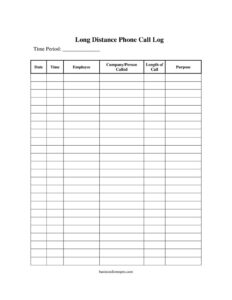
Long Distance Phone Call Log
Track work calls accurately with our free Long Distance Phone Call Log template, recording date, time, employee, and call purpose — free download in PDF and DOCX.
PDF
DOCX
6 downloads
0
likes
Download Files
- DOCX
A Long Distance Phone Call Log is a simple record-keeping sheet used to track every long distance or toll call placed within a business, capturing who made each call, who they called, how long it lasted, and why. Most people use it to monitor phone expenses, verify charges against the carrier bill, and assign costs to the right department or client. It is free to download in both PDF and DOCX formats, with no signup required.
What Is a Long Distance Phone Call Log?
A Long Distance Phone Call Log is a manual or printable tracking document that businesses use to record outbound long distance calls during a set time period. It is typically issued by an office manager, bookkeeper, or department head and filled in by employees each time they place a toll call. The log documents the date, time, caller, the company or person reached, the duration, and the business purpose of each call. Its core function is accountability: it creates a paper trail that lets you reconcile your phone bill, control telecommunication spending, recover billable charges from clients, and identify patterns in how phone resources are being used across your team.
When Do You Need a Long Distance Phone Call Log?
This log is most useful in any setting where long distance or toll charges add up and need to be tracked, justified, or recovered. Common situations include:
- Reconciling the monthly phone bill — comparing logged calls against carrier statements to catch billing errors or unexplained charges.
- Billing clients for call time — law firms, consultants, and agencies that pass through communication costs to specific matters or accounts.
- Allocating costs by department — splitting a shared phone expense fairly across teams based on actual usage.
- Monitoring personal vs. business use — discouraging unauthorized personal long distance calls on company lines.
- Supporting expense reports and budgets — providing documentation for accounting and forecasting telecom spend.
- Tracking remote or field staff — keeping a record of calls made from satellite offices, hotels, or job sites.
What a Long Distance Phone Call Log Should Have
A complete and useful log balances brevity with enough detail to be auditable. The essential elements are a clearly defined time period so each sheet covers a known span (a week, a month, or a billing cycle); the date and time of each call for chronological accuracy; the employee who placed the call for accountability; the company or person called to identify the recipient; the length of call to estimate cost; and the purpose to confirm the call was business-related. Together these fields let anyone reviewing the log answer who, when, whom, how long, and why for every entry without guesswork.
How to Fill Out a Long Distance Phone Call Log
- Set the time period. At the top of the sheet, write the range this log covers — for example, “March 1–31” or “Week of June 10.” This keeps each log tied to a billing cycle and makes reconciliation easier.
- Record the date. For each call, enter the calendar date it was placed so entries stay in order and match the phone bill.
- Note the time. Log the start time of the call (and indicate AM/PM). This helps distinguish multiple calls to the same number and verify peak vs. off-peak rates.
- Enter the employee. Write the name or initials of the person who made the call so usage can be attributed correctly.
- Identify the company or person called. Record the business name or individual contacted, and optionally the number dialed for cross-checking.
- Add the length of call. Note the duration in minutes. This is the key field for estimating cost and for any client billing.
- State the purpose. Briefly describe why the call was made — “client follow-up,” “vendor order,” “support case #1234” — to confirm it was a legitimate business expense.
Tips for Accurate Call Tracking
The value of a phone log depends entirely on consistency. Keep the log near the phone or save the DOCX version where staff can update it immediately after each call rather than relying on memory at day’s end. Standardize how durations are recorded — round to the nearest minute, and decide as a team whether to round up or to the nearest half-minute. Encourage short but specific purpose entries; “called Acme re: PO 5582” is far more useful months later than “work stuff.” If multiple employees share a line, assign each a consistent set of initials to avoid confusion. Finally, file completed logs alongside the matching carrier statement so the two can be reviewed side by side.
Using the Log for Reconciliation and Billing
When the monthly statement arrives, line up each charge against your log entries. Calls on the bill that do not appear in the log are worth investigating — they may be errors, unauthorized use, or simply unlogged. For client billing, sort entries by the company or matter referenced in the purpose field, total the minutes, and apply your agreed rate. Many offices keep these logs for the duration of their normal records-retention period so they can support audits, disputes with the carrier, or year-end expense summaries. A digital DOCX copy makes totaling minutes and filtering by employee much faster than a paper sheet.
Common Mistakes to Avoid
- Logging calls hours later — duration and purpose details fade quickly, so record immediately.
- Leaving the purpose blank — without it, you cannot prove a call was business-related or bill it to a client.
- Forgetting the time period header — an undated sheet is nearly impossible to reconcile against a bill.
- Vague caller identification — write the full company name, not just “vendor,” so entries are searchable later.
- Inconsistent duration units — mixing minutes and rough estimates skews cost calculations.
- Not assigning the employee — anonymous entries defeat the accountability purpose of the log.
Frequently Asked Questions
What is a Long Distance Phone Call Log used for? It is used to document every long distance or toll call a business makes during a set period. The log helps reconcile the carrier bill, control telecom costs, bill clients for call time, and discourage unauthorized personal use of company lines.
How do I fill out a Long Distance Phone Call Log? Start by writing the time period the sheet covers, then add one row per call. For each call, record the date, start time, the employee who placed it, the company or person called, the length in minutes, and a short note on the call’s purpose.
Is this log legally binding? A call log is a record, not a contract, so it is not “binding” in the legal sense. However, a consistently maintained log can serve as supporting documentation in billing disputes, audits, or expense reviews, which is why accuracy and completeness matter.
Do I need to track personal calls too? Many businesses log only business calls, but some prefer to note all long distance calls on a line and flag personal ones for reimbursement. Decide on a clear policy and apply it consistently so the log matches the carrier statement.
How long should we keep completed call logs? Retention depends on your accounting and tax practices, but it is common to keep them at least until the related bills are reconciled and any audit window has passed. Storing the DOCX version digitally makes long-term retention easy.
How much does this template cost? It is completely free to download from Business Forms Pro in both PDF and DOCX formats, with no signup or account required. You can print it for use beside the phone or edit the editable version to match your office’s needs.
This template is provided as a general example for informational purposes only and does not constitute legal, financial, or tax advice. Record-keeping and expense-tracking requirements vary by jurisdiction and industry — consult a qualified professional for guidance specific to your situation.
Related Forms
- Individual Computer Inventory
- Hotel Reservation Request
- Hazardous Chemical Inventory
- New Car Inventory Card
- Document Tracker
- Submission Tracker Sent
Browse more in Log and Inventory.