
Document Tracker
Organize your important papers with a free Document Tracker template - log where each record is filed and how long to keep it. Free download in PDF and DOCX.
PDF
DOCX
1 downloads
0
likes
Download Files
- DOCX
A Document Tracker is a simple log that records where your important papers are stored and how long you should keep each one. People most often use it to bring order to scattered records — birth certificates, insurance policies, tax files, and warranties — so that any document can be found in seconds instead of hours. This template is free to download in PDF and DOCX, with no signup required.
What Is a Document Tracker?
A Document Tracker is a household or office record-keeping tool that catalogs your essential documents, their physical or digital locations, and their retention timelines. Rather than storing the documents themselves, it acts as an index — telling you what you own, where it lives, when it was filed, and when it can be updated, sold, or shredded. Individuals use it to manage personal records, executors rely on it to locate a loved one’s papers, and small businesses use it to stay audit-ready. By grouping documents into retention categories such as “Keep Forever” or “Until Sold or Completed,” the tracker turns a chaotic filing cabinet into a clear, searchable system that anyone in your household can follow.
When Do You Need a Document Tracker?
This form earns its place whenever you need to know exactly where a record is and whether it is still worth keeping. Common situations include:
- Decluttering a filing cabinet — deciding which old bank statements and receipts can be safely shredded and which must be preserved.
- Estate planning — leaving a clear map for your family of where your will, life insurance policy, and Social Security card are stored.
- Moving house — confirming you have every deed, title, and warranty before the boxes are sealed and the new location is recorded.
- Tax season — quickly locating tax records and annual investment statements without digging through unlabeled folders.
- Insurance claims or renewals — finding your homeowner’s or car insurance policy and noting when it was last updated.
- Selling a home or vehicle — tracking the deed, vehicle title, and big-purchase receipts and logging the date sold.
What a Document Tracker Should Have
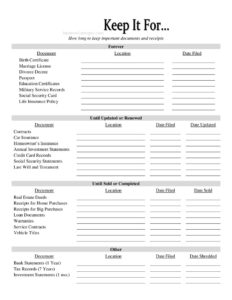
A complete Document Tracker organizes records by how long they should be kept, then captures consistent details for each entry. The four retention groups in this template are: Forever (documents you never discard, like a birth certificate or passport), Until Updated or Renewed (records replaced periodically, like contracts and insurance), Until Sold or Completed (items tied to an asset or obligation, like deeds, titles, and loan documents), and Other (time-limited records such as bank statements kept one year or tax records kept seven years). Within each group, every entry should list the document name, its location, the date filed, and the relevant action date — updated, sold, or shredded — so the log stays accurate and actionable over time.
How to Fill Out a Document Tracker
- Start with the “Forever” section. List each permanent record — Birth Certificate, Marriage License, Divorce Decree, Passport, Education Certificates, Military Service Records, Social Security Card, and Life Insurance Policy — and for each enter the Document, Location, and Date Filed.
- Complete the “Until Updated or Renewed” section. Log Contracts, Car Insurance, Homeowner’s Insurance, Annual Investment Statements, Credit Card Records, Social Security Statements, and your Last Will and Testament. Add the Location, Date Filed, and Date Updated so you know which version is current.
- Fill in the “Until Sold or Completed” section. Record Real Estate Deeds, Receipts for Home Purchases, Receipts for Big Purchases, Loan Documents, Warranties, Service Contracts, and Vehicle Titles, noting the Location, Date Filed, and Date Sold.
- Use the “Other” section for time-limited records. Enter Bank Statements (1 Year), Tax Records (7 Years), and Investment Statements (1 mo.), with the Location, Date Filed, and Date Shredded once destroyed.
- Review and store the tracker somewhere secure and tell a trusted person where to find it.
Retention Tips and Best Practices
The retention windows printed on this template are sensible starting points, but your situation may call for longer storage. Keep tax records for at least seven years if you have complex returns, deductions, or business income, and hold investment statements until you reconcile them against your year-end summary. For documents you keep “Forever,” consider storing originals in a fireproof safe or safe-deposit box and noting that exact location on the tracker. Whenever you shred a record, fill in the Date Shredded column so the tracker reflects reality. Reviewing the entire log once a year — perhaps at tax time — keeps it trustworthy and prevents outdated entries from misleading you later.
Paper vs. Digital Records
Many people now keep a mix of paper originals and scanned copies. Your Document Tracker handles both: use the Location field to specify whether a document lives in a labeled folder, a home safe, a bank box, or a named cloud folder. For scanned files, write the folder path or service name so you are not guessing later. Pairing a digital backup with a clearly logged physical location protects you against loss from fire, flood, or misplacement, and makes handing records to family or an executor straightforward.
Common Mistakes to Avoid
- Vague locations — writing “the cabinet” instead of “top drawer, green folder” defeats the purpose of the log.
- Shredding too soon — destroying tax or investment records before their retention period ends.
- Keeping the tracker with no backup — store a copy separately so a single disaster doesn’t erase both records and index.
- Forgetting to update dates — leaving the Date Updated or Date Sold blank after a renewal or sale.
- Listing sensitive details — avoid writing full Social Security or account numbers on the tracker itself; note only where the document is filed.
- Never reviewing it — a tracker that is filled out once and abandoned slowly drifts out of date.
Frequently Asked Questions
What is a Document Tracker used for? It is used to record where your important documents are stored and how long each should be kept. Instead of holding the documents themselves, it serves as a master index so you — or your family — can locate any record quickly and know when it can be safely discarded.
How long should I keep my documents? This template groups records into Forever, Until Updated or Renewed, Until Sold or Completed, and time-limited categories like Bank Statements (1 Year) and Tax Records (7 Years). These are common guidelines, but retention needs vary by situation, so verify the right timeframe for complex tax or legal matters.
Does a Document Tracker need to be notarized? No. A Document Tracker is a personal organizational tool, not a legal instrument, so it requires no notarization or witnesses. It simply helps you manage records that may themselves have their own legal requirements.
Where should I store my completed tracker? Keep it somewhere secure but accessible, such as a home safe or a password-protected file, and consider keeping a backup copy in a separate location. Let a trusted family member or executor know where to find it so your records remain useful in an emergency.
Is this Document Tracker template free? Yes. You can download it free in both PDF and DOCX formats with no signup or payment required. The DOCX version is fully editable so you can add or rename document categories to fit your household or business.
Can I use this for a small business? Absolutely. Businesses can adapt the categories to track contracts, vehicle titles, warranties, service contracts, and tax records, using the same filed and shredded dates to stay organized and audit-ready.
This Document Tracker template is provided as a general example for informational purposes only and does not constitute legal, financial, or tax advice. Record-retention requirements vary by jurisdiction and individual circumstances, so consult a qualified professional before discarding any important documents.
Related Forms
- Inventory Report
- Sleepover Checklist
- Prospect List
- Meeting Minutes
- Club Tracking Payments
- Change Log
Browse more in Log and Inventory.