
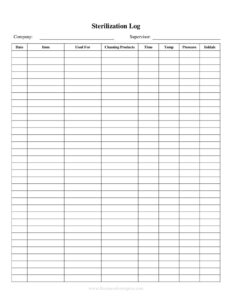
Sterilization Log
Track every sterilization cycle with this free Sterilization Log template, recording loads, parameters, and results in PDF or DOCX free download.
PDF
DOCX
4 downloads
0
likes
Download Files
- DOCX
A Sterilization Log is a record-keeping document used to track every sterilization cycle run on instruments, equipment, or supplies, capturing the date, load contents, machine settings, and verification results. People most commonly use it to prove that reusable instruments were properly processed and to satisfy infection-control and inspection requirements. You can download this Sterilization Log free in both PDF and DOCX formats, with no signup required.
What Is a Sterilization Log?
A Sterilization Log is a chronological record that documents each sterilizer cycle performed in a facility. It is typically maintained by clinical, dental, veterinary, tattoo, laboratory, or salon staff who operate an autoclave or other sterilizing device. The log captures who ran the load, what was processed, the temperature, pressure, and exposure time used, and whether the cycle passed its chemical and biological checks. By keeping this information in one place, the log creates an audit trail that demonstrates instruments were rendered safe for reuse. It is a core part of any infection-prevention program and is often reviewed by regulators, accreditation bodies, and quality managers to confirm that sterilization protocols are followed consistently.
When Do You Need a Sterilization Log?
A Sterilization Log is needed any time reusable items must be processed and the results documented. Common situations include:
- Dental and medical practices sterilizing handpieces, probes, forceps, and surgical trays between patients.
- Tattoo and piercing studios processing tubes, grips, and reusable tools to meet local health codes.
- Veterinary clinics documenting autoclave cycles for surgical packs and dental instruments.
- Laboratories sterilizing glassware, media, and biohazard waste before disposal or reuse.
- Salons, spas, and nail studios processing metal implements where state board rules require sterilization records.
- Inspections and audits, when a health department, OSHA reviewer, or accreditation surveyor asks to see proof of consistent sterilization.
What a Sterilization Log Should Have
A complete Sterilization Log should let anyone reading it reconstruct exactly what happened during each cycle. The essential elements include the date and time of the cycle, a sequential cycle or load number, the identity of the sterilizer used (especially in facilities with more than one machine), and a description of the load contents. It should record the cycle parameters — temperature, pressure, and exposure or dwell time — along with the results of any monitoring. That monitoring usually includes a chemical indicator check and, periodically, a biological (spore) test. Finally, the log needs the operator’s name or initials and a space for the result (pass or fail) plus notes for any corrective action taken when a cycle does not meet standards.
How to Fill Out a Sterilization Log
Follow these steps each time you run a cycle so the record stays complete and accurate:
- Enter the date and time the cycle was started or completed.
- Assign a cycle or load number in sequence so loads can be traced back later.
- Identify the sterilizer by name, unit number, or location if you operate more than one device.
- Describe the load contents, listing the instrument packs, pouches, or item types processed.
- Record the cycle parameters — set temperature, pressure, and exposure time for that run.
- Note the chemical indicator result, confirming the indicator strip or tape changed correctly.
- Log any biological (spore) test performed and whether it was sent for incubation.
- Mark the overall result as pass or fail.
- Add the operator’s initials or signature to show who is accountable for the cycle.
- Use the notes column to document any failures, repeat cycles, or corrective steps taken.
Understanding Indicators and Verification
Reliable sterilization records depend on more than just running the machine. Chemical indicators — strips, tape, or integrators — change color when exposed to the right conditions and confirm that a load was processed, though they do not guarantee the items are sterile. Biological indicators, often called spore tests, contain resistant bacterial spores and provide the strongest evidence that the sterilizer is actually killing microorganisms; many facilities run them on a weekly or per-protocol basis and after any repair. Recording both types of results in your Sterilization Log shows reviewers that you are verifying performance, not just assuming it. If a biological test fails, the log should reflect that the affected loads were quarantined or reprocessed.
Recordkeeping and Retention Tips
Keep your Sterilization Log in a consistent, accessible place so staff can find and complete it without delay. Many facilities retain logs for several years, but retention periods vary by jurisdiction and by the type of practice, so confirm your local requirements. Attaching or stapling the printed cycle printout, spore-test report, or indicator strip to the corresponding log entry strengthens the record. Review the log regularly for missing entries or trends, such as repeated failures from one machine, which may signal that the sterilizer needs servicing. Whether you use the printable PDF or fill in the DOCX version on a computer, store completed logs securely and back up digital copies.
Common Mistakes to Avoid
- Skipping entries when the facility is busy, which leaves gaps that undermine the whole record.
- Failing to record biological test results, leaving no proof that the sterilizer was verified.
- Omitting operator initials, so no one can be held accountable for a specific cycle.
- Not documenting failed cycles or corrective action, which looks like an attempt to hide problems.
- Using vague load descriptions that make it impossible to trace which instruments were in a load.
- Overwriting or erasing mistakes instead of drawing a single line through an error and initialing the correction.
Frequently Asked Questions
What is a Sterilization Log used for? It is used to document every sterilization cycle so a facility can prove instruments and equipment were properly processed. The log records the load, cycle parameters, and test results, creating an audit trail for infection control and inspections. It also helps identify equipment problems early when failures repeat.
How do I fill out a Sterilization Log? For each cycle, enter the date, a sequential load number, the sterilizer used, and a description of the contents. Then record the temperature, pressure, and time, note the chemical and biological indicator results, mark pass or fail, and add the operator’s initials. Use the notes column for any corrective action.
How often should I run a biological (spore) test? Many facilities run a biological indicator at least weekly and after any sterilizer repair or installation, but the exact frequency depends on your equipment and local rules. Always record each spore test and its result in the log. Check your governing health authority or state board for the requirement that applies to you.
How long should I keep sterilization records? Retention periods differ by jurisdiction and practice type, with many facilities keeping logs for several years. Confirm the specific requirement that applies to your profession and location. Storing both paper and backup digital copies helps ensure records survive an audit.
Is this Sterilization Log legally required? Documentation requirements vary by location and by the type of facility, and many health codes and accreditation standards do require sterilization records. This template helps you meet those documentation needs, but you should verify the exact rules for your jurisdiction. Consult your regulating agency to confirm what must be recorded.
Is this template really free to download? Yes. You can download this Sterilization Log free in PDF or DOCX with no signup required. Print it for a binder or fill in the editable version on your computer, and customize the columns to match your facility’s workflow.
This Sterilization Log template is a general example provided for informational purposes only and does not constitute medical, legal, or regulatory advice. Sterilization, monitoring, and recordkeeping requirements vary by jurisdiction and by profession — consult your governing health authority or a qualified professional to ensure compliance.
Related Forms
- Loaned Items Tracker
- Salad Bar Items Inventory Spreadsheet
- Inventory Cards — Black And White
- Cleaning Log By Room
- Photo Log
- Club Tracking Payments
Browse more in Log and Inventory.