
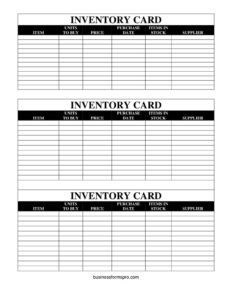
Inventory Cards — Black And White
Track stock, suppliers, and reorder points with this free black-and-white inventory cards template — free PDF and DOCX download, no signup.
PDF
DOCX
0
likes
Download Files
- DOCX
An inventory card is a simple record used to track a single item’s stock levels, purchases, pricing, and supplier details on one easy-to-scan card. People most often reach for inventory cards when they want a low-tech, reliable way to know what’s on hand and when to reorder. This black-and-white template is free to download in both PDF and DOCX formats, with no signup required.
What Is an Inventory Card?
An inventory card is a per-item tracking sheet that consolidates the essential facts about one product into a single record. Instead of one giant spreadsheet, each item gets its own card listing what it is, how many units to buy, the price, the purchase date, how many are currently in stock, and the supplier. Small businesses, warehouse staff, retail shops, classrooms, libraries, and home-based sellers use inventory cards to monitor stock movement and make purchasing decisions. The black-and-white design prints cleanly on any printer, making it ideal for binders, card boxes, or pinning to a shelf. It documents the lifecycle of an item’s stock at a glance.
When Do You Need an Inventory Card?
Inventory cards are useful any time you need to track physical items without complex software. Common situations include:
- Retail stock control — tracking how many units of each product remain on the shelf and when to restock before running out.
- Warehouse and storeroom management — keeping a card per SKU so staff can check stock without logging into a system.
- Small business purchasing — recording the units to buy and supplier for each item to streamline reordering.
- Office and supply rooms — monitoring consumables like paper, toner, and cleaning supplies.
- Workshops and makers — tracking raw materials, components, and parts used in production.
- Classrooms, libraries, and nonprofits — logging equipment, books, or donated goods on individual cards.
What an Inventory Card Should Have
A complete inventory card captures enough detail to identify the item, measure its stock, and reorder it confidently. The essential elements are a clear item name or description, the quantity of units to buy when reordering, the unit price, the purchase date, the current items in stock, and the supplier the item comes from. Together these fields answer the three questions every stock keeper asks: what do I have, what does it cost, and who do I buy it from? A good card is consistent, dated, and updated whenever stock changes so it always reflects reality.
How to Fill Out an Inventory Card
- Item: Write the product name or description clearly. Include a model number, size, or color if you stock similar variations so the card is unmistakable.
- Units To Buy: Enter the quantity you typically order at one time, or your reorder amount. This helps anyone restocking know exactly how much to purchase.
- Price: Record the unit price you pay. Note whether it is the cost per single unit or per case so calculations stay accurate.
- Purchase Date: Log the date of the most recent purchase. This shows how fresh the stock is and helps you track ordering frequency over time.
- Items In Stock: Count the current quantity on hand and write it here. Update this number each time you add or remove units to keep the card trustworthy.
- Supplier: Name the vendor or source you buy this item from, ideally with a phone number or account reference so reordering is fast.
Once filled, file the card alphabetically or by category so it’s easy to locate during stock checks.
Tips for Keeping Inventory Cards Accurate
An inventory card is only as good as its upkeep. Set a routine — daily, weekly, or monthly depending on how fast items move — to physically count stock and update the Items In Stock field. Many businesses set a minimum threshold: when stock drops to that number, the Units To Buy field tells staff how much to reorder from the listed supplier. Recording the Purchase Date consistently lets you spot seasonal patterns and slow-moving items. If prices change, update the Price field and consider noting the old price in the margin so you can track cost trends. Keep cards in a dedicated box or binder near the stock area so updates happen in real time rather than from memory later.
Inventory Cards vs. a Spreadsheet
Both tools track stock, but they suit different needs. An inventory card is tactile, requires no device or login, and works well in a physical stockroom where staff update counts by hand. A spreadsheet centralizes data, calculates totals automatically, and scales to thousands of items. Many operations use both: printed cards at the shelf for quick reference and live updates, with periodic transfer into a master spreadsheet for reporting. This black-and-white template bridges the gap — print as many cards as you need at no cost, and digitize later if you grow.
Common Mistakes to Avoid
- Letting the stock count go stale — failing to update Items In Stock after a sale or use makes the card misleading and causes stockouts.
- Vague item descriptions — writing just “box” or “part” instead of a specific name leads to confusion between similar products.
- Skipping the supplier field — without a clear supplier, reordering becomes a guessing game and slows down purchasing.
- Mixing price units — recording a case price in one card and a unit price in another distorts your cost picture.
- Forgetting the purchase date — you lose the ability to track turnover and spot aging inventory.
- Not setting reorder amounts — leaving Units To Buy blank forces staff to recalculate every time stock runs low.
Frequently Asked Questions
What is an inventory card used for? An inventory card is used to track a single item’s stock level, cost, purchase date, and supplier on one record. It gives anyone who picks it up an instant snapshot of what’s on hand and when to reorder, without needing software or a computer.
How do I fill out an inventory card? Enter the item name, the number of units to buy when restocking, the price, the most recent purchase date, the current quantity in stock, and the supplier you buy from. Update the stock count whenever you add or remove units so the card stays accurate.
Is this inventory card template free to download? Yes. This black-and-white inventory cards template is completely free to download in both PDF and DOCX formats, with no signup or account required. You can print as many copies as you need.
Can I edit the inventory card to add my own fields? Yes. The DOCX version is editable, so you can add columns such as SKU, location, minimum stock level, or reorder thresholds. The PDF version is ready to print and fill in by hand.
How often should I update an inventory card? Update the stock count every time items move, or on a set schedule that matches how quickly the item sells. Fast-moving products may need daily updates, while slower items can be reviewed weekly or monthly.
What’s the difference between an inventory card and an inventory log? An inventory card typically holds one item per card for quick reference, while a log lists many transactions or items together in chronological order. Cards are convenient at the shelf; logs are better for recording detailed movement history over time.
This inventory cards template is a general example provided for informational purposes only and does not constitute legal, financial, or accounting advice. Inventory practices and recordkeeping requirements vary by industry and jurisdiction — consult a qualified professional for guidance specific to your business.
Related Forms
- Auction Sell List
- Credit History Record
- Weekly Bathroom Cleaning Checklist
- Inventory Cards Spreadsheet
- Employee Order Log
- Asset List
Browse more in Log and Inventory.