
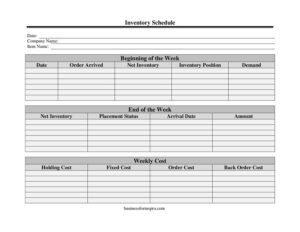
Inventory Schedule
Track stock levels, demand, and reorder costs with our free Inventory Schedule template, available as a free download in PDF and DOCX.
PDF
DOCX
10 downloads
0
likes
Download Files
- DOCX
An Inventory Schedule is a working document that tracks how much stock you hold, what arrives, what customers demand, and the costs tied to keeping or reordering each item over a defined period. People most often use it to plan weekly reordering so they never run out of a product or tie up cash in excess stock. You can download this Inventory Schedule free in PDF and DOCX — no signup required.
What Is an Inventory Schedule?
An Inventory Schedule is a structured log used by business owners, warehouse managers, purchasing staff, and small retailers to monitor inventory movement period by period. Unlike a simple stock count, it ties together quantities and costs: it records what you start with, what arrives, what demand consumes, and what it costs to hold or reorder. The schedule documents each item’s net inventory and inventory position so you can decide when to place an order and how much it will cost. In short, it turns scattered stock observations into a forecasting and budgeting tool that supports smarter purchasing decisions and protects against both stockouts and overstocking.
When Do You Need an Inventory Schedule?
This form earns its place any time stock levels and reorder timing affect your cash flow or customer service. Common situations include:
- Weekly reordering routines — a retailer reconciling beginning-of-week and end-of-week counts to decide what to reorder.
- Cost analysis — comparing holding costs, order costs, and back order costs to find the most economical reorder quantity.
- Demand planning — recording weekly demand to spot trends and avoid running short on fast-moving items.
- Lead-time tracking — logging arrival dates so you know whether suppliers are delivering on schedule.
- Multi-item warehouses — keeping a row for each item name so a single sheet covers an entire product line.
- Budget forecasting — totaling weekly cost figures to predict inventory spending across a quarter or year.
What an Inventory Schedule Should Have
A complete Inventory Schedule should clearly identify the business and the period, list each item, and capture both the physical quantities and the financial figures behind them. The essential elements are the company name and date for context; an item name and amount for each product; beginning and end-of-week counts; demand for the period; arrival information including arrival date and whether the order arrived; the inventory position and net inventory after movements; and the cost columns — fixed cost, order cost, holding cost, back order cost, and total weekly cost. A placement status field shows whether a reorder is pending, placed, or fulfilled. Together these turn raw numbers into actionable insight.
How to Fill Out an Inventory Schedule
- Enter the Company Name and the Date at the top so the schedule is tied to a business and a reference point.
- For each product, write the Item Name and the current Amount on hand.
- Record the Beginning of the Week count for that item, then the End of the Week count at period close.
- Log the Demand — units sold or consumed during the week.
- If a shipment is expected or received, fill in the Arrival Date and mark Order Arrived as yes or no.
- Calculate Net Inventory (stock after demand and arrivals) and the Inventory Position (on hand plus on order minus back orders).
- Enter the cost columns: Fixed Cost, Order Cost, Holding Cost, and any Back Order Cost incurred.
- Total these into the Weekly Cost, and update Placement Status to show whether a reorder is needed, placed, or complete.
Understanding the Cost Columns
The financial fields are what separate a schedule from a plain stock count, so it helps to understand each one. Fixed Cost covers expenses that don’t change with order size, such as setup or administrative charges. Order Cost is the per-order expense of placing and receiving a shipment. Holding Cost reflects the expense of storing unsold inventory — warehousing, insurance, and the opportunity cost of tied-up capital. Back Order Cost captures the penalty of running out: lost sales, expedited shipping, or unhappy customers. Tracking these side by side over several weeks reveals whether you are ordering too often (high order cost) or holding too much (high holding cost), helping you settle on a balanced reorder quantity.
Tips for Accurate Tracking
Consistency makes the schedule reliable. Count stock at the same time each week so beginning and ending figures line up across periods. Update the schedule the same day a shipment arrives rather than relying on memory later. Keep one row per item and avoid combining similar products, since blended figures hide which item is actually moving. Save a fresh copy of the DOCX for each new period so you build a historical record you can compare. Finally, reconcile the schedule against your point-of-sale or accounting numbers periodically to catch discrepancies early.
Common Mistakes to Avoid
- Skipping the arrival check — forgetting to mark whether an order arrived leaves the inventory position wrong and triggers duplicate orders.
- Ignoring back order cost — leaving this blank hides the real expense of stockouts and skews your reorder decisions.
- Inconsistent counting times — mixing morning and evening counts makes weekly comparisons meaningless.
- Confusing net inventory with inventory position — net inventory is physical stock, while position factors in pending orders.
- Not updating placement status — outdated status leads to missed or repeated orders.
- Overwriting old weeks — losing prior periods erases the trend data that makes the schedule valuable.
Frequently Asked Questions
What is an Inventory Schedule used for? It is used to track stock levels, demand, arrivals, and associated costs over a set period, usually week by week. Businesses rely on it to decide when and how much to reorder so they avoid both stockouts and excess inventory. It also doubles as a budgeting tool by totaling weekly inventory costs.
How do I fill out the inventory position field? Inventory position generally equals the stock you have on hand plus any quantity already on order, minus any back orders. It tells you the total stock you can count on once outstanding orders arrive. This figure is more useful than physical stock alone when deciding whether to place a new order.
What is the difference between holding cost and order cost? Holding cost is the ongoing expense of storing inventory, such as warehousing, insurance, and tied-up capital. Order cost is the per-order expense of placing and receiving a shipment. Balancing the two helps you find an economical reorder quantity — ordering more reduces order frequency but raises holding cost.
Is this Inventory Schedule template free? Yes. You can download it completely free from Business Forms Pro in both PDF and DOCX formats, with no signup or payment required. The DOCX version is fully editable so you can add rows, rename columns, or insert your own formulas.
Can I use this for multiple products at once? Absolutely. Add one row for each item name so a single schedule covers your whole product line for the period. Keeping items on separate rows ensures each product’s demand, net inventory, and costs stay clear and comparable.
How often should I update the schedule? Most users update it weekly, since the template is built around beginning-of-week and end-of-week figures. Update arrival dates and order status the moment a shipment is received, and save a new copy each period to preserve your history for trend analysis.
This Inventory Schedule template is provided as a general example for informational purposes only and does not constitute financial, accounting, or tax advice. Inventory practices and reporting requirements vary by business and jurisdiction — consult a qualified accountant or inventory professional for guidance specific to your situation.
Related Forms
- Hospital Comparison
- Large-Print Packing List
- Semi Annual Safety And Maintenance Update
- Wagering Tracker
- Time Management Log
- Log Sheet
Browse more in Log and Inventory.