
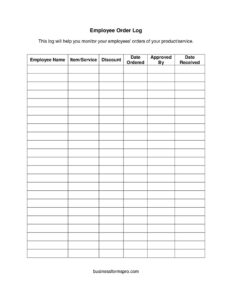
Employee Order Log
Track every order placed by your team with this free Employee Order Log template, available as a free download in PDF and DOCX.
PDF
DOCX
4 downloads
0
likes
Download Files
- DOCX
An Employee Order Log is a simple tracking sheet that records the orders your staff place on behalf of the business, capturing who ordered what, when, and at what cost. The most common reason people use one is to keep purchasing organized and accountable so nothing slips through the cracks or gets double-ordered. It’s free to download here in both PDF and DOCX formats, with no signup required.
What Is an Employee Order Log?
An Employee Order Log is a record-keeping document used to document each order an employee places, whether that’s office supplies, inventory restocks, equipment, materials, or vendor purchases. It’s typically maintained by a department, store, warehouse, or small business and filled in by the employee who places the order or by a supervisor reviewing purchasing activity. The log creates a running history that ties each order to a specific person, date, supplier, and amount. Rather than relying on scattered emails, receipts, or memory, the log centralizes purchasing details in one place so managers can monitor spending, confirm deliveries, and reconcile invoices. It’s a practical operational tool, not a contract, and it works for businesses of any size.
When Do You Need an Employee Order Log?
This log earns its keep any time more than one person can place orders or whenever purchases need to be tracked over time. Common situations include:
- Office supply purchasing — when several employees order pens, paper, toner, and kitchen supplies and you want to avoid duplicate orders.
- Inventory restocking — retail and warehouse staff logging product reorders so stock levels and reorder timing stay visible.
- Materials and parts — field crews, technicians, or shop staff ordering parts that need to be matched against jobs.
- Vendor management — tracking which supplier each order went to and comparing pricing across vendors.
- Expense oversight — managers reviewing who is spending what before invoices arrive, helping catch unauthorized or oversized orders.
- Audit and reconciliation — accounting matching logged orders to packing slips, receipts, and statements at month-end.
Types of Orders You Might Track
Although the format stays the same, the log adapts to many purchasing needs. A small office might use it strictly for consumables and stationery. A restaurant could track food and beverage orders by vendor and delivery date. A construction or repair business might log tools and replacement parts tied to specific projects. A clinic might record orders for gloves, sanitizer, and medical consumables. By keeping every order type in a single consistent log, you build one searchable history instead of juggling separate systems for each category.
What an Employee Order Log Should Have
A complete and useful log captures enough detail to answer the basic questions of any purchase. Strong logs include:
- The date the order was placed.
- The employee name responsible for the order.
- A clear description of the item(s) ordered, including quantity.
- The supplier or vendor the order went to.
- An order or reference number for tracking.
- The cost or estimated amount.
- A status field (ordered, shipped, received) and a column for notes.
- An approval signature or initials where authorization is required.
How to Fill Out an Employee Order Log
Because this template uses a row-per-order layout, completing it is quick and repeatable:
- Add a header at the top with your business or department name and the time period the log covers (for example, a month or quarter).
- Enter the order date in the first column for each new line so entries stay in chronological order.
- Record the employee name of the person who placed or requested the order.
- Describe the item(s) ordered with enough detail to identify them later, including quantity and unit if relevant.
- List the supplier or vendor name and, if helpful, the contact or account used.
- Write the order or reference number assigned by the vendor or your internal system.
- Enter the cost — the quoted price, estimate, or final amount — and any shipping noted.
- Update the status as the order progresses from placed to received, and use the notes column for backorders, partial shipments, or returns.
- Capture approval with an initial or signature when your policy requires sign-off before purchasing.
Tips for Keeping an Accurate Log
Fill the log in at the moment an order is placed rather than from memory at the end of the week — same-day entries are far more reliable. Keep the log in a shared location so anyone authorized to order can add to it and managers can review it without chasing people for updates. Pair each logged entry with its receipt or packing slip by filing them under the matching reference number. Review the log on a regular schedule to flag open orders that haven’t arrived, and archive completed periods so the active sheet stays manageable. Consistency in how items are described will make the log searchable and useful months later.
Common Mistakes to Avoid
- Leaving the employee name blank — without it, accountability disappears and you can’t follow up on questions.
- Vague item descriptions like “supplies” that make reconciliation against invoices impossible.
- Skipping the order number, which is your fastest way to track shipments and resolve disputes.
- Never updating status, so the log shows what was ordered but not what actually arrived.
- Recording costs inconsistently — mixing pre-tax, post-tax, and shipping figures distorts totals.
- Letting multiple people keep separate copies, which defeats the purpose of a single shared record.
Frequently Asked Questions
What is an Employee Order Log used for? It’s used to track every order your employees place for the business, recording the date, person, item, vendor, and cost in one running list. This keeps purchasing organized, prevents duplicate orders, and gives managers a clear view of spending. It also makes reconciling invoices and receipts at month-end much easier.
How do I fill out an Employee Order Log? Add a new row each time an order is placed, entering the date, employee name, item description with quantity, supplier, order number, and cost. Update the status column as the order ships and arrives, and use notes for anything unusual. Filling it in the same day you order keeps it accurate.
Is an Employee Order Log a legally binding document? No, it’s an internal record-keeping tool rather than a contract or purchase order. It documents purchasing activity for organization and oversight but doesn’t create a legal obligation between you and a vendor. The binding agreement is the purchase order or contract you place with the supplier.
Who should fill out the log? Usually the employee who places the order completes their own row, while a supervisor or office manager reviews the log and signs off where approval is required. In smaller teams, one person may maintain the entire log on behalf of everyone. The key is that whoever orders records it promptly.
Can I customize this template for my business? Yes. The DOCX version is fully editable, so you can rename columns, add fields like department or project code, or remove ones you don’t need. You can adapt it for office supplies, inventory restocks, parts, or any other purchasing your team handles.
Is this Employee Order Log template really free? Yes, it’s completely free to download in both PDF and DOCX formats with no signup, account, or payment required. Use the PDF for a quick print-and-fill version or the DOCX to edit it on your computer first. You can reuse it across periods and departments at no cost.
This Employee Order Log template is a general example provided for informational purposes only and is not legal, financial, or tax advice. Purchasing policies, approval requirements, and record-keeping practices vary by organization and jurisdiction. Consult a qualified professional to ensure your processes meet your specific business and compliance needs.
Related Forms
- Project Status Report
- Restroom Cleaning Checklist
- Outgoing Mail Log
- Bill Reminder Tracker
- Evidence Inventory
- Conference Call Log
Browse more in Log and Inventory.