
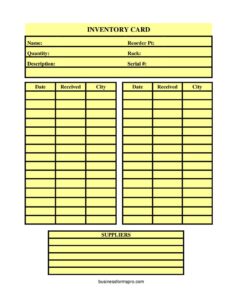
Inventory Card Template
Track stock levels, reorder points, and suppliers with this free Inventory Card Template, available as a free download in PDF and DOCX.
PDF
DOCX
5 downloads
0
likes
Download Files
- DOCX
An Inventory Card Template is a single-item record used to track the quantity, location, reorder point, and supply history of one product in your stock. People most often use it to keep a running count of an item so they know exactly when to reorder before running out. This template is free to download in both PDF and DOCX, with no signup required.
What Is an Inventory Card Template?
An Inventory Card Template is a one-page document, sometimes called a bin card or stock card, that holds all the key details for a single inventory item in one place. It is typically created and maintained by warehouse staff, store managers, or small-business owners who need to monitor stock without complex software. The card documents what the item is, where it sits on the shelf, how many units remain, the threshold at which it should be reordered, and a history of receipts from suppliers. Because each item gets its own card, the system stays simple and easy to audit. It bridges the gap between memory-based tracking and a full digital inventory system.
When Do You Need an Inventory Card Template?
An inventory card is useful any time you need a clear, item-level snapshot of stock. Common situations include:
- Running a retail shop or stockroom where you manually count goods and want to avoid stockouts of popular items.
- Managing spare parts or tools in a warehouse where each item has a fixed rack or bin location.
- Tracking serialized equipment, electronics, or machinery that must be matched to a specific serial number.
- Setting reorder points so purchasing staff know precisely when to place a new order with a supplier.
- Performing periodic physical counts and reconciling them against recorded quantities during an audit.
- Operating a small business that has outgrown a notepad but is not ready for inventory software.
What an Inventory Card Should Have
A complete inventory card captures both the identity of the item and its movement over time. At minimum it should include the item name and a clear description so anyone can identify the product. It needs a storage rack or bin location, the current quantity on hand, and a reorder point that triggers a new purchase. For traceable goods, a serial number ties the card to a specific unit. Finally, the card should log each receipt with the date received, the city or origin location, and the suppliers who provided the goods, creating a usable purchase history.
How to Fill Out an Inventory Card Template
- Name: Enter the item’s name or short title at the top of the card so it can be filed and found quickly.
- Description: Add a fuller description—model, size, color, or specifications—so the item is unambiguous to anyone reading the card.
- Serial #: Record the serial number for serialized or high-value items; leave blank for bulk consumables.
- Rack: Note the rack, shelf, or bin location where the item is physically stored.
- Reorder Pt: Set the reorder point—the quantity at which you should place a new order to avoid running out.
- Quantity: Write the current quantity on hand; update this figure every time stock moves in or out.
- Date / Received / City: Each time a shipment arrives, log the date, the amount received, and the city or source location. The template provides repeating rows so you can record multiple receipts.
- Suppliers: List the supplier or suppliers that provide the item, with contact details if space allows, for fast reordering.
Setting an Effective Reorder Point
The reorder point is the single most valuable field on the card because it turns a passive log into an early-warning system. To set it well, estimate how many units you sell or use during the time it takes a supplier to deliver, then add a small safety buffer for unexpected demand or shipping delays. For a fast-moving item with a one-week lead time, that might mean reordering when stock drops to two weeks of supply. Review and adjust the reorder point seasonally, since demand often rises around holidays or busy periods. When the recorded quantity falls to or below the reorder point, that is your cue to contact the listed supplier and place a fresh order.
Keeping Cards Accurate Over Time
An inventory card is only as reliable as its last update. Adopt a habit of editing the quantity the moment goods are received or issued, rather than waiting until the end of the day. Use the date and received columns to build a paper trail you can cross-check during a physical count. If the recorded quantity and the actual count differ, investigate before adjusting the number—discrepancies often point to unlogged sales, damage, or shrinkage. Store cards in a consistent order, such as by rack location or item name, so staff can locate them instantly. When a card fills up with receipt entries, start a fresh card and staple or file the old one behind it to preserve history.
Inventory Card vs. Inventory Spreadsheet
An inventory card focuses on one item per page and lives close to the stock it tracks, making it ideal for shop-floor or warehouse use where workers update counts by hand. A spreadsheet or software system centralizes every item in one searchable file and is better for reporting across an entire catalog. Many businesses use both: cards at the shelf for real-time accuracy and a periodic spreadsheet roll-up for analysis. This template gives you a clean, printable card you can begin using immediately.
Common Mistakes to Avoid
- Forgetting to update the quantity after a sale or withdrawal, which makes the card unreliable.
- Leaving the reorder point blank, so no one knows when to restock.
- Skipping the date and city on receipts, which erases the purchase history you may later need.
- Recording vague descriptions that make it impossible to tell similar items apart.
- Storing serialized and bulk items on the same card instead of giving high-value units their own.
- Keeping cards in a random order, which wastes time during counts and reorders.
Frequently Asked Questions
What is an inventory card template used for? It is used to track a single inventory item’s quantity, location, reorder point, and supply history on one page. Businesses rely on it to know how much stock they have and when to reorder. It works well for both retail and warehouse settings.
How do I fill out an inventory card? Start with the item name, description, and serial number, then record its rack location, reorder point, and current quantity. Each time goods arrive, log the date, amount received, and city, and list the supplier. Update the quantity whenever stock moves in or out.
What is a reorder point on an inventory card? The reorder point is the quantity at which you should order more stock to avoid running out. It accounts for how fast you use the item and how long delivery takes. When your quantity hits this number, it is time to contact your supplier.
Is an inventory card the same as a bin card? They are very similar—both track one item at a fixed location. A bin card usually stays at the storage bin and records movements, while an inventory card may also include supplier and reorder details. This template combines those functions.
Does an inventory card need to be digital? No. Many businesses keep printed cards at the shelf for fast manual updates. You can download this template, print it, and write entries by hand, or fill in the DOCX version on a computer—whichever suits your workflow.
How much does this inventory card template cost? It is completely free to download here in both PDF and DOCX formats, with no signup or payment required. You can print as many copies as you need and customize the DOCX version to match your items.
This Inventory Card Template is provided as a general example for informational purposes only and does not constitute legal, financial, or accounting advice. Inventory and record-keeping requirements vary by business and jurisdiction—consult a qualified professional to ensure your practices meet your specific needs.
Related Forms
- Housekeeping Inspection Checklist
- Pledge Log
- Inventory Tag
- Project To Do List
- Store Opening Procedure Checklist
- Safe Deposit Box Inventory
Browse more in Log and Inventory.