
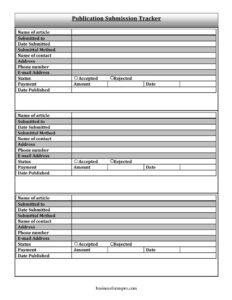
Publication Submission Tracker
Track every article submission, contact, and payment with this free Publication Submission Tracker template — organized log, free download in PDF and DOCX.
PDF
DOCX
11 downloads
0
likes
Download Files
- DOCX
A Publication Submission Tracker is a simple log that records every article you send out for publication, where you sent it, and what happened next. Writers, freelancers, and academics use it most often to avoid losing track of pending submissions, follow-up dates, and payments across multiple outlets. It is free to download here in both PDF and DOCX formats with no signup required.
What Is a Publication Submission Tracker?
A Publication Submission Tracker is a record-keeping document used by writers, journalists, poets, researchers, and content creators to monitor the status of work they have submitted to magazines, journals, blogs, anthologies, or publishers. It captures the essential details of each submission — the article name, the outlet it was sent to, the editor or contact, the date, and the outcome — in one organized place. Rather than relying on scattered emails or memory, the tracker gives you a single reference point so you always know what is pending, what was accepted or rejected, and what you have been paid. It is especially valuable when you submit the same or different pieces to several publications at once.
When Do You Need a Publication Submission Tracker?
This log becomes essential the moment you have more than a handful of submissions in circulation. Common situations include:
- A freelance writer pitching articles to several magazines and needing to know which editors have responded.
- An academic submitting research papers to multiple peer-reviewed journals while observing exclusivity rules.
- A poet or short-story author tracking dozens of submissions to literary journals and contests.
- A blogger or content creator placing guest posts across various websites and following up on payment.
- An agency or editor managing submissions on behalf of multiple clients or contributors.
- A writer preparing a tax record of where work was published and how much each piece earned during the year.
What a Publication Submission Tracker Should Have
A complete tracker captures enough detail to answer three questions at a glance: what did I submit, to whom, and what was the result? At minimum it should identify each article by name, the publication it went to, the date it was submitted, and the method used. It should record the editor or contact person along with their address, phone, and email so follow-up is easy. Crucially, it needs a status section to mark whether a piece was accepted or rejected, plus a payment section showing the amount, the payment date, and the date the work was published. Together these fields turn loose notes into a reliable, searchable history of your publishing activity.
How to Fill Out a Publication Submission Tracker
- Name of article: Enter the exact title or working title of the piece you submitted, so it matches your manuscript file.
- Submitted to: Write the name of the publication, journal, website, or publisher receiving the work.
- Date submitted: Record the date you sent it — useful for tracking response times and meeting deadlines.
- Submittal method: Note how you sent it: online submission portal, email, postal mail, or a service like Submittable.
- Name of contact: Add the editor, acquisitions contact, or submissions coordinator handling your piece.
- Address, phone number, e-mail address: Fill in the contact’s details so you can follow up through any channel.
- Status: Mark the current state — pending, under review, revise and resubmit, or final.
- Accepted / Rejected: Check or note the outcome once you hear back.
- Payment and amount: Record whether payment is owed or received, and the dollar amount agreed or paid.
- Date: Enter the date payment was made or confirmed.
- Date published: Log the publication date once your work goes live or appears in print.
Types of Submissions to Track
Not every submission behaves the same way, and a good tracker accommodates the differences. Simultaneous submissions — the same piece sent to multiple outlets at once — require careful status updates so you can withdraw it elsewhere if it’s accepted. Exclusive submissions demand that you note response-time windows before you can move on. Pitches versus completed manuscripts may have different acceptance flows, and paid versus unpaid placements matter for your financial records. Using the status and payment columns consistently lets you separate these categories at a glance, so you never accidentally violate an outlet’s exclusivity policy or forget to chase an invoice.
Using the Tracker for Follow-Up and Records
The contact fields are not just for reference — they are your follow-up toolkit. Most publications list expected response times, and if that window passes you can use the recorded date submitted and contact email to send a polite status query. The payment and date-published fields double as a year-end summary: when tax season arrives, you have a clear list of where each piece appeared and what it earned. Keep the tracker updated in real time rather than reconstructing it later, and save dated versions periodically so you preserve a history of your submission activity.
Common Mistakes to Avoid
- Leaving the date submitted blank, which makes it impossible to know when a follow-up is due.
- Forgetting to update the status after you receive a response, so the log no longer reflects reality.
- Omitting the contact’s email and phone, forcing you to dig through old messages to follow up.
- Failing to mark accepted pieces in simultaneous submissions, risking double-acceptance issues.
- Skipping the payment and amount fields and losing track of money you are owed.
- Not recording the date published, which complicates portfolios, tax records, and reprint rights.
Frequently Asked Questions
What is a Publication Submission Tracker used for? It is used to keep an organized record of every article or manuscript you submit for publication, including where it went, who handled it, the outcome, and any payment received. The tracker helps writers manage multiple submissions at once without losing track of pending responses or deadlines. It serves both as a workflow tool and a financial record.
How do I fill out the tracker? Start a new row each time you submit a piece, entering the article name, the publication, the submission date, and the method used. Add the editor’s contact information, then update the status, acceptance or rejection, payment details, and publication date as the process unfolds. Keeping it current ensures the log stays accurate and useful.
Is this template free to download? Yes. The Publication Submission Tracker is completely free to download from Business Forms Pro in both PDF and DOCX formats, with no signup or payment required. You can print it or edit the DOCX version in your word processor to match your workflow.
Can I track simultaneous submissions with it? Absolutely. The status and date fields let you monitor the same article across multiple outlets, so you can withdraw it elsewhere as soon as one publication accepts it. This is one of the most important reasons writers keep a submission log.
Should I use the PDF or the DOCX version? Use the PDF if you prefer to print a clean copy or fill it in by hand, and the DOCX if you want to type entries, add rows, or customize the columns. Both contain the same fields, so choose whichever fits how you like to work.
Does this tracker replace a contract or rights agreement? No. The tracker is a personal record-keeping tool, not a legal agreement. Acceptance terms, payment rates, and rights are governed by the agreement you sign with each publication, so always keep those documents separate from your log.
This template is provided as a general example for informational purposes only and does not constitute legal, financial, or tax advice. Submission policies, payment terms, and publishing rights vary by outlet and jurisdiction, so consult the relevant publication’s guidelines and a qualified professional for advice specific to your situation.
Related Forms
- Beauty Salon Equipment And Furniture Inventory Card
- Weekly Cleaning Log
- Janitorial Checklist
- Yearly Multiple Project Timetable
- College Packing Checklist
- Wilderness Emergency Checklist
Browse more in Log and Inventory.