
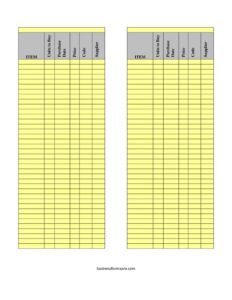
Inventory Cards Spreadsheet
Track stock, suppliers, and purchase prices with this free Inventory Cards Spreadsheet template — free download in PDF and DOCX, no signup needed.
PDF
DOCX
0
likes
Download Files
- DOCX
An Inventory Cards Spreadsheet is a simple tracking tool that records each stock item alongside the quantity to reorder, purchase date, price, item code, and supplier. People most often use it to keep a clear, running record of what they own, what they need to buy, and where to buy it. It’s free to download here in both PDF and DOCX formats, with no signup required.
What Is an Inventory Cards Spreadsheet?
An Inventory Cards Spreadsheet is a structured list — historically kept on individual “cards” for each product — that documents the details of stock items in one place. Each row functions like a single card, capturing what the item is, how many units need purchasing, the date and price of the most recent purchase, the internal or supplier code, and who supplies it. Shop owners, warehouse staff, office managers, and small-business operators use it to monitor stock levels, plan reorders, and compare supplier pricing. Unlike a full inventory management system, this spreadsheet is lightweight and immediately usable, making it ideal for businesses that want organized records without expensive software.
When Do You Need an Inventory Cards Spreadsheet?
This form is useful any time you need to keep tabs on physical goods and their sources. Common situations include:
- Retail stock control — tracking products on shelves and in the back room so you know when to reorder before running out.
- Restocking and purchasing — using the “Units to Buy” column to build a clear shopping list for your next supplier order.
- Comparing suppliers — recording price and supplier together so you can spot who offers the best rate for each item.
- Office and supply management — monitoring consumables like paper, toner, or cleaning products and knowing when stocks run low.
- Workshop or warehouse organization — assigning codes to parts and materials so items are easy to locate and identify.
- Year-end or periodic stocktakes — providing a baseline record of items, quantities, and values during a physical count.
What an Inventory Cards Spreadsheet Should Have
A complete and useful inventory cards spreadsheet captures enough detail to identify each item and act on it. At minimum, each entry should clearly name the item, show how many units you intend to purchase, note the date of purchase, list the price paid, include a unique code, and identify the supplier. Consistency matters more than complexity: the same naming convention and code format across every row keeps the sheet searchable and sortable. A good spreadsheet also leaves room to update entries over time, so the record stays current as prices change, suppliers shift, or reorder needs fluctuate.
How to Fill Out an Inventory Cards Spreadsheet
- Item: Enter a clear, consistent name for the product or material — for example, “A4 Copy Paper” or “M6 Steel Bolts.” Avoid vague labels so similar items aren’t confused.
- Units to Buy: Record how many units you need to purchase or reorder. Update this figure as you sell, use, or restock the item so it reflects current demand.
- Purchase Date: Enter the date of the most recent purchase. This helps you track how quickly stock turns over and when an item was last replenished.
- Price: Note the price paid per unit (or per case, if that’s how you buy). Keep the basis consistent across entries so cost comparisons stay accurate.
- Code: Assign a unique identifier — an SKU, barcode number, or internal reference. Codes make it easy to locate, sort, and match items to invoices.
- Supplier: List the vendor you buy the item from. If you use more than one source, note your primary supplier or add a second row for the alternative.
Tips for Keeping Your Inventory Accurate
An inventory record is only as valuable as it is current. Set a regular cadence — weekly or monthly — to review and update quantities, and reconcile the spreadsheet against a physical count at least periodically. When you receive a new shipment, update the purchase date and price immediately rather than relying on memory later. Use the code column to cross-reference invoices and packing slips, which speeds up checking deliveries against orders. If you manage many items, consider sorting or filtering by supplier to streamline ordering, or by “Units to Buy” to prioritize what needs purchasing most urgently.
How It Differs from a Full Inventory System
An Inventory Cards Spreadsheet is intentionally simple and is best suited to small inventories or businesses just getting organized. A full inventory management system typically tracks real-time stock levels, automatically deducts sales, integrates with point-of-sale hardware, and generates valuation reports. This spreadsheet does none of that automatically — it relies on manual updates — but that simplicity is its strength: it requires no subscription, no learning curve, and no setup beyond opening the file. Many businesses start with a spreadsheet like this and graduate to dedicated software only once their item count or order volume outgrows manual tracking.
Common Mistakes to Avoid
- Inconsistent item names — calling the same product different things in different rows makes searching and totaling unreliable.
- Duplicate or missing codes — reusing a code or leaving it blank defeats the purpose of having a unique identifier.
- Forgetting to update prices — stale prices lead to inaccurate cost comparisons and budgeting errors.
- Not recording the purchase date — without dates, you lose the ability to track how fast items turn over.
- Mixing price bases — recording some items per unit and others per case without noting the difference distorts your numbers.
- Letting the sheet go stale — an inventory record that isn’t updated regularly quickly becomes useless for reordering decisions.
Frequently Asked Questions
What is an Inventory Cards Spreadsheet used for? It is used to track stock items along with how many units to buy, the purchase date, price, item code, and supplier. It helps you stay organized, know when to reorder, and compare supplier pricing all in one place.
How do I fill out the spreadsheet? Enter one item per row, then complete the Units to Buy, Purchase Date, Price, Code, and Supplier columns for each. Keep your naming and coding consistent, and update the figures whenever stock changes or you place a new order.
Is this spreadsheet free to download? Yes. You can download it free from Business Forms Pro in both PDF and DOCX formats, with no signup or account required. The DOCX version can be opened and edited in common word processors.
What does the “Code” column mean? The code is a unique identifier for each item, such as an SKU, barcode number, or your own internal reference. It makes items easy to locate, sort, and match against invoices and delivery slips.
Can I use this for a small business? Absolutely. The spreadsheet is well suited to small shops, offices, workshops, and home-based businesses that need simple, no-cost inventory tracking without investing in dedicated software.
How often should I update my inventory cards? Update entries whenever you receive new stock, change suppliers, or adjust reorder quantities, and review the whole sheet on a regular schedule such as weekly or monthly. Periodically reconcile it against a physical count to keep the records accurate.
This template is provided as a general example for informational purposes only and is not legal, financial, tax, or accounting advice. Inventory, valuation, and record-keeping requirements vary by business and jurisdiction — consult a qualified professional for guidance specific to your situation.
Related Forms
- Blog Post Planner
- Book Inventory
- Donations Tracker Thermometer
- Yearly Project Timetable
- List of Non-Negotiables
- Wilderness Emergency Checklist
Browse more in Log and Inventory.