
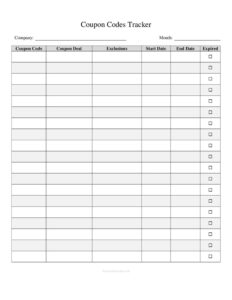
Coupon Codes Tracker
Organize and monitor every promo code with a free Coupon Codes Tracker template, available as a free download in PDF and DOCX with no signup required.
PDF
DOC
1 downloads
0
likes
Download Files
- DOC
A Coupon Codes Tracker is a simple log used to record, organize, and monitor every discount code your business issues or uses across campaigns. People most often reach for it to keep promo codes from overlapping, expiring unnoticed, or being overused. You can download it free here in both PDF and DOCX formats, with no signup required.
What Is a Coupon Codes Tracker?
A Coupon Codes Tracker is a record-keeping sheet that captures the essential details of each promotional or discount code in one organized place. It is typically used by marketing teams, e-commerce store owners, small business owners, and affiliate managers to document what codes exist, what they offer, when they are valid, and how often they have been redeemed. Rather than scattering codes across spreadsheets, sticky notes, and email threads, the tracker centralizes everything into a single reference. It documents the code itself, its discount value, its active dates, usage limits, and current status. The goal is full visibility: at a glance you can tell which offers are live, which have expired, and which are nearing their redemption cap.
When Do You Need a Coupon Codes Tracker?
This log is helpful any time you run more than a handful of promotions, or when several people manage offers and need a shared source of truth. Common situations include:
- Running multiple campaigns at once — a holiday sale, a newsletter code, and an influencer code can run simultaneously without conflicting.
- Managing affiliate or partner codes — track which partner owns which code and how much each has driven in redemptions.
- Preventing expired codes from circulating — knowing exact start and end dates helps you retire offers on schedule.
- Controlling usage limits — monitor single-use or capped codes so a promotion does not exceed its budget.
- Reporting campaign performance — comparing redemption counts shows which offers actually convert.
- Onboarding new team members — a clean tracker gives staff instant context on every active and past code.
Types of Coupon Codes to Track
Not all codes behave the same way, and a good tracker accommodates each type. Percentage-off codes reduce the order by a set percentage, while fixed-amount codes subtract a flat dollar value. Free shipping codes waive delivery costs, and BOGO or bundle codes apply to specific product combinations. You may also run single-use codes tied to one customer, or public codes shared widely on social media. Recording the type alongside each code makes the log far more useful when you analyze results, because a 10% public code and a $50 one-time partner code tell very different stories about cost and reach.
What a Coupon Codes Tracker Should Have
A complete tracker leaves no ambiguity about how a code works. The strongest versions include a column for the actual code string, a clear description of the offer, the discount type and amount, start and end dates, any usage or redemption limit, a running count of how many times it has been used, the campaign or channel it belongs to, the current status, and a notes field for context. Together these elements let anyone reading the log understand a code’s purpose, validity, and performance without asking around or digging through past emails.
How to Fill Out a Coupon Codes Tracker
Work row by row, adding one line per code. Follow these steps:
- Enter the coupon code. Type the exact code string, matching capitalization, such as SUMMER25 or WELCOME10.
- Add a description. Briefly explain the offer in plain language, like “25% off summer collection.”
- Record the discount type and value. Note whether it is a percentage, fixed amount, or free shipping, and the exact figure.
- Set the start date. Mark the day the code becomes active.
- Set the end or expiration date. Mark when it should stop working so you can retire it on time.
- Note the usage limit. Specify any cap, such as one use per customer or a total of 500 redemptions.
- Log redemptions used. Update the running count regularly so you can see remaining capacity.
- Assign the campaign or channel. Tie the code to its source, like email, Instagram, or a named affiliate.
- Update the status. Mark each code as active, scheduled, expired, or paused.
- Add notes. Capture anything unusual, such as exclusions or stacking rules.
Tips for Keeping the Tracker Accurate
A tracker is only as good as its upkeep. Update redemption counts on a regular schedule — weekly works for most small businesses, daily during a major sale. Color-code or sort by status so active codes stay at the top and expired ones move out of the way. Keep your code naming consistent (for example, a season plus a discount value) so the log stays scannable. If multiple people edit the file, agree on who owns updates to avoid conflicting versions. Finally, archive rather than delete old codes; historical data is valuable when you plan future promotions and want to repeat what worked.
Common Mistakes to Avoid
- Typing codes inconsistently — a mismatch between the tracker and the live code causes confusion and failed redemptions.
- Forgetting to update redemption counts — stale numbers make budget and performance tracking unreliable.
- Leaving expiration dates blank — open-ended codes can keep discounting orders long after a campaign ends.
- Skipping the channel or campaign field — without it you cannot tell which marketing efforts drive results.
- Reusing the same code across unrelated promotions — this muddies your data and complicates exclusions.
- Not noting stacking or exclusion rules — vague terms lead to disputes and unintended discounts at checkout.
Frequently Asked Questions
What is a Coupon Codes Tracker used for? It is used to keep a centralized record of every promotional code your business creates or manages. The tracker shows each code’s discount, validity dates, usage limits, and redemption count so you always know which offers are live and how they are performing. It prevents duplicate, expired, or overused codes from slipping through.
How do I fill out a Coupon Codes Tracker? Add one row per code, entering the exact code string, a short description, the discount type and value, start and end dates, any usage limit, and the campaign it belongs to. Then update the redemptions-used count and status over time. Keeping each field current makes the log a reliable single source of truth.
Is this template free to download? Yes. The Coupon Codes Tracker is completely free to download here in both PDF and DOCX formats, and no signup or account is required. You can start using it immediately and customize the columns to fit your business.
Can I edit the columns to match my needs? Absolutely. The DOCX version is fully editable, so you can rename columns, add fields like minimum order value, or remove ones you do not use. The PDF version is convenient for printing or quick reference.
How often should I update the tracker? Update it whenever you create a new code and on a regular schedule for redemption counts. Weekly updates suit most small businesses, while a high-volume sale may warrant daily updates so usage limits and budgets stay accurate.
Does a Coupon Codes Tracker replace my e-commerce platform’s reports? No, it complements them. Your platform tracks transactions automatically, but the tracker gives you a human-readable overview of strategy, ownership, dates, and notes that platform reports often lack. Many teams use both together.
This template is provided as a general example for informational purposes only and does not constitute legal, financial, tax, or marketing advice. Promotional rules, consumer-protection requirements, and platform policies vary by jurisdiction and provider — consult a qualified professional before launching campaigns.
Related Forms
- Pre-Trip Vehicle Inspection Checklist
- Weekly Music Practice Log
- Garment Inventory Form
- Library Loan List
- Phone Log
- Sterilization Log
Browse more in Log and Inventory.