
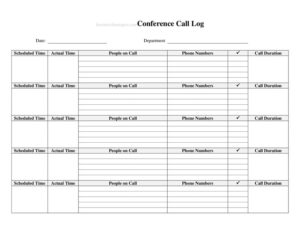
Conference Call Log
Track every conference call with a free Conference Call Log template, capturing date, attendees, times, and duration. Free download in PDF and DOCX.
PDF
DOCX
5 downloads
0
likes
Download Files
- DOCX
A Conference Call Log is a simple tracking sheet used to record the details of each conference call your team holds — including the date, who joined, when the call actually started, and how long it lasted. People most often use it to keep an accurate record of meeting participation and call activity for billing, scheduling, or accountability purposes. You can download this template free in both PDF and DOCX formats, with no signup required.
What Is a Conference Call Log?
A Conference Call Log is a record-keeping document that captures the essential details of every conference call within an organization or department. It is typically maintained by an administrative assistant, team lead, receptionist, or whoever coordinates calls, and it documents who participated, when the call was scheduled versus when it began, and its total length. Rather than relying on memory or scattered emails, the log centralizes this information in one consistent format. It is especially useful for departments that hold frequent calls, bill clients by the hour, or need a paper trail showing that meetings took place and who attended.
When Do You Need a Conference Call Log?
A Conference Call Log fits into many everyday business routines. Common situations include:
- Client billing: Consultants, attorneys, and agencies that bill for call time need an accurate record of duration and participants.
- Recurring team meetings: Departments holding daily or weekly conference calls can track attendance and punctuality over time.
- Project coordination: Project managers log calls with vendors, contractors, or remote teams to document decisions and follow-ups.
- Performance and accountability: Supervisors review who joined calls and whether they started on schedule.
- Cross-department reporting: Larger organizations track call volume by department for resource planning.
- Audit and reference: When a dispute arises about whether a meeting happened or who attended, the log provides a dated reference.
What a Conference Call Log Should Have
A useful Conference Call Log balances completeness with simplicity. The core elements include the date of the call, the department responsible, the scheduled time and the actual time the call began, the people on the call, their phone numbers, and the total call duration. Together these fields answer the key questions: when did the call happen, who was supposed to start it, who actually joined, how to reach them, and how long it ran. A good log uses one row per call so entries stay easy to scan, and it leaves room for notes or follow-up items if your team needs them.
How to Fill Out a Conference Call Log
- Date: Enter the calendar date of the conference call. Use a consistent format such as MM/DD/YYYY so entries sort cleanly.
- Department: Record the team or department hosting the call — for example, Sales, Operations, or Finance — so calls can be grouped later.
- Scheduled Time: Write the time the call was planned to begin, including AM/PM. This is the time circulated in the invite.
- Actual Time: Note when the call genuinely started. Comparing this to the scheduled time reveals delays.
- People on Call: List the names of everyone who joined. For large calls, you can record a headcount plus key participants.
- Phone Numbers: Capture each participant’s dial-in or contact number so anyone can be reached for follow-up.
- Call Duration: Enter how long the call lasted, in minutes or hours and minutes (for example, 45 min or 1:15). Fill this in as soon as the call ends so it stays accurate.
Tips for Keeping an Accurate Call Log
The value of a Conference Call Log depends entirely on how consistently it is maintained. Assign one person per call — usually the host or coordinator — to be responsible for the entry, so nothing slips through the cracks. Fill in the date, scheduled time, and expected participants before the call begins, then complete the actual time and duration right after it ends while details are fresh. Standardize your time format and abbreviations across the team so the log reads cleanly weeks later. If you maintain the log digitally in the DOCX version, you can sort and filter by department or date; if you keep a printed PDF on a clipboard, store completed pages in a labeled binder.
Scheduled Time vs. Actual Time: Why Both Matter
One of the most useful features of this log is the pairing of scheduled time and actual time. Recording both lets you spot patterns — for instance, if a recurring call consistently starts ten minutes late, you have hard evidence to adjust the invite or address punctuality. For billing, the actual time and duration are what matter, since clients are charged for real elapsed time, not the planned slot. Keeping these two fields distinct also protects you in disputes: you can show that a call was offered on time even if a participant joined late.
Common Mistakes to Avoid
- Confusing scheduled and actual time: Logging only one defeats the purpose; always capture both separately.
- Leaving duration blank: Duration is often the most-needed field for billing and reporting — fill it in immediately after the call.
- Incomplete participant lists: Listing only the organizer hides who actually attended; record every name.
- Inconsistent formats: Mixing 12-hour and 24-hour times or different date styles makes the log hard to read and sort.
- Delayed entries: Filling in details days later leads to guesswork and errors; log calls the same day.
- Outdated phone numbers: Verify dial-in and contact numbers so follow-up calls reach the right person.
Frequently Asked Questions
What is a Conference Call Log used for? It is used to record the essential details of each conference call — date, department, scheduled and actual start times, participants, their phone numbers, and how long the call lasted. Businesses use it for billing, attendance tracking, scheduling analysis, and creating a reliable record of when calls took place.
How do I fill out a Conference Call Log? Enter the date and department, then record the scheduled time before the call and the actual start time once it begins. After the call, list everyone who joined along with their phone numbers and the total duration. Using one row per call keeps the log easy to read.
Is a Conference Call Log a legal document? On its own it is an internal business record rather than a formal legal contract. That said, an accurate, consistently maintained log can serve as useful supporting evidence in billing disputes or audits, since it documents dates, participants, and call length.
What is the difference between scheduled time and actual time? Scheduled time is when the call was planned to begin, as stated in the invitation, while actual time is when it genuinely started. Tracking both lets you measure punctuality and ensures billing reflects real elapsed time rather than the planned slot.
Can I use this log for billing clients? Yes. The actual start time and call duration fields give you the figures needed to bill by the hour or minute, and the participant list documents who was on the call. Many consultants and agencies rely on a call log for exactly this purpose.
Is the Conference Call Log template really free? Yes. You can download this Conference Call Log template completely free in both PDF and DOCX formats, with no signup or payment required. Print it for a clipboard or edit the DOCX version to match your team’s needs.
This Conference Call Log template is a general example provided for informational purposes only and does not constitute legal, financial, or tax advice. Record-keeping and billing requirements vary by industry and jurisdiction, so consult a qualified professional to ensure your practices meet applicable standards.
Related Forms
- Fire Emergency Checklist
- Quarterly Sales Record
- Wilderness Emergency Checklist
- Short Term Disability Claims Tracker
- Work Seeking Log
- Library Loan List
Browse more in Log and Inventory.