
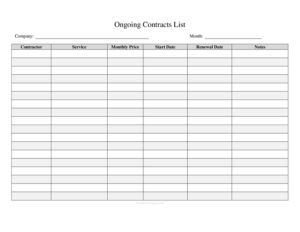
Ongoing Contracts List
Track every active agreement with this free Ongoing Contracts List template, organizing parties, dates, values, and renewals in one easy log — free download.
PDF
DOC
2 downloads
0
likes
Download Files
- DOC
An Ongoing Contracts List is a simple tracking document that records every active agreement your business currently holds in one organized place. People most often use it to avoid missed renewals, surprise auto-renewals, and lapsed obligations by keeping all contract details visible at a glance. It is free to download here in both PDF and DOCX formats, with no signup required.
What Is an Ongoing Contracts List?
An Ongoing Contracts List is a register that captures the key facts about each contract a company is party to — who the agreement is with, what it covers, when it started, when it expires, and how much it is worth. It is typically maintained by an office manager, operations lead, finance team, or business owner, and it serves as a central reference rather than the contract itself. Where a contract holds the binding terms, this list summarizes those terms so anyone reviewing it can quickly understand the organization’s commitments. It functions as both a planning tool and a compliance aid, helping teams stay ahead of deadlines and budget for upcoming obligations.
When Do You Need an Ongoing Contracts List?
This log earns its place in almost any organization that signs more than a handful of agreements. Common situations include:
- Vendor and supplier management — tracking service contracts, supply agreements, and subscriptions so renewals and price increases never catch you off guard.
- Lease and facilities oversight — keeping office, equipment, and vehicle leases in one view with their end dates and notice windows.
- Software and SaaS subscriptions — monitoring recurring licenses that auto-renew, so you can cancel or renegotiate before billing.
- Client and customer agreements — recording ongoing service-level commitments, retainers, and maintenance contracts.
- Audit and due diligence preparation — providing accountants, auditors, or a potential buyer with a clean summary of active obligations.
- Leadership transitions — handing off a clear record when a manager leaves or a new owner takes over.
Types of Contracts Worth Logging
Not every document belongs on the list, but most recurring or long-term commitments do. Consider including vendor service agreements, equipment and property leases, employment or independent-contractor agreements, insurance policies, software licenses, marketing and advertising contracts, financing and loan agreements, and any non-disclosure or partnership arrangements with ongoing terms. The goal is to capture anything that carries a deadline, a recurring cost, or a renewal decision. One-time purchases with no continuing obligation generally do not need tracking.
What an Ongoing Contracts List Should Have
A useful list balances completeness with readability. At minimum, each entry should identify the contract, the counterparty, the relevant dates, and the financial commitment. Strong lists also flag renewal terms and assign an internal owner. Helpful columns include:
- A contract name or reference number for quick lookup
- The counterparty or vendor name
- A short description of what the contract covers
- Start date and end or expiration date
- Contract value or recurring cost
- Renewal type — fixed-term, auto-renew, or month-to-month
- Notice period required to cancel or renegotiate
- The internal person responsible
- Status and any notes
How to Fill Out an Ongoing Contracts List
This template uses an open, customizable table so you can adapt it to your needs. Follow these steps:
- Title and date the log. Add your business name and the date the list was last updated so readers know it is current.
- Set up your columns. Label headers for contract name/reference, counterparty, description, start date, end date, value, renewal type, notice period, owner, and status.
- Enter the contract name. Use a clear title or internal reference number for each agreement on its own row.
- Record the counterparty. Note the vendor, client, landlord, or partner the contract is with.
- Describe the scope. Summarize what the contract provides in a few words.
- Add the dates. Fill in the start date and the expiration or renewal date precisely.
- List the value. Enter the total contract value or the recurring monthly/annual cost.
- Capture renewal and notice details. Mark whether it auto-renews and how many days’ notice are required to cancel.
- Assign an owner and status. Name the responsible person and mark each as active, expiring soon, or under review.
Tips for Keeping the List Accurate
A contracts list is only valuable if it stays current. Set a recurring calendar reminder — monthly or quarterly — to review entries, update statuses, and remove expired agreements. Sort or color-code by expiration date so contracts approaching their notice windows rise to the top. Store the master file in a shared, access-controlled location so the whole team works from one version rather than scattered copies. When you sign a new contract, make adding it to the list part of your standard closing routine so nothing slips through. Finally, link or note where the full executed contract is filed, so anyone can retrieve the complete document when the summary isn’t enough.
How It Differs From a Contract Itself
It’s worth being clear about what this log is and is not. The Ongoing Contracts List is an internal summary — it has no legal force and does not change the terms of any agreement it references. The actual signed contract remains the binding document. If there is ever a discrepancy between the list and the contract, the contract governs. Treat the list as a navigation tool that points you to obligations and deadlines, not as a substitute for reading the underlying terms.
Common Mistakes to Avoid
- Letting it go stale — an out-of-date list is worse than none because it creates false confidence.
- Omitting notice periods — missing the cancellation window is how auto-renewals quietly lock you in for another term.
- Vague counterparty names — abbreviations and nicknames make it hard to match entries to real vendors later.
- No assigned owner — when nobody is responsible for a contract, renewals and disputes fall through the cracks.
- Mixing currencies or billing cycles — record costs consistently so totals and comparisons stay meaningful.
- Keeping multiple uncontrolled copies — duplicate files lead to conflicting information and lost updates.
Frequently Asked Questions
What is an Ongoing Contracts List used for? It is used to keep all of a business’s active agreements organized in one place, with their key dates, values, and renewal terms visible. This helps teams avoid missed deadlines, plan budgets, and prepare quickly for audits or ownership changes. It acts as a single reference point for every commitment the organization holds.
How do I fill out the contracts list? Start by titling and dating the document, then set up columns for the contract name, counterparty, description, dates, value, renewal type, notice period, owner, and status. Add one row per contract and complete each field accurately. Update the list whenever a contract is signed, renewed, or ends.
Is an Ongoing Contracts List legally binding? No. The list is an internal tracking tool and carries no legal weight on its own. The signed contracts it references remain the binding documents, and if the list and a contract ever conflict, the contract controls.
How often should I update it? Review and update the list on a regular schedule — monthly or quarterly works for most businesses — and always add new agreements as soon as they are signed. Regular reviews catch upcoming expirations and notice windows before they pass. A current list is what makes the tool reliable.
Who should maintain the contracts list? Typically an office manager, operations lead, finance team member, or business owner owns the master file. Whoever is responsible should have access to contract details and the authority to chase down updates. Assigning a clear owner prevents the list from being neglected.
Is this template really free to download? Yes. You can download the Ongoing Contracts List in PDF and DOCX formats at no cost and with no signup required. Edit the DOCX version freely to add or remove columns to match your business.
This template is provided as a general example for informational purposes only and does not constitute legal, financial, or tax advice. Contract management requirements and obligations vary by jurisdiction and by the terms of each agreement. Consult a qualified attorney or advisor for guidance specific to your situation.
Related Forms
- Log Sheet
- Office Supplies Inventory
- Store Opening Procedure Checklist
- Conference Call Log
- Book Inventory
- Hazardous Chemical Inventory
Browse more in Log and Inventory.