
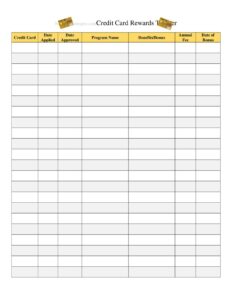
Credit Card Rewards Tracker
Use our free Credit Card Rewards Tracker template to log points, miles, and cash back across all your cards and never let rewards expire. Free download.
PDF
DOCX
2 downloads
0
likes
Download Files
- DOCX
A Credit Card Rewards Tracker is a simple log that helps you record the points, miles, and cash back you earn across all of your credit cards in one organized place. People most often use it to keep tabs on accumulating balances so rewards don’t expire unused, and to compare which card actually pays best on everyday spending. You can download it free in PDF or DOCX with no signup required.
What Is a Credit Card Rewards Tracker?
A Credit Card Rewards Tracker is a personal record-keeping sheet used by cardholders to monitor the value they earn from rewards credit cards. It documents each card, its reward type and rate, current point or cash-back balances, redemption activity, and any expiration dates or promotional bonuses. Anyone who carries more than one rewards card—or even a single card with rotating bonus categories—can use it to stay on top of their earnings. Unlike a bank-issued statement, this tracker pulls everything together across multiple issuers and programs into a single view. It is a planning and awareness tool, not an official financial document, helping you treat rewards as the real money they represent rather than letting points quietly vanish.
When Do You Need a Credit Card Rewards Tracker?
This tracker becomes genuinely useful any time rewards are scattered across programs or hard to remember. Common situations include:
- Managing multiple cards: You hold three or four cards from different issuers and can’t recall which earns the most on groceries, gas, or dining.
- Chasing sign-up bonuses: You opened a card with a spending requirement (for example, spend a set amount in 90 days) and need to track progress toward the bonus.
- Rotating category cards: Your card offers 5% back in quarterly categories that change, and you want to log activation dates and current categories.
- Travel planning: You’re saving miles or points toward a flight or hotel stay and want to see your running total across loyalty programs.
- Avoiding expiration: Some programs expire points after a period of inactivity, and a logged expiration date prevents losing them.
- Annual fee decisions: Before renewal, you want to compare the rewards earned against the card’s annual fee to decide whether to keep, downgrade, or cancel it.
What a Rewards Tracker Should Include
A complete Credit Card Rewards Tracker captures enough detail to make decisions without becoming a chore to maintain. The essentials are the card name and issuer, the reward type (cash back, points, or miles), the earning rate or bonus categories, the current balance, the cash value of those rewards, redemption history, and any expiration or bonus-deadline dates. A notes column is invaluable for reminders like “activate Q3 categories” or “annual fee posts in March.” Including a running total or summary line lets you see your combined rewards value at a glance, which is the single most motivating number on the page.
How to Fill Out a Credit Card Rewards Tracker
- List each card: Enter the card name and issuing bank on its own row so every account has a dedicated line.
- Note the reward type: Record whether the card earns cash back, points, or miles, and the program name if applicable (such as an airline or hotel loyalty program).
- Record earning rates: Write the base rate plus any bonus categories—for example, 3% dining, 2% gas, 1% everything else.
- Enter the current balance: Pull the latest points, miles, or cash-back figure from your statement or app and date the entry.
- Convert to value: Estimate the cash value of the balance using your program’s redemption rate so you can compare cards fairly.
- Track bonuses: Log any sign-up bonus requirement, the spending target, and the deadline to hit it.
- Add expiration dates: Note when points expire or when bonus categories reset.
- Log redemptions: Each time you cash out or book travel, record the date, amount used, and what you redeemed it for.
- Update the summary: Total your combined value and refresh balances on a regular schedule.
Tips for Getting the Most From Your Rewards
The tracker is only as valuable as the habits around it. Set a recurring reminder—monthly works well—to update balances right after statements close. Pay attention to your card’s per-point value when converting to cash, since transferring points to a travel partner often yields more than a straight statement credit. Use the notes column aggressively: jot down when an introductory APR ends, when an annual fee posts, and when rotating categories need activation. If you’re working toward a sign-up bonus, front-load planned large purchases onto that card during the qualifying window. Above all, redeem before you lose value—points sitting idle can devalue when programs change their charts.
Tracker vs. Your Bank’s App
Issuer apps show balances for one card and one program at a time, which is fine until you hold several. A consolidated Credit Card Rewards Tracker gives you a cross-program comparison the apps can’t, letting you decide which card to reach for at the register and which rewards are nearing expiration. It also creates a personal history that survives account closures, app glitches, or program migrations. Think of the app as the source of current numbers and the tracker as the dashboard that turns those numbers into decisions.
Common Mistakes to Avoid
- Logging points without their value: Ten thousand points means little until you note what it’s worth—record the cash equivalent.
- Forgetting expiration dates: Points and miles can expire from inactivity; leaving that column blank invites lost rewards.
- Ignoring annual fees: Tracking rewards but not fees gives a misleading picture of a card’s true value.
- Missing bonus deadlines: Failing to log a sign-up spending window can cost you a large bonus by a single day.
- Updating too rarely: A tracker that’s months out of date can’t guide a purchase decision today.
- Overcomplicating it: Adding so many columns that you never update it defeats the purpose—keep it lean.
Frequently Asked Questions
What is a Credit Card Rewards Tracker used for? It is a personal log for recording points, miles, and cash back earned across all of your credit cards in one place. People use it to compare which card earns the most, monitor progress toward sign-up bonuses, and avoid letting rewards expire. It turns scattered balances into a single, decision-ready view.
How do I fill out the tracker? Add one row per card with its name, issuer, reward type, and earning rate, then enter the current balance and its estimated cash value. Log any bonuses, expiration dates, and redemptions as they happen, and total your combined value in a summary line. Update it on a regular schedule, ideally after each statement closes.
Is this tracker free to download? Yes. You can download the Credit Card Rewards Tracker free in both PDF and DOCX formats with no signup or payment required. The DOCX version is editable so you can add or remove columns to match your cards.
Do credit card rewards expire? It depends on the program. Some cash-back cards keep your rewards as long as the account is open, while many airline and hotel points expire after a period of inactivity. That’s why the tracker includes an expiration column—logging those dates is the simplest way to protect your earnings.
How often should I update it? A monthly update right after your statements post keeps balances accurate without much effort. If you’re chasing a sign-up bonus or rotating categories, check it more frequently so you don’t miss a deadline. The goal is a tracker current enough to guide which card you use at checkout.
Can I use it for business credit cards too? Absolutely. The same format works for personal, business, or a mix of both—just list each card on its own row. Many small-business owners use it to compare rewards across cards and document earnings for their own records.
This Credit Card Rewards Tracker template is a general example provided for informational purposes only and is not financial, tax, or legal advice. Reward terms, point values, and expiration rules vary by issuer and program and can change at any time. Consult your card agreements and a qualified financial professional for guidance specific to your situation.
Related Forms
- Cleaning Checklist
- Time Management Log
- Club Tracking Payments
- Individual Computer Inventory
- Edit Log
- Observation Log
Browse more in Log and Inventory.