
Travel Itinerary
Organize flights, rental cars, hotels, and parking in one place with this free travel itinerary template — free download in PDF and DOCX.
PDF
DOCX
5 downloads
0
likes
Download Files
- DOCX
A travel itinerary is a single document that gathers every detail of a trip — flights, rental cars, hotels, airport parking, and confirmation numbers — into one easy-to-read sheet. Most people use it to keep all their travel logistics in one place so nothing gets lost between booking and boarding. This template is free to download in both PDF and DOCX, with no signup required.
What Is a Travel Itinerary?
A travel itinerary is an organized record of the schedule and logistics for a trip. It is created by the traveler, an assistant, or a travel coordinator and used to track who is traveling, when each leg departs and arrives, and where to go once you land. Rather than digging through separate confirmation emails, a travel itinerary consolidates flight times, carriers, gate numbers, rental car reservations, hotel bookings, and even where you parked at the airport. It serves as a quick reference during the trip and a shareable summary for family, coworkers, or anyone who needs to know your whereabouts. A complete itinerary reduces stress and helps you stay on schedule.
When Do You Need a Travel Itinerary?
A travel itinerary is useful any time a trip involves more than one moving part. Common situations include:
- Business travel with connecting flights, a rental car, and a hotel that all need to line up.
- Family vacations where one person manages bookings and shares the plan with everyone else.
- Trips requiring airport parking, so you can record the lot, row, and spot and find your car when you return.
- Sharing your plans with a spouse, coworker, or emergency contact who may need to reach you.
- Multi-leg journeys with several flights, carriers, and gates to keep straight.
- Expense reporting, where confirmation numbers and reference numbers help reconcile receipts later.
Even a short weekend getaway benefits from having flight times, a hotel address, and a rental car pickup location written in one spot.
What a Travel Itinerary Should Have
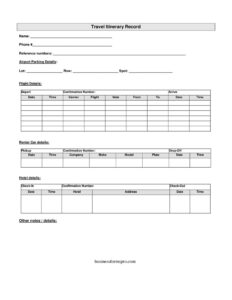
A useful itinerary captures both the schedule and the supporting reference details. Key elements include the traveler’s name and phone number, all relevant reference and confirmation numbers, full flight details (carrier, flight number, departure and arrival times, gate, and route), rental car information (company, vehicle, plate, pickup and drop-off), hotel details, and airport parking specifics. A notes field rounds it out for anything that doesn’t fit a labeled box. The goal is to answer, at a glance: where am I going, when, how, and what do I need to show or reference at each step.
How to Fill Out a Travel Itinerary
- Name and phone #: Enter the traveler’s full name and a mobile number reachable during the trip.
- Reference numbers: List any booking or loyalty reference numbers you’ll need to quote.
- Airport parking details: Record the parking lot, row, and spot so you can locate your car on return.
- Flight details: For each leg, fill in the date, time, carrier, flight number, and gate, plus the depart and arrive cities (from/to) and the confirmation number.
- Arrival info: Note your scheduled arrival time so anyone picking you up knows when to expect you.
- Rental car details: Enter the company, the pickup and drop-off locations and times, and the make, model, and plate once you collect the vehicle.
- Hotel details: Add the hotel name, address, and reservation confirmation.
- Other notes/details: Use this space for transfers, meeting times, addresses, or anything else relevant.
Tips for Building a Clear Itinerary
List trip segments in chronological order so the document reads like a timeline from departure to return. Keep confirmation numbers visible but be careful about sharing the full document publicly, since it contains personal travel details. Print a copy and keep a digital version on your phone in case one is unavailable. If you are filling out the rental car make, model, and plate, do so at the counter when you actually receive the vehicle — these details are not known until pickup. For airport parking, snap a photo of the lot signage and write the lot, row, and spot in the itinerary immediately, before you head into the terminal.
Sharing and Updating Your Itinerary
An itinerary is most valuable when it is current. Travel plans shift — flights get delayed, gates change, and hotels are sometimes rebooked. Update the relevant fields as soon as you learn of a change, and resend the document to anyone relying on it. For business trips, give a copy to your office or assistant so colleagues know your availability. For personal trips, leave a copy with a trusted contact at home. Because the template downloads in editable DOCX, you can adjust it on the fly, and the PDF version is ideal for a clean printout to carry through the airport.
Common Mistakes to Avoid
- Mixing up time zones — record whether times are local to the departure or arrival city to avoid confusion.
- Leaving out confirmation numbers — you’ll need them at check-in, the rental counter, and the hotel front desk.
- Forgetting parking details — failing to note the lot, row, and spot can mean a long search when you’re tired.
- Not updating after changes — an outdated gate or flight time is worse than none.
- Omitting a reachable phone number — contacts can’t reach you if the number is wrong or missing.
- Listing legs out of order — keep everything chronological so the trip flows logically.
Frequently Asked Questions
What is a travel itinerary used for? It is used to keep all of a trip’s logistics — flights, rental cars, hotels, and parking — in one organized document. Travelers reference it to stay on schedule and share it so others know their whereabouts and how to reach them.
How do I fill out the flight details section? For each flight leg, enter the date, time, carrier, and flight number, the departure and arrival cities (from and to), the gate, and the confirmation number. If you have connecting flights, list each leg separately and in order.
Do I need to complete the rental car make, model, and plate before the trip? No. You can leave the make, model, and plate blank until you pick up the vehicle, since the rental company assigns a specific car at the counter. Fill in the company name, pickup and drop-off locations, and times in advance.
Is a travel itinerary a legal document? No, it is an organizational record for personal use, not a contract or binding agreement. Your actual reservations with airlines, rental companies, and hotels are the binding bookings; the itinerary simply summarizes them.
How much does this travel itinerary template cost? It is completely free to download from Business Forms Pro in both PDF and DOCX formats, with no signup required. You can fill it out by hand using the PDF or edit the DOCX on your computer.
Should I share my itinerary with someone else? Yes, it is wise to leave a copy with a family member, coworker, or emergency contact so they know your schedule and can reach you. Just be cautious about posting it publicly, since it contains personal travel and contact details.
This travel itinerary template is provided as a general example for informational and organizational purposes only and does not constitute legal, financial, or travel advice. Booking terms and travel requirements vary by carrier, location, and provider — confirm details directly with your airline, rental company, and accommodation, and consult a qualified professional where appropriate.
Related Forms
- Request Transcript
- Basic Entry Form
- Customer Complaint Form
- Credit Information Shared
- Dressing Room Numbers
- Basic Entry Form White
Browse more in Miscellaneous.