
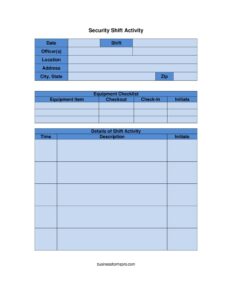
Security Shift Activity
Document patrols, incidents, and equipment with the Security Shift Activity Log template — a clear, professional form available as a free download.
PDF
DOCX
0
likes
Download Files
- DOCX
A Security Shift Activity Log is a chronological record that security officers use to document everything that happens during a duty shift — from patrols and visitor checks to incidents and equipment handovers. The most common reason people use it is to create a reliable, time-stamped account of a shift that can be reviewed by supervisors or referenced if questions arise later. You can download this template free in both PDF and DOCX, with no signup required.
What Is a Security Shift Activity Log?
A Security Shift Activity Log is an operational document completed by an on-duty officer (or team of officers) to capture what occurred at a guarded site during a specific shift. It records the date, shift, officers on duty, and the exact location being protected, then tracks equipment checked out and returned along with a running, time-stamped list of activities. Security companies, in-house facility teams, event organizers, and property managers rely on it to maintain accountability, support billing, and preserve an accurate timeline. Because it is filled in as events unfold, it serves as a contemporaneous record that is far more credible than memory after the fact.
When Do You Need a Security Shift Activity Log?
This form is useful any time a guarded post needs a documented account of activity. Common situations include:
- Routine guard shifts at office buildings, warehouses, or gated communities where regular patrols must be logged.
- Equipment accountability when radios, keys, flashlights, or vehicles are issued at the start of a shift and returned at the end.
- Incident documentation such as alarms, trespassing, suspicious behavior, or medical events that require a precise timeline.
- Shift handovers where the outgoing officer passes notes and outstanding tasks to the incoming officer.
- Event and venue security at concerts, festivals, or conferences where multiple posts report activity.
- Client reporting and billing, where a security firm provides proof of coverage and patrol frequency to the property owner.
What a Security Shift Activity Log Should Have
A complete log balances administrative details with a clear activity record. At minimum it should identify the shift and the people responsible, document any equipment exchanged, and provide enough space to record each notable event with a time stamp. Strong logs include the full site address, the officer’s printed name and initials for accountability, an equipment checklist with checkout and check-in columns, and a chronological activity section with time, description, and initials for each entry. Legible, factual, and complete entries are what make the document trustworthy.
How to Fill Out a Security Shift Activity Log
- Enter the date of the shift and specify the shift (for example, day, swing, or overnight, or the actual start and end times).
- List the officer(s) on duty by full name so responsibility is clearly assigned.
- Record the location name, then the complete address, including city, state, and zip.
- Work through the equipment checklist: for each equipment item, note the checkout time or condition at the start, the check-in at the end, and add your initials to confirm the handover.
- In the details of shift activity section, log each event as it happens: write the time, a factual description of what occurred, and your initials.
- Continue adding time-stamped entries throughout the shift, then review the entire log for completeness before signing off and handing over to the next officer.
Tips for Writing Strong Activity Entries
The activity section is the heart of this log, and the quality of each entry determines how useful the document is later. Write in plain, objective language and stick to facts: who, what, where, and when. Avoid speculation or opinion — instead of “the man looked suspicious,” write “male wearing a gray jacket walked the east perimeter twice between 02:10 and 02:25.” Use a 24-hour clock or be consistent with AM/PM so times are never ambiguous. Log routine patrols as well as incidents, because a record showing regular, uneventful rounds is valuable proof of coverage. If nothing notable occurs for a stretch, a periodic “all clear” entry confirms the post was actively monitored.
Equipment Checklist Best Practices
The equipment checklist protects both the officer and the employer. Inspect each item at checkout and note any existing damage so you are not blamed for it later. Confirm that radios are charged, keys are accounted for, and vehicles are fueled and undamaged. At the end of the shift, check items back in against the same list and initial each one. If an item is missing or damaged during the shift, document it immediately in the activity section with the time it was discovered. This habit creates a clean chain of custody for valuable or sensitive equipment and reduces disputes during shift changes.
Common Mistakes to Avoid
- Leaving time blank on activity entries, which destroys the chronological value of the log.
- Vague descriptions that record opinions instead of observable facts.
- Filling the log out after the shift from memory rather than in real time as events occur.
- Skipping equipment check-in, leaving no record of whether items were returned.
- Omitting initials, so entries cannot be tied to a responsible officer.
- Incomplete location details — a missing address or post name makes the report hard to file or audit.
Frequently Asked Questions
What is a Security Shift Activity Log used for? It is used to document everything that happens during a security shift, including patrols, incidents, visitor activity, and equipment handovers. The log creates a time-stamped, accountable record that supervisors, clients, or investigators can review later. It is a core operational tool for both contract security firms and in-house teams.
How do I fill out the activity section correctly? Record each event as it happens with the exact time, a factual description, and your initials. Keep entries objective and specific, noting observable details rather than assumptions. Add periodic entries even during quiet stretches to show the post was actively monitored.
Is a Security Shift Activity Log a legally binding document? The log itself is an internal record rather than a contract, but it can carry significant weight as evidence in disputes, insurance claims, or legal proceedings. Because it may be reviewed by third parties, accuracy and honesty are essential. Always treat each entry as something that could be examined later.
Do I need to log equipment every shift? Yes, completing the equipment checklist at both checkout and check-in is strongly recommended whenever items like radios, keys, or vehicles are issued. It establishes a clear chain of custody and protects officers from being held responsible for pre-existing damage or losses. Initialing each item confirms who handled it.
Can multiple officers share one log? Yes. The form has space to list more than one officer, and each activity entry includes an initials field so individual actions can be attributed to the correct person. For larger sites, some teams use a separate log per post and consolidate them for reporting.
Is this template really free to download? Yes, the Security Shift Activity Log is completely free to download in both PDF and DOCX formats with no signup required. You can print it for clipboard use on patrol or edit the DOCX to add your company logo, post numbers, or custom equipment lists.
This template is provided as a general example for informational purposes only and does not constitute legal, security, or professional advice. Documentation and reporting requirements vary by jurisdiction, client contract, and company policy — consult your employer’s guidelines or a qualified professional to ensure your records meet applicable standards.
Related Forms
- Credit Information Shared
- PICK Chart
- Decision Tree
- Blank Memo
- Customizable Now Hiring Sign
- Testimonial Form
Browse more in Miscellaneous.