
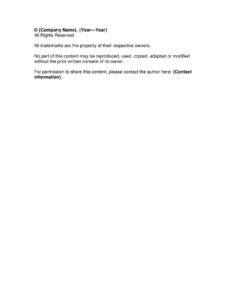
Copyright Notice
Download a free Copyright Notice template to protect your content and assert ownership clearly, with editable PDF and DOCX formats and free download.
PDF
DOCX
1 downloads
0
likes
Download Files
- DOCX
A Copyright Notice is a short statement that publicly asserts ownership of creative content and warns others against unauthorized use. People most often add it to websites, documents, presentations, and printed materials to make their ownership clear and discourage copying. This Copyright Notice template is free to download in PDF and DOCX, with no signup required, so you can fill in your details and apply it in minutes.
What Is a Copyright Notice?
A Copyright Notice is a brief, formal declaration that identifies the owner of a work and reserves the legal rights associated with it. It is used by authors, businesses, designers, photographers, software developers, bloggers, and content creators of all kinds to signal that their material is protected and not free to reuse. The notice typically combines the copyright symbol, the owner’s name, the year or range of years the work was created or published, and a reservation of rights. While copyright protection exists automatically in most countries the moment a work is fixed in a tangible form, a visible notice reminds the public of those rights and provides a point of contact for anyone wishing to request permission.
When Do You Need a Copyright Notice?
A Copyright Notice is useful any time you publish or distribute original content and want to discourage unauthorized copying. Common situations include:
- Websites and blogs: placing a notice in the footer to cover articles, images, and page design across every page of the site.
- Documents and reports: adding a notice to white papers, ebooks, manuals, proposals, and PDFs distributed to clients or the public.
- Presentations and slide decks: protecting proprietary research, charts, and training materials shared with audiences.
- Photography and artwork: labeling galleries, portfolios, and downloadable images to assert ownership and provide contact details for licensing.
- Software and apps: including a notice in the about screen, documentation, or source files to mark the code and assets.
- Marketing and printed materials: brochures, catalogs, and packaging where you want to deter competitors from copying your text or design.
What a Copyright Notice Should Have
A complete Copyright Notice is short but contains a few essential elements that make it effective and recognizable:
- The copyright symbol (©) or the word “Copyright,” which immediately signals the nature of the statement.
- The owner’s name — the individual, company, or organization that holds the rights.
- The year or year range showing when the work was first published and, if applicable, when it was last updated.
- A reservation of rights, commonly phrased as “All Rights Reserved.”
- A trademark acknowledgment noting that trademarks belong to their respective owners.
- A permissions statement and contact explaining that the content may not be reproduced without consent and where to ask for it.
How to Fill Out a Copyright Notice
This template is intentionally compact, so completing it takes only a moment. Work through each placeholder carefully:
- Enter the Company Name: Replace {Company Name} with the exact legal name of the person or business that owns the content. Use the registered business name where one exists, or your full personal name if you are an individual creator.
- Set the Year range: Fill in {Year-Year} with the first year of publication and the most recent year of update — for example, 2021–2025. If the work was published in a single year, you can use just that year.
- Keep the rights and trademark language: The phrases “All Rights Reserved” and the trademark acknowledgment are standard and should generally remain as written.
- Add Contact information: Replace {Contact information} with a reliable way to reach you — an email address, a contact page link, or a mailing address — so anyone seeking permission can request it.
- Place the notice: Copy the finished line into your website footer, document header or footer, or the credits section of your material.
How a Copyright Notice Differs From Registration
It is important to understand that displaying a Copyright Notice is not the same as registering a copyright with a government office. In most countries, copyright arises automatically when an original work is created and fixed in a tangible medium — you do not need a notice for protection to exist. The notice serves a practical, public-facing role: it identifies the owner, marks the year, and discourages innocent infringement by making ownership obvious. Formal registration, by contrast, is a separate process that can strengthen your position in a dispute and, in some jurisdictions, is required before you can sue or claim certain damages. Use the notice as a clear deterrent and signpost, and consider registration separately if your work has significant commercial value.
Tips for Using Your Copyright Notice Effectively
To get the most from your notice, keep the year range current by updating the end year each time you revise the content, especially in website footers. Apply the notice consistently across all your materials so the ownership signal is unmistakable. Make sure the contact method you list stays active, because a broken link or abandoned inbox defeats the purpose of inviting permission requests. For collaborative or commissioned work, confirm who actually owns the rights before naming them in the notice — the answer depends on your agreements.
Common Mistakes to Avoid
- Using an outdated year: Leaving last year’s date in a footer makes a site look neglected and can muddy the timeline of your work.
- Naming the wrong owner: Listing a brand name instead of the legal entity, or vice versa, can create confusion about who holds the rights.
- Omitting contact details: Without a way to reach you, people who want to license your work cannot ask, and may copy it anyway.
- Assuming the notice replaces registration: A notice alone does not provide every legal benefit that formal registration can offer.
- Applying it inconsistently: Placing a notice on some pages or documents but not others weakens the overall message of ownership.
- Claiming rights you do not hold: Do not place your notice on content created by others, such as stock images or third-party text, without permission.
Frequently Asked Questions
What is a Copyright Notice used for? It is a short statement that publicly identifies the owner of a creative work and reserves the rights to it. It deters unauthorized copying and gives others a clear point of contact for permission requests. It is commonly placed in website footers, documents, and other published materials.
Is a Copyright Notice legally required? In most countries copyright protection is automatic once a work is created, so a notice is not strictly required for your rights to exist. However, displaying one is strongly recommended because it makes ownership obvious and can discourage accidental infringement. Requirements and benefits vary by jurisdiction.
How do I fill out this Copyright Notice template? Replace the company name placeholder with the owner’s legal name, set the year range to your publication and update years, and add a reliable contact method. The standard “All Rights Reserved” and trademark language can stay as written. Then paste the finished notice into your content.
Does a Copyright Notice need to be notarized or witnessed? No, a Copyright Notice does not require notarization, witnesses, or any signature to be displayed. It is simply a published statement of ownership rather than a contract. You can apply it yourself as soon as you complete the template.
What year should I put in the notice? Use the year your work was first published, and add the current year as the end of the range if the content is updated over time, such as 2020–2025. For a one-time publication a single year is fine. Keep the end year current on living documents like websites.
How much does this Copyright Notice template cost? It is completely free to download here in both PDF and DOCX formats, with no signup or payment required. You can edit it as many times as you like for different projects. There is no cost to use it for personal or business content.
This Copyright Notice template is provided as a general example for informational purposes only and does not constitute legal advice. Copyright laws and registration requirements vary by jurisdiction and circumstance. For guidance specific to your situation, please consult a qualified attorney or intellectual property professional.
Related Forms
- Production Goal Sign
- Entry Form
- Recipes to Try
- Corporate Minutes
- Volunteer Badges
- Weekly Schedule By Name
Browse more in Miscellaneous.