
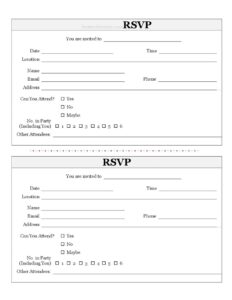
Individual RSVP Form
Use this free Individual RSVP Form template to confirm event attendance, headcounts, and guest details — free download in PDF and DOCX, no signup.
PDF
DOCX
0
likes
Download Files
- DOCX
An Individual RSVP Form is a simple document that lets a single invited guest confirm whether they will attend an event and share the details an organizer needs to plan. People most often use it to collect clear, written headcounts for weddings, parties, dinners, and meetings instead of chasing replies by text. It’s free to download here in both PDF and DOCX formats, with no signup required.
What Is an Individual RSVP Form?
An Individual RSVP Form is a response card or sheet completed by one invitee to reply to an invitation. The word RSVP comes from the French répondez s’il vous plaît, meaning “please respond.” The host issues the form alongside an invitation, and the guest fills it in to confirm attendance, provide contact details, and indicate how many people will accompany them. It documents who is coming, how to reach them, and the size of their party, giving the organizer a reliable record for seating, catering, and budgeting. Unlike a group sign-up sheet, this version focuses on a single household or invitee, keeping responses tidy and easy to track one reply at a time.
When Do You Need an Individual RSVP Form?
Almost any event that requires a headcount benefits from collecting individual replies. Common situations include:
- Weddings and receptions — confirm each guest, count their party, and plan seating charts and meal selections.
- Birthday parties and anniversaries — know how many people to expect for food, cake, and party favors.
- Corporate events and meetings — track attendance for conferences, workshops, or team dinners.
- Fundraisers and galas — confirm paid or invited attendees and capture contact information for follow-up.
- Family reunions and holiday gatherings — coordinate who is attending and how many relatives are coming with them.
- Baby showers, graduations, and open houses — gather a clear list of confirmed guests well before the date.
What an Individual RSVP Form Should Have
A complete RSVP form captures both the event details and the guest’s response in one place. At minimum it should identify the event being responded to, the guest replying, a clear way for the organizer to reach them, a definitive attendance answer, and the total number of people in the guest’s party. Including space for the names of additional attendees helps the host plan name tags, seating, and meals accurately. The clearer and more specific each field is, the fewer follow-up messages the organizer will need to send.
How to Fill Out an Individual RSVP Form
- You are invited to: Enter the event name exactly as it appears on the invitation, such as “Sarah & James’s Wedding” or “Annual Sales Kickoff.”
- Date: Write the date of the event so your reply is matched to the correct occasion.
- Time: Note the start time listed on the invitation for reference.
- Location: Record the venue name or address where the event will be held.
- Name: Print your full name as the primary guest responding.
- Email: Provide a current email address so the host can send confirmations or updates.
- Phone: Add a phone number for last-minute changes.
- Address: Include your mailing address if the organizer needs it for thank-you notes or records.
- Can You Attend? Check Yes, No, or Maybe to give a clear answer.
- No. in Party (Including You): Enter the total head count, counting yourself.
- Other Attendees: List the full names of anyone joining you so the host can plan accordingly.
Tips for Getting Accurate RSVPs
The quality of your guest list depends on how easy the form is to complete and return. Always include a clear reply-by date on the invitation itself, even though the form captures the event date, so guests understand the deadline. Encourage people to use the “No. in Party” field carefully — a common source of headcount errors is guests forgetting to include themselves or assuming a “plus one” they were not offered. If your event has meal choices, dietary needs, or song requests, add those notes in the “Other Attendees” area or on the back of the printed form. For digital use, the DOCX version can be edited to add custom questions, while the PDF is ideal for printing and mailing with paper invitations.
RSVP Form vs. Group Sign-Up Sheet
An Individual RSVP Form differs from a shared sign-up sheet in scope and purpose. The individual form is designed for one invitee or household to complete privately, capturing their personal contact details and party size in full. A group sign-up sheet collects many short responses in a single list and is better for casual events like potlucks or volunteer shifts. Use the individual form when you need accurate contact information, want each guest to feel personally invited, or are managing seating and catering that depend on precise per-guest detail. The individual format also keeps responses organized when you are entering them into a spreadsheet later.
Common Mistakes to Avoid
- Leaving the attendance box blank — always mark Yes, No, or Maybe so the host knows your intent.
- Miscounting your party — remember the count should include you, not just your guests.
- Forgetting other attendees’ names — listing only a number leaves the host guessing for seating and name tags.
- Skipping contact fields — without an email or phone, the organizer can’t reach you with updates.
- Returning it late — submit your reply before the requested deadline so planning stays on track.
- Assuming a plus-one — only include extra guests if the invitation clearly allowed them.
Frequently Asked Questions
What is an Individual RSVP Form used for? It is used by a single invited guest to confirm whether they will attend an event and to provide their contact details and party size. Hosts use the collected responses to finalize headcounts, seating, catering, and budgets. It keeps each reply organized and easy to track.
How do I fill out the “No. in Party” field? Enter the total number of people attending from your group, and be sure to count yourself in that total. For example, if you are bringing your spouse, you would write 2. Then list your guests’ names in the “Other Attendees” field so the host can plan for everyone.
Does an RSVP form need to be signed or notarized? No. An RSVP is an informal courtesy reply to an invitation, not a legal contract, so it does not require a signature, witness, or notarization. Simply completing the fields and returning it by the requested date is enough.
Can I change my answer after submitting the form? Yes, but you should contact the host as soon as possible by phone or email, since they may already be planning seating and food based on your original reply. Late changes can affect catering counts and costs, so the earlier you notify the organizer the better.
Is this RSVP form template free to download? Yes, this Individual RSVP Form is completely free to download in both PDF and DOCX formats, with no signup required. You can print the PDF for mailing or edit the DOCX to add custom questions like meal choices.
What should I do if I’m not sure I can attend? Mark “Maybe” if the form allows it, and add a note in the other attendees area explaining your situation. It’s polite to follow up with a firm answer before the host’s planning deadline so they can finalize their numbers.
This Individual RSVP Form template is provided as a general example for informational purposes only and does not constitute legal, financial, or professional advice. Event and contract requirements vary by situation and jurisdiction; consult a qualified professional if you need guidance for a formal or paid event.
Related Forms
- Todays Focus Sign
- Individual RSVP Form Fancy
- RSVP Guest List
- VIP Pass Small
- Book Club Ballot
- Logic Model
Browse more in Miscellaneous.