
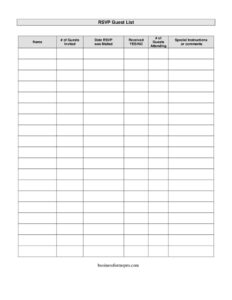
RSVP Guest List
Track invitations and replies with a free RSVP Guest List template—log names, guest counts, and attendance in PDF or DOCX, free download, no signup.
PDF
DOCX
3 downloads
0
likes
Download Files
- DOCX
An RSVP Guest List is a simple tracking sheet that helps you record who you invited to an event, whether they have replied, and how many people in their party plan to attend. Most people reach for one when planning a wedding, party, or large gathering and need a single place to monitor responses as they trickle in. You can download this RSVP Guest List free in both PDF and DOCX formats, with no signup required.
What Is an RSVP Guest List?
An RSVP Guest List is an organizational document used by event hosts and planners to manage invitation responses. The host or whoever is coordinating the event issues and maintains it, often building it from the original invitation mailing list. It documents each invited guest or household, how many people were invited, when their invitation was sent, whether a reply has come back, and the final headcount for those attending. Its purpose is practical: it turns a scattered pile of reply cards, texts, and emails into one reliable count. With it, you can plan catering quantities, arrange seating, order favors, and follow up with anyone who has not yet responded—all from a single, easy-to-scan reference.
When Do You Need an RSVP Guest List?
Any event where you need an accurate headcount benefits from a tracking sheet. Common situations include:
- Weddings and receptions where catering, seating charts, and favors all depend on a precise final count.
- Birthday parties, anniversaries, and milestone celebrations with mailed invitations and reply cards to track.
- Corporate events, conferences, and luncheons where you must confirm attendees and meal counts in advance.
- Baby showers, bridal showers, and graduation parties that involve gifts, games, and seating tied to attendance.
- Fundraisers, galas, and banquets where ticket counts and table assignments must be reconciled before the date.
- Family reunions and holiday gatherings where you are coordinating contributions, lodging, and meals for many households.
What an RSVP Guest List Should Have
A complete RSVP Guest List captures both the outgoing invitation and the incoming reply so nothing falls through the cracks. At minimum it should record each guest or household name, the number of guests invited in that party, the date the invitation was mailed, a clear yes/no marker for whether a response was received, the number actually attending, and a space for notes such as dietary restrictions or seating requests. Keeping all six of these elements together lets you calculate a running total at a glance and spot who still needs a reminder. A good list is also easy to update, since responses arrive over days or weeks rather than all at once.
How to Fill Out an RSVP Guest List
- Name: Enter the guest’s name or the household name exactly as it appeared on the invitation—for example, “The Johnson Family” or “Maria and David Lopez.” Keep names alphabetized or grouped by family for fast lookups.
- Number of guests invited: Record how many people that invitation covered. A couple counts as two; a family of four counts as four. This figure is your baseline for the maximum possible attendance.
- Date RSVP was mailed: Note the date the invitation went out. This helps you judge when a reply is overdue and plan your follow-up reminders.
- Received YES/NO: Mark whether a response has come back. Update this column the moment a reply arrives so the field always reflects current status.
- Number of guests attending: Once a guest replies, enter how many from their party will actually attend. This may be fewer than the number invited.
- Special instructions or comments: Add any notes—meal choices, allergies, plus-ones, seating preferences, or arrival timing—that you will need when finalizing arrangements.
Tips for Keeping Your Count Accurate
Update the sheet in real time rather than letting replies pile up; a single overlooked card can throw off your catering order. Set an RSVP deadline a week or two before the event so you have time to call anyone who has not responded, then use the “Received YES/NO” column to build your follow-up list. Add a totals row at the bottom that sums the “attending” column so you always have a live headcount. If you are managing a large event, consider color-coding or sorting by household to make the list easier to scan, and keep a backup copy—digital or printed—so your tracking survives a spilled coffee or a lost file.
RSVP Guest List vs. a Seating Chart
It is easy to confuse these two planning tools, but they serve different stages. The RSVP Guest List is about who is coming—it gathers and confirms responses and gives you a headcount. A seating chart is about where they sit and comes later, once your numbers are firm. In practice, you build the seating chart directly from the finalized RSVP list: the “attending” counts tell you how many seats you need, and the “special instructions” notes feed table assignments, such as keeping certain guests together or near accessible exits. Completing the guest list first makes the seating chart far simpler.
Common Mistakes to Avoid
- Confusing invited with attending. Always keep these as separate columns; assuming everyone invited will attend leads to over-ordering and wasted budget.
- Forgetting to date the mailing. Without the mailed date, you cannot tell who is overdue and may chase people prematurely or too late.
- Leaving the YES/NO column blank. An empty field is ambiguous—mark “no reply” clearly so it stands out for follow-up.
- Ignoring the comments field. Dietary needs, plus-ones, and accessibility requests get lost when they are not logged where you will see them.
- Not totaling the attending column. A running total prevents last-minute scrambling to count rows one by one.
- Keeping only one copy. A single unsaved file or misplaced printout can erase weeks of tracking.
Frequently Asked Questions
What is an RSVP Guest List used for? It is a tracking sheet for managing event invitations and replies. Hosts use it to record who was invited, who has responded, how many people are attending, and any special notes, so they can plan catering, seating, and supplies accurately.
How do I fill out an RSVP Guest List? Enter each guest or household name, the number invited, and the date the invitation was mailed. As replies come in, mark the YES/NO column, fill in the number attending, and jot down any comments such as meal choices or seating requests.
What is the difference between invited and attending? “Invited” is how many people an invitation covers, while “attending” is how many from that party actually plan to come. The attending number is usually equal to or smaller than the invited number, and it is the figure you use for your final headcount.
When should I set the RSVP deadline? A common practice is to set the reply deadline one to three weeks before the event, depending on its size. This gives you enough time to follow up with non-responders and finalize counts with your caterer or venue before their cutoff.
Is this RSVP Guest List free to download? Yes. You can download this template free in PDF and DOCX formats with no signup required, and you are welcome to customize the columns, add a totals row, or adjust it for your specific event.
Can I use this template for any type of event? Absolutely. The same fields work for weddings, birthday parties, corporate functions, showers, reunions, and fundraisers. Simply adapt the wording and add columns—such as table number or meal type—to match your event’s needs.
This RSVP Guest List template is a general example provided for informational and organizational purposes only. It does not constitute legal, financial, or professional advice, and event requirements vary by venue and circumstance. Confirm details such as vendor deadlines and headcount policies directly with your relevant providers.
Related Forms
- Todays Focus Sign
- Correct Credit Report
- VIP Pass Small
- RSVP List
- Auto Collision Report Form
- Flow Chart
Browse more in Miscellaneous.