
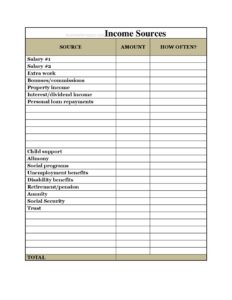
Income Sources
Use a free Income Sources form template to list and track every stream of money you earn, perfect for budgeting, loans, and taxes. Free download in PDF/DOCX.
PDF
DOCX
5 downloads
0
likes
Download Files
- DOCX
An Income Sources form is a simple document used to list and total every stream of money a person or household receives over a set period. People most often reach for it when applying for a loan, building a budget, or preparing for tax season — and it is completely free to download here in both PDF and DOCX formats with no signup required.
What Is an Income Sources Form?
An Income Sources form is a personal finance worksheet that organizes all the ways you receive money in one place. It is typically completed by an individual, a couple, or a household member who needs a clear picture of total earnings. The document records each source — such as employment wages, self-employment income, government benefits, investment returns, or rental income — alongside the amount and how often it is received. By gathering everything onto a single sheet, it converts scattered pay stubs, deposit notices, and benefit letters into one readable summary that you, a lender, a landlord, or a financial counselor can review at a glance.
When Do You Need an Income Sources Form?
This form is useful any time you must demonstrate or calculate how much money comes in. Common situations include:
- Applying for a loan or mortgage — lenders want a complete list of income streams to assess your ability to repay.
- Renting a home or apartment — landlords often request proof and a summary of your monthly income.
- Building a personal or household budget — you cannot plan spending until you know exactly what is coming in.
- Qualifying for benefits or assistance programs — many programs require a full accounting of household income.
- Preparing your taxes — listing every source helps ensure nothing is overlooked when filing.
- Financial counseling or debt planning — advisors start with a clear income picture before recommending a strategy.
Types of Income to Capture
A thorough Income Sources form should account for more than just a paycheck. Consider these categories so nothing slips through the cracks: earned income from a job or wages; self-employment or freelance income from contracts and side work; business income from a company you own; investment income such as dividends, interest, or capital gains; rental income from property you lease out; retirement income like pensions, Social Security, or annuity payments; and other income including child support, alimony, government benefits, scholarships, or occasional gifts. Listing each separately makes your total far more accurate.
What an Income Sources Form Should Have
To be genuinely useful, the form should capture a description of each source, the amount received, and the frequency (weekly, biweekly, monthly, or annually). It should also include a column or note for whether the income is gross or net, a space to identify the recipient if multiple household members contribute, and a clear total line. A header for your name and the reporting period — for example, “Monthly Income, January 2025” — keeps the document organized and easy to reference later.
How to Fill Out an Income Sources Form
- Add your details and time period. Write your name (or household name) at the top and note the period the form covers, such as a single month or a full year.
- List your primary employment income. Enter your employer or job title and the amount you earn, noting whether the figure is before or after taxes.
- Record the frequency. Beside each amount, indicate how often it arrives so totals can be calculated consistently.
- Add self-employment or business income. List freelance, contract, or business earnings, using an average if the amount varies month to month.
- Include investment and rental income. Note dividends, interest, and any rent you collect from property.
- Capture benefits and other sources. Add Social Security, pensions, child support, or any other recurring money.
- Convert everything to a common period. Standardize amounts to monthly or annual figures so they add up correctly.
- Total it all. Sum every line on the total row and double-check the math before sharing the form.
Tips for an Accurate Income Picture
Use recent pay stubs, bank statements, and benefit letters as you fill out the form rather than relying on memory. For variable income, average several months to avoid overstating or understating your earnings. Decide upfront whether you are reporting gross (before deductions) or net (take-home) figures and stay consistent — mixing the two produces a misleading total. If a lender, landlord, or agency specifies which they want, follow their instruction exactly. Keep the completed form alongside the supporting documents so you can substantiate every number if asked.
Income Sources Form vs. a Budget Worksheet
It is easy to confuse the two, but they serve different roles. An Income Sources form focuses solely on the money coming in — it answers the question “how much do I earn and from where?” A budget worksheet pairs that income with your expenses to show what is left over. Many people complete the Income Sources form first and then feed its total into a budget. Used together, they give a complete view of your financial situation, but each stands on its own for specific tasks like a rental application or benefits review.
Common Mistakes to Avoid
- Forgetting irregular income — bonuses, seasonal work, and occasional freelance jobs add up and should be included.
- Mixing gross and net figures — pick one basis and apply it to every line.
- Inconsistent frequencies — failing to convert weekly and annual amounts to the same period throws off your total.
- Leaving off non-wage income — benefits, child support, and investment returns are real income too.
- Skipping the supporting documents — numbers without proof may be questioned by lenders or agencies.
- Not updating it — an outdated form misrepresents your current situation when circumstances change.
Frequently Asked Questions
What is an Income Sources form used for? It is used to list and total every way you receive money, whether wages, benefits, investments, or side income. People rely on it for loan and rental applications, budgeting, benefit eligibility, and tax preparation. Having one organized sheet makes it far easier to prove or calculate total earnings.
How do I fill out an Income Sources form? Start with your name and the time period, then list each income source with its amount and how often it arrives. Convert all amounts to the same period — usually monthly or annually — and add them for a grand total. Use pay stubs and statements to keep your figures accurate.
Should I report gross or net income? That depends on who is requesting the form. Lenders often want gross (pre-tax) income, while budgeting may be easier with net (take-home) pay. The key is to choose one basis and apply it consistently across every line so your total is meaningful.
Does this form need to be notarized? No, an Income Sources form is generally an informal personal worksheet and does not require notarization or witnesses. If a lender, agency, or program asks for certified proof, they will usually request supporting documents like pay stubs or tax returns alongside it.
Is the Income Sources form legally binding? By itself it is a summary document rather than a contract, so it is not legally binding. However, if you submit it as part of a loan or benefits application, providing false information can carry serious consequences, so always report your income honestly.
How much does this template cost? Nothing — it is completely free to download from Business Forms Pro in both PDF and DOCX formats. There is no signup or payment required, and you can edit the DOCX version to fit your specific income categories.
This template is provided as a general example for informational purposes only and does not constitute legal, financial, or tax advice. Requirements for reporting income vary by lender, program, and jurisdiction, so consult a qualified financial or tax professional for guidance on your specific situation.
Official resource: for the rules that apply to your situation, see the Consumer Financial Protection Bureau.
Related Forms
- Roommate Expense Tracker
- Tip Jar Labels
- Cash Receipts
- Hair Cash Envelope
- Weekly Payroll Form
- Saving Cash Envelope
Browse more in Money.