
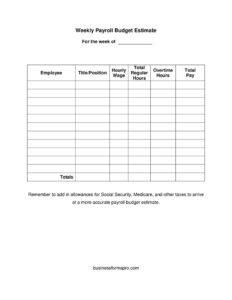
Payroll Budget Estimate
Plan your weekly labor costs with our free Payroll Budget Estimate template, listing wages, hours, and totals per employee — free download in PDF and DOCX.
PDF
DOCX
0
likes
Download Files
- DOCX
A Payroll Budget Estimate is a simple worksheet that projects how much your business will spend on wages for a given week, listing each employee’s pay rate, hours, and total cost. Most people use it to forecast labor costs before a pay period begins so payroll never blindsides the bank account. You can download this template free in PDF and DOCX with no signup required.
What Is a Payroll Budget Estimate?
A Payroll Budget Estimate is an internal planning document used by business owners, managers, and bookkeepers to calculate the projected cost of paying staff for a specific period — in this case, a single week. It captures each worker’s title, hourly wage, regular hours, and overtime, then sums those figures into a total pay column and an overall total. Unlike a finished payroll register or a paycheck stub, it is a forward-looking estimate rather than a record of payments already made. Its purpose is to help you anticipate cash needs, control labor spending, and account for taxes such as Social Security and Medicare before checks are cut.
When Do You Need a Payroll Budget Estimate?
This worksheet is most valuable any time you want a clear picture of upcoming labor costs. Common situations include:
- Weekly cash-flow planning — confirming you have enough in the account to cover wages before the pay date arrives.
- Scheduling decisions — testing how adding a shift or approving overtime will affect the week’s total before you commit.
- Seasonal or project staffing — estimating the cost of temporary hires for a busy stretch, an event, or a short-term contract.
- New-business setup — building a baseline labor budget when you first start hiring employees.
- Comparing actual vs. estimated — checking last week’s estimate against what you really paid to tighten future forecasts.
- Pitching or reporting — giving a partner, investor, or accountant a quick, readable snapshot of weekly payroll obligations.
What a Payroll Budget Estimate Should Have
A complete estimate is easy to read and leaves no surprises. At minimum it should include the week it covers, a line for every employee being paid, each person’s title or position, their hourly wage, the number of regular hours and overtime hours expected, and a per-employee total pay figure. A column or row for grand totals ties everything together. Just as important, the document should remind you to layer in employer-side costs — Social Security, Medicare, unemployment, and any other applicable taxes or benefits — because gross wages alone understate what the week truly costs your business.
How to Fill Out a Payroll Budget Estimate
- Set the week. Write the week the estimate covers in the “For the week of” line so the figures are tied to a specific pay period.
- List each employee. Enter the worker’s name in the employee column, one row per person.
- Add the title or position. Note each person’s role so anyone reviewing the sheet can see who is being paid and why.
- Enter the hourly wage. Record each employee’s pay rate per hour.
- Fill in total regular hours. Add up the standard, non-overtime hours you expect that person to work.
- Fill in overtime hours. Enter any hours above the regular threshold; remember overtime is usually paid at a higher rate.
- Calculate total pay. Multiply regular hours by the wage, add overtime hours at the applicable overtime rate, and record the result in the total pay column.
- Sum the totals. Add every employee’s total pay to get the week’s combined wage figure in the totals line.
- Add tax and benefit allowances. Layer in employer Social Security, Medicare, and other taxes to reach a realistic budget number.
Don’t Forget Employer-Side Costs
The gross wages on this sheet are only part of the picture. As the template itself reminds you, your business typically owes employer payroll taxes on top of what employees take home. In the United States this commonly includes the employer share of Social Security and Medicare (FICA), plus federal and state unemployment taxes. Some employers also carry workers’ compensation insurance, retirement matching, or health-benefit contributions. A practical approach is to add a percentage cushion on top of gross wages to approximate these costs, then refine the figure once you know your exact tax rates. Because rates and obligations vary by location and by employee classification, treat the cushion as an estimate and verify the specifics with your payroll provider or accountant.
Tips for a More Accurate Estimate
The estimate is only as good as the assumptions behind it. To improve accuracy, base your hour projections on recent timesheets rather than guesswork, and build in a small buffer for unplanned overtime during busy weeks. Keep the wage column current as raises and new hires happen, and review the completed estimate against actual payroll once the week closes so you can spot patterns. Over a few cycles, comparing estimated and actual totals turns this simple worksheet into a reliable forecasting tool you can trust for cash-flow planning.
Common Mistakes to Avoid
- Ignoring employer taxes. Budgeting only gross wages leaves out Social Security, Medicare, and unemployment costs that can add meaningfully to the total.
- Mishandling overtime. Multiplying overtime hours by the regular wage understates pay; apply the correct overtime rate.
- Using stale wage rates. Forgetting a recent raise or a new hire throws off the whole estimate.
- Leaving the week blank. Without the pay-period date, an estimate can be mistaken for a different week’s numbers.
- Skipping the totals check. Failing to re-add the column after edits leads to a grand total that no longer matches the rows.
- Treating it as a final record. This is a forecast, not your official payroll register — reconcile it against actual payments.
Frequently Asked Questions
What is a Payroll Budget Estimate used for? It is used to forecast how much a business will spend on wages for a specific week before payroll is processed. By listing each employee’s rate, hours, and total pay, it helps owners and managers plan cash flow and avoid surprises on payday.
Is this the same as a payroll register or pay stub? No. A payroll register and pay stubs are records of pay that has actually been calculated and issued, while this estimate is a forward-looking projection. You typically prepare the estimate first to plan, then compare it against the actual payroll afterward.
How do I account for taxes in the estimate? Add employer-side costs such as Social Security, Medicare, and unemployment taxes on top of the gross wage totals. A common shortcut is to apply a percentage cushion to gross pay, then refine it using your exact rates from your accountant or payroll service.
How is overtime handled on this form? Overtime hours go in their own column separate from regular hours. When you calculate total pay, multiply overtime hours by the appropriate overtime rate rather than the standard hourly wage, since overtime is usually paid at a premium.
Is this template legally binding? No. A Payroll Budget Estimate is an internal planning tool, not a contract or a tax filing. It carries no legal obligation on its own, though the wage and overtime rules behind your figures are governed by labor laws that vary by jurisdiction.
How much does this template cost? Nothing — it is completely free to download in both PDF and DOCX formats with no signup required. You can use the editable DOCX to add your own employees and totals, or print the PDF for quick manual planning.
This template is a general example provided for informational purposes only and does not constitute legal, financial, or tax advice. Payroll tax rates, overtime rules, and employer obligations vary by jurisdiction and over time — consult a qualified accountant, payroll professional, or attorney before relying on any payroll figures.
Official resource: for the rules that apply to your situation, see the Consumer Financial Protection Bureau.
Related Forms
- Fun Cash Envelope
- Consumer Equity Form
- Utilities Tracker
- Large-Print Bill Tracker
- Brokerage Accounts Ledger
- Monthly Bookkeeping Record
Browse more in Money.