
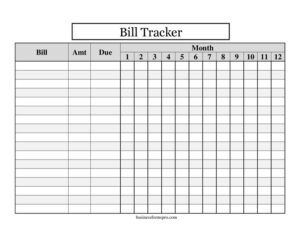
Large-Print Bill Tracker
Track every monthly bill with this free Large-Print Bill Tracker template — easy-to-read columns for amounts, due dates, and 12 months. Free download.
PDF
DOCX
5 downloads
0
likes
Download Files
- DOCX
A Large-Print Bill Tracker is a simple, easy-to-read worksheet for listing your recurring bills and checking off each one as you pay it across all twelve months of the year. People most often use it to make sure no payment slips through the cracks when the regular type on a calendar or app feels too small or cluttered. It’s free to download here in PDF and DOCX, with no signup required.
What Is a Large-Print Bill Tracker?
A Large-Print Bill Tracker is a one-page financial organizer printed in oversized, high-contrast text so it can be read at a glance. It lists each bill in its own row alongside the typical amount and due date, then provides a column for every month so you can mark when each bill has been paid. It’s commonly used by older adults, people with low vision, caregivers managing a loved one’s finances, and anyone who simply prefers paper over a screen. Rather than logging into multiple accounts, you keep one clear sheet on the fridge or in a binder and update it as payments go out.
When Do You Need a Large-Print Bill Tracker?
This tracker is handy any time you want a clear, at-a-glance overview of recurring payments. Common situations include:
- You or a family member has low vision and finds standard budgeting apps and small print difficult to read.
- You’re a caregiver or family member helping an aging parent stay on top of monthly bills.
- You keep missing due dates and want a single sheet that shows what’s paid and what’s still outstanding.
- You prefer pen-and-paper budgeting over digital tools and want one place to see the whole year.
- You’re setting up a household budget and need a quick way to total your fixed monthly expenses.
- You manage bills for a small household, rental property, or shared living arrangement and want a printable record.
What a Large-Print Bill Tracker Should Have
For the tracker to actually keep you organized, a few core elements matter. First, a clear Bill column where you write the name of each payment — rent, electricity, phone, insurance, and so on. Second, an amount column for the typical or expected cost, so you can budget and spot unusual charges. Third, a due date column so you know the day each payment is owed. Finally, twelve month columns (January through December) where you mark each bill paid. Generous spacing, bold headers, and high-contrast lines are what make it large-print and genuinely readable.
How to Fill Out a Large-Print Bill Tracker
Filling out the tracker takes only a few minutes once you gather your statements:
- In the Bill column, list each recurring expense on its own row — for example, mortgage, water, internet, car payment, and subscriptions.
- In the Amt (amount) column, write the usual cost of each bill. For amounts that vary, like utilities, jot down an average or the most recent figure.
- In the Due column, enter the day of the month each bill is due, such as the 1st or the 15th, so you can plan around paydays.
- Work across the twelve columns labeled Month 1 through Month 12 (January to December). As you pay each bill, mark its box with a check, the date paid, or the actual amount.
- Scan down each month’s column at a glance to confirm every bill shows a mark — any blank box flags a payment you still owe.
Tips for Getting the Most From Your Tracker
Keep the tracker somewhere you’ll see it daily, like a kitchen counter or a household binder, so checking it becomes routine. Consider grouping bills by due date — earliest at the top — so the rows mirror the order payments come due. If a bill is on autopay, you can still mark it once you confirm the charge cleared, which protects you against failed payments or surprise rate increases. Using a bright pen or highlighter for paid boxes makes the large-print layout even easier to scan. At year-end, save the completed sheet; comparing twelve months side by side reveals seasonal spikes and helps you build next year’s budget.
Large-Print Bill Tracker vs. Budgeting Apps
A digital budgeting app can sync transactions automatically, but it depends on small screens, logins, and a comfort level with technology that not everyone shares. A Large-Print Bill Tracker trades automation for clarity and control: it’s always visible, never needs a password, and shows the whole year on one page. Many people use both — the app for spending categories and the printed tracker for the handful of fixed bills they never want to miss. For caregivers, the paper sheet also makes it easy to share an at-a-glance status with the person whose finances they help manage.
Common Mistakes to Avoid
- Leaving variable bills blank. Still list utilities and credit cards even if the amount changes — write an estimate so the row isn’t forgotten.
- Forgetting irregular or annual charges. Add yearly costs like insurance premiums or memberships in the month they fall due.
- Marking a bill paid before confirming it cleared. Wait for the charge to post, especially with autopay, to avoid a false sense of security.
- Crowding rows together. Use one bill per line so the large-print layout stays readable.
- Not updating the amounts. Revisit the Amt column when rates or subscriptions change so your totals stay accurate.
- Storing it where no one looks. A tracker only works if it’s visible and checked regularly.
Frequently Asked Questions
What is a Large-Print Bill Tracker used for? It’s used to list your recurring bills and track which ones you’ve paid each month across a full year. The oversized text makes it ideal for anyone who finds small print or budgeting apps hard to read, including older adults and people with low vision.
How do I fill out the monthly columns? Each of the twelve month columns represents one month from January to December. As you pay a bill, mark its box for that month with a check, the date, or the amount paid, so a quick glance shows exactly what’s done and what’s still outstanding.
Is this Large-Print Bill Tracker free to download? Yes. You can download it free in both PDF and DOCX formats with no signup required. The DOCX version lets you type in your bills and adjust column sizes, while the PDF is ready to print and fill in by hand.
Can I add my own bills and rows? Absolutely. Use the DOCX file to add, remove, or rename rows for your specific bills — rent, utilities, phone, insurance, and any subscriptions — so the tracker matches your household exactly.
What should I put in the amount column for bills that change? Write your best estimate or the most recent amount, such as an average monthly utility cost. When the actual bill arrives, you can note the real figure in that month’s box to keep your records accurate.
Is a bill tracker a financial planning tool? It’s an organizing tool, not a financial plan. It helps you see and remember what’s due, but it doesn’t analyze spending or offer advice. For budgeting strategy or debt decisions, consider consulting a qualified financial professional.
This Large-Print Bill Tracker template is a general example provided for informational and organizational purposes only. It is not financial, tax, or legal advice, and your needs may vary. For guidance on budgeting, debt, or financial planning, please consult a qualified professional.
Official resource: for the rules that apply to your situation, see the Consumer Financial Protection Bureau.
Related Forms
- Home Budget Cuts Worksheet
- Appointment Of Collection Agent
- Payment Record
- Income Sources
- Account Statement
- Payment Calculator per $100
Browse more in Money.